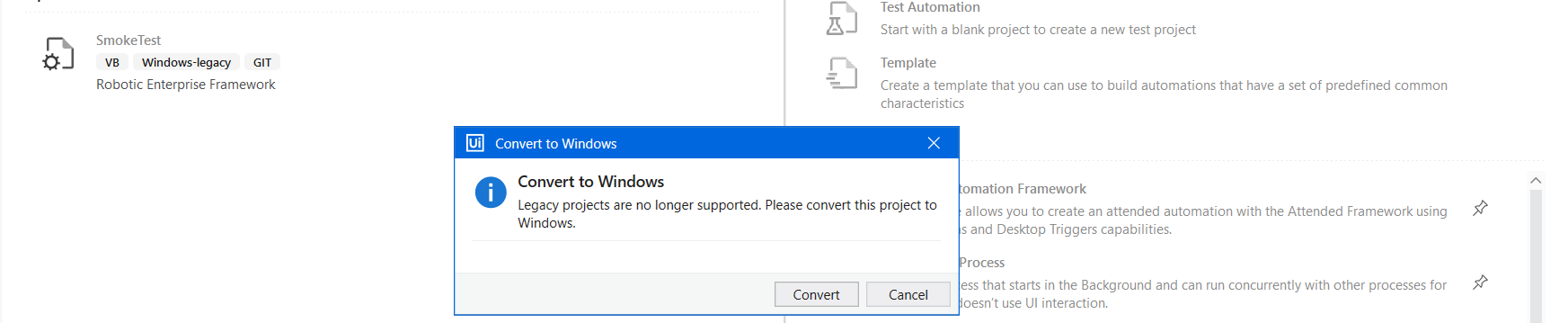
Hello, I have a very big automation project which is based on legacy , today I was opening my project and saw the message to update the project to windows, I did convert it to windows but then the project was not running, my automation files were showing a lot of errors, is there any way I can run my project in legacy because fixing huge number of files and debugging the errors won’t be easy at all, it was working fine on legacy, can someone provide solution for this , thanks!
Solutions will be as per symptoms  Share the details about them one by one and we can try to get them fixed.
A piece of advise, don’t use Community Studio for PROD development and get your PROD projects migrated to Windows compatibility before this update hits to Enterprise edition.
1 Like
Hello @ahsan_khan
If the project is the one displayed in the left pane then I can see that you are using GIT-integration.
Here you should simply be able to rightclick any file and select Undo which will revert the project to the one from your GIT repository.
Migrating a project from Legacy to Windows can be a large and overwhelming task, but taking it in small bits can make it more manageable.
Consider creating a branch or copy of your project for this.
Best regards
Soren
I can see many dependencies and activities depreciated after I converted my project to Windows, which is causing many errors.
how can I find alternate dependencies/activites that will work and perform the same thing as those depreciated ones

It depends who made that library, but it needs to be recompiled in 64 bit (Windows) compatibility. Its not a package I recognize so might be made internally by your guys.
I’d recommend you stop using the community studio version and switch to the enterprise one as that still can run legacy projects, this will give you the room to convert as you’ll still need to convert in the end.
Switching to enterprise edition isn’t an option for me now. I need solution for this on Coummunity studio. I’m getting error in more than 300 files and it seems impossible to me to fix these errors one by one.The errors are related to ‘Missing activity or it could not be loaded’. Can anyone tell me that how can I find the alternatives for these depreciated activities. Is there any document or any reference which tells the alternatives activties/Packages for the depreciated ones?
This is the reason Community version is just for learning, POC etc. and not for PROD. UiPath tests every feature, change, deprecation on community version first and then it goes to Pro Trial and Enterprise version.
Unfortunately NO. You will have to find the developers of these packages (if the packages not developed by you) and request for update the packages to Windows compatibility. If developed by you, upgrade the packages to Windows compatibility and you should be good.
1 Like
How am I supposed to find the developers for these packages, I mean there are a lot of packages so How can I find them?. Can you guide me through it?
Also For Community version, it seems that I can’t access customer portal also right? becuase I tried to follow the steps for submitting ticket on customer portal but It is giving me error on validating license key/support id
Community version don’t provide customer support. You will have to depend on the community forum support.
It’s going to be hard work because you will have to search for every package. For example this package you shared in screenshot. @Manoj_Batra is the developer.

Hi @ashokkarale, thanks for highlighting this.
@ahsan_khan I’ll support you here to fix your issues with the activities I’ve created, allow me some more time to convert this to windows. will get back to you soon.
Ping me if you have any questions.
Thanks,
Manoj Batra
1 Like
Thank you @Manoj_Batra for taking up this quickly 
Thanks alot @ashokkarale for mentioning this, I will try to check this for the remaining packages also
1 Like
Thank you @Manoj_Batra for your support and prompt response. I truly appreciate your effort in helping resolve the issues with the activities. I’ll wait for your update once the conversion to Windows compatibility is complete.
I’ll reach out if I have any further questions in the meantime. Thanks again for your assistance!
Best regards,
Ahsan
Hello @markusw, After switching from windows-legacy to windows, I’m facing compatibility issue with ‘Alphabetic Workflow Activities’ Could you please help me here?If you could update these packages so that they are compatible with windows. That would be really heplful for me

Best Regards
Ahsan
Hello @Manoj_Batra,
I hope you’re doing well! I would really appreciate it if you could provide an ETA on this. It would help me plan and prepare accordingly on my end. If there’s any way to address this sooner, it would save me a lot of time.
Thank you so much for your help!
Hi @ahsan_khan , I’m on it now and will submit it to UiPath Marketplace by 30th Dec. Not sure how much time will it take to get the solution approved from UiPath’s end.
Hope it will be approved soon once submitted. Will let you know 
Thanks
Manoj Batra
1 Like
@Manoj_Batra Thank you so much for your help. I truly appreciate your efforts, and I’m hoping it gets approved by UiPath’s end sooner.
Best regards,
Ahsan
1 Like