Hello Everyone,
I would like to present this post who are looking for the File Change trigger
Let Jump into the Tutorial
Go to Manage Package → All Pacakge → Seach Uipath.System.Activities → Click Install → Save
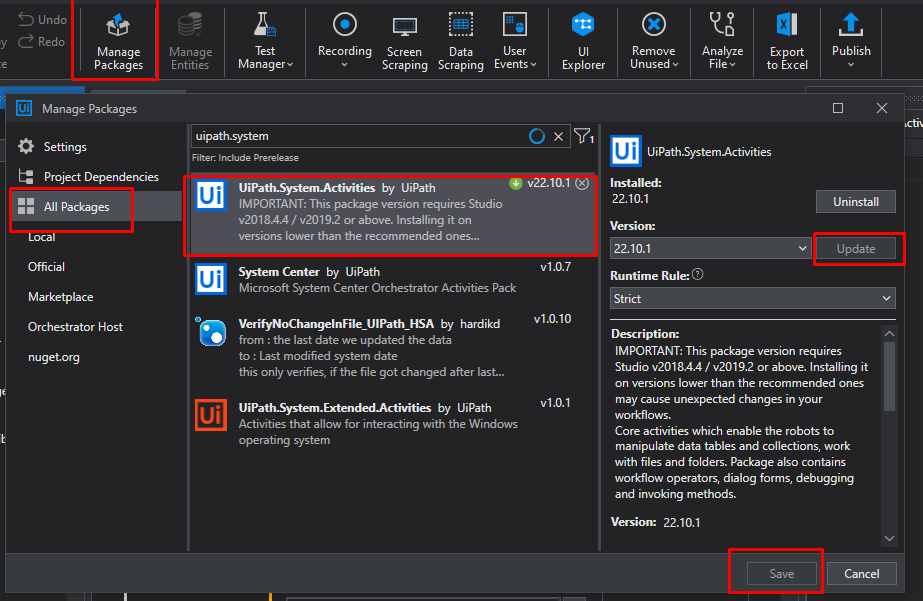
Steps to do
- In UiPath we have a Trigger Scope Activity.

-
There are two activity areas in the trigger scope activity, the trigger area, and the actions area. In the trigger area, we invoke the trigger-based activities, and the action area is followed by what we need to perform if the activity is triggered.
-
File Change Trigger activity was used to trigger the bot when any changes in a certain folder and file are made.

-
Give the path name of the file, Filename Filter, and gives the type of file needed to monitor for any changes. example: “.xlsx”, “.pdf”, “*.txt”.
-
In file properties, need to select the required change type that needs to be monitored.


-
When there are any changes noted in a file, Bot will start the trigger and do the activity on actions.
-
In the actions area, the bot will read the given file and store it in a Data Table memory, and the bot will delete the original excel file from the folder and its data table values.

- Any changes made in the application are stored in the specific folder using an API, and it will trigger the bot.
Hope this will be helpful 
Questions
For questions on your retrieval case open a new topic and get individual support
Feedback
Click  button to share your thoughts
Best Regards,
Gokul