Which Project Type Should I Use for Python? (.NET 6 vs Windows-Legacy)

Description

I’m trying to understand the preferred and supported way to run Python inside UiPath Studio today.

I know that the older UiPath.Python.Activities package only works reliably in Windows-Legacy projects, but I noticed that the option to create a Windows-Legacy project no longer appears by default in Studio. My questions are:

:one: What is the recommended project type for running Python in 2024/2025?

Should new developments still use Windows-Legacy when Python integration is required?

Or is there an officially supported method for running Python inside the new Windows (.NET 6+) project type?

I have seen guidance in the past, but I want to confirm the current recommended approach from UiPath’s perspective.

:two: How do I re-enable the “Windows-Legacy” option in Studio?

My Studio installation only shows:

Windows

Cross-platform

There is no Windows-Legacy in the Compatibility dropdown.

I’ve been told that Windows-Legacy is hidden by default in newer versions of Studio and must be enabled somewhere in the Studio settings, but I cannot find the setting.

Where exactly do I enable this?

:three: If the preferred method is to use the new Windows (.NET 6) project type, how should Python be executed?

Since Python Scope, Load Python Script, and Invoke Python Method do not work in Windows (.NET 6) projects (I get Pipe is broken errors), what is the recommended solution?

For example:

Invoke PowerShell → call Python.exe and return JSON

Start Process → run Python and read output from a file

Exposing Python code via a REST API

Or some other UiPath-supported method

If the intention is that Python code should be run externally rather than via the Python Activities in modern projects, I would like clarification.

:four: What is UiPath’s long-term plan for Python support?

Is development of the Python Activities continuing?
Or should we assume that:

Windows-Legacy + Python Activities = “classic support”

Windows (.NET 6) = use external Python via PowerShell/Start Process/API
?

I want to make sure I’m using the approach that UiPath recommends going forward.

Thank you!

Date

2025-12-02

Related UiPath products

Studio

@loginerror your inputs on this please.

Hi @Phil_Kelsey

For the Python activity package, both versions 1.10.0 and 2.0.0-preview support Python 3.13 on Windows projects. The only dependency is that you have either the .NET Desktop Runtime 6 or 8 installed on your machine:

Only the latest LTS Studio releases (latest 25.10) include the option to open and edit legacy workflows. You can control the project type dropdown experience with the governance rules. On Cloud, that is controlled via Automation Ops. You can read more about it here:

It should work with the latest Python version, 3.13. Is there a specific Python version that you’re having trouble with?

Here is a working sample for Python 3.12:

I believe the team is working on a much better experience where Python is easier to work with. Stay tuned!

1 Like

Thanks for the detailed answer, that Thanks for the detailed answer, that helps a lot.

I’m on Studio Enterprise trial (60 days), using a Windows project with UiPath.Python.Activities and a local Python install at C:\Python38 (3.8.10, 64-bit).

When I use Python Scope + Load Python Script + Invoke Python Method even with a very simple add(a, b) test, the call fails with System.IO.IOException: Pipe is broken / Error invoking Python method. That was why I originally thought I needed a Windows-Legacy project.

From your reply it sounds like the missing .NET Desktop Runtime 6/8 might be the root cause in my case. I don’t think it’s installed on this VM yet.

My plan is:

Install .NET 8 Desktop Runtime (x64) on the VM.
Update to UiPath.Python.Activities 1.10.0 (or 2.0.0-preview).
Install Python 3.12 or 3.13 (64-bit) and point Python Scope to that python.exe.
Re-run the sample / my add(a, b) test in a Windows project.
Does that sound like the correct setup for using Python Activities in a modern Windows project?

Also, for Python 3.8 specifically: is that still expected to work with the latest package, or should I plan to standardize on 3.12/3.13 going forward?

Thanks again for the clarification and for the hint about the upcoming improvements to the Python experience—I’ll keep an eye out for that. a lot.

1 Like

This is the exact set of steps you should follow to make it work.

Interesting, I will have to test it with that specific version. In theory, the UiPath Python package supports every Python version that is supported by the Python.net C# library used behind the scenes. However, there might be a bug that sneaked in for an older Python version.

Either way, the newer Python version will work 100%.

1 Like

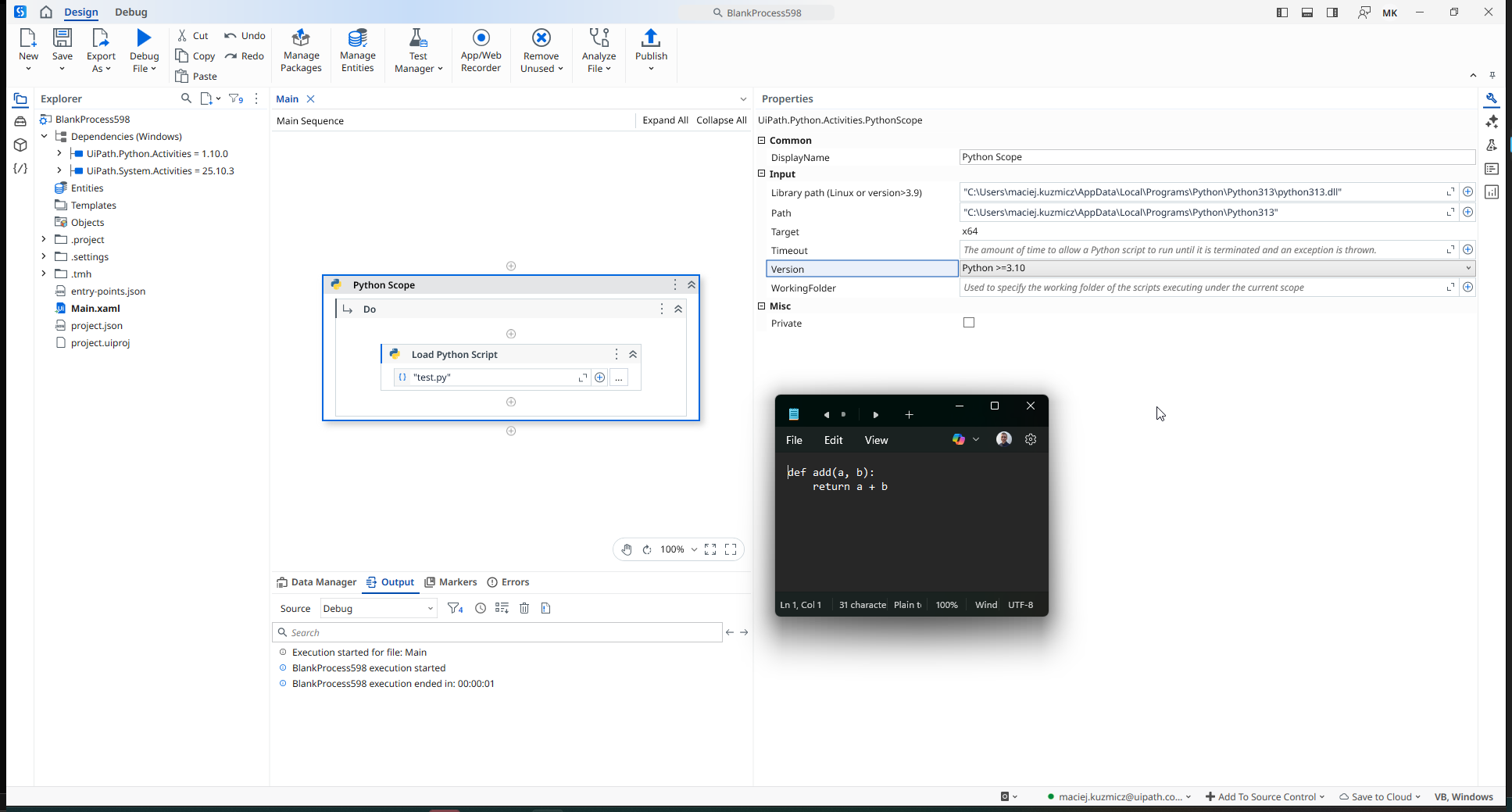
Thank you again for the detailed guidance! I followed your suggestions and wanted to report back with results and a remaining issue.

I’ve attached a screenshot of my current Python Scope configuration for reference. This was before upgrading UiPath so showing an error.

:check_mark: Steps Taken Based on Your Advice

  • Upgraded UiPath.Python.Activities to 1.10.0
  • Project type: Windows (.NET 8)
  • Installed Python 3.13.10 (x64) via Chocolatey at:
C:\Python313\

In Python Scope, I initially (incorrectly) set:

Executable: C:\Python313\

Note: I followed below steps for Python 3.12 which is show in the screenshot

After your guidance, I corrected this to:

Executable: C:\Python313\python.exe

The Library Path is set to / auto-resolves as:

C:\Python313\python313.dll

Target is x64, Version is Python >= 3.10.

With these settings, the Python Scope now initializes successfully, so that part of the configuration appears to be correct.

:warning: Remaining Problem: Load Python Script

Even with the correct executable path, the next activity Load Python Script fails with:

Load Python Script: One or more errors occurred. (Error loading Python script)

This happens even with a very simple test script:

C:\PythonTests\test.py

def add(a, b):
    return a + b

No imports, no top-level code other than the function definition.

The workflow inside the Python Scope is just:

  1. Load Python ScriptC:\PythonTests\test.pypyInstance
  2. Invoke Python Method → Name: "add", Inputs: {1, 2}pyResult
  3. Get Python Object → Int32 → sumResult
  4. Log Message"Sum = " & sumResult.ToString

But it never gets past Load Python Script.

:red_question_mark: Questions

  1. Is there any known issue in 2026 STS / .NET 8 + UiPath.Python.Activities 1.10.0 when loading scripts under Python 3.13, even if the engine initializes?
  2. Should I downgrade to Python 3.12.10 instead, since official documentation and examples seem to focus on 3.12 as the validated version?
  3. Are there any additional dependencies (VC++ runtime, specific .NET Desktop Runtime version, etc.) required specifically for the Load Python Script step in this configuration?

Again, thanks for your help so far — fixing the executable path and updating the Python activities definitely got me past the engine initialization errors. I’m just stuck on this last “Error loading Python script” step now. The attached screenshot shows my current Python Scope setup.

I’ve tried to come as close to your set as I could right now:

The only difference is that I am using the official Python installer rather than the Chocolatey version.

However, I then installed it this way as well, and it worked as well (I tested with Python 3.8 just to cover the previous thing as well):

Could you please share how is your activity configured?
Could you try providing your inputs as new Object(){1,2} instead of {1,2}?

I am also a bit confused why your Python activity doesn’t have an icon. Might be nothing, but maybe it will be a hint as well. It is for sure Python 1.10.0 on your screenshot?

The error turned out to be in my py script file. I corrected it and it worked. Hopefully others will benefit from the narrative we created above.
Thanks for your help.

I am now having trouble with a JSON Deserialization and an unexpected character. If I can’t resolve it, I will post it here.

1 Like