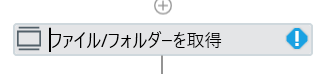
ご質問させていただきます。UIPATH初学者です。以下の写真のように青三角の中に!が表示されて使用できないアクティビティが多々あります。このアイコンの意味と解決策を教えていただきたいです。よろしくお願いいたします。
Hello @yuu72979,
This activity shows the warning:
- It might be part of the UiPath.System.Activities package.
- Make sure this package is installed and updated.
- If you’re using a Windows-Legacy project, try switching to Windows or vice versa depending on compatibility.
Check Dependencies Panel:
- Go to the Project panel → Click on Manage Packages.
- Look for any packages marked with warnings or errors.
- Click Restore or Update as needed.
Or try restarting your UiPath studio.
Please check and let us know your results.
Happy Automation 

UiPath stdioのバージョンは2025.0.172 sts
パッケージは3.3.2になります
取り急ぎになりますが
3.3.2はpreview版かと思いますので、安定版最新の3.2.10を試せますか?
既存のものはうまく表示されない可能性があるので、ダウングレード後新規にアクティビティを設置してみてはと思います。
ダウングレードしたところ解決いたしました!
毎度ありがとうございます!
Check if you have packages with runtime mentioned at the end installed in your project. If yes, Install the full package with same name.
You can follow this article to learn more about it.