phaynes
(Phaynes)
1
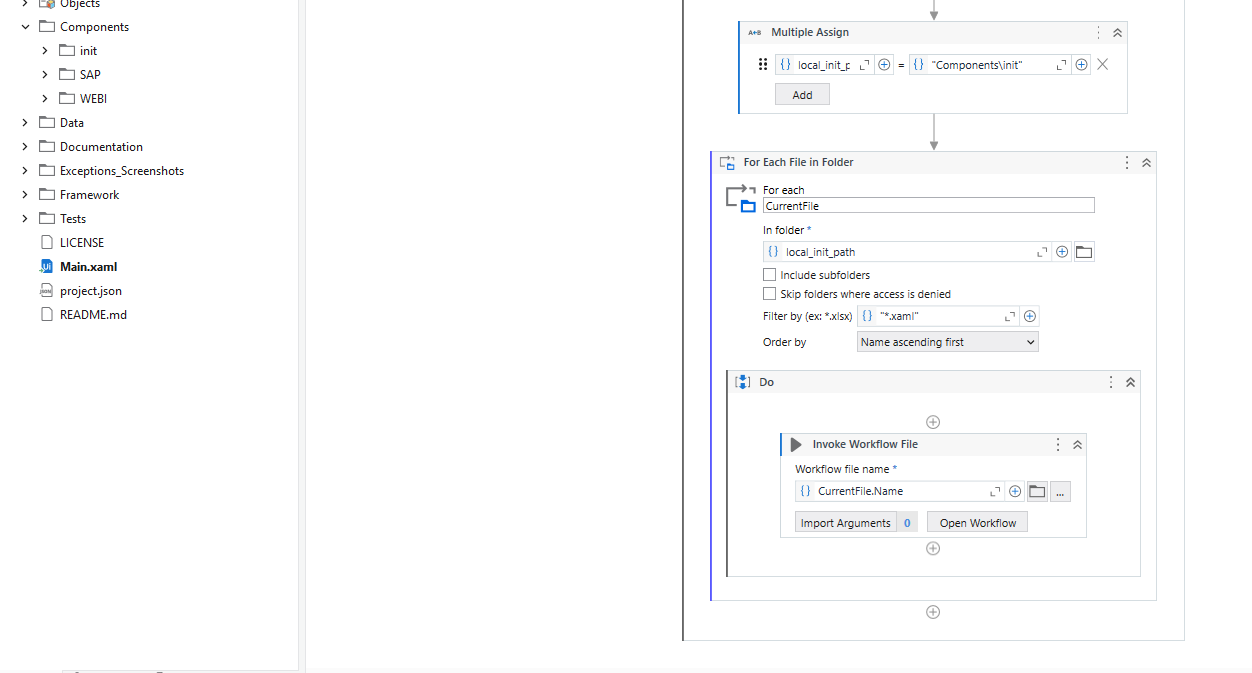
I am just messing around and trying to make a workflow that automatically initializes all workflows from a project folder like so:
However, every time I try to run it, I get the following error:
What can I do/change to make this work?
EDIT:
My Studio version was not high enough to support the dynamic invoking of workflow files. I am on 2023.4.4 and it requires 2023.10
rikulsilva
(Henrique Lima da Silva)
2
Hi @phaynes
Try to use CurrentFile.FullName instead
mkankatala
(Mahesh Kankatala)
3
Hi @phaynes
In the Invoke workflow file don’t get whole folder path just give
CurrentFile.ToString
Hope it helps!!
phaynes
(Phaynes)
4
I tried that initially, same problem exactly.
rikulsilva
(Henrique Lima da Silva)
5
Hi @phaynes
And what is the project compatibility?
Take a look here
Dynamic file path should work in Studio 23.10 or higher
Dynamic invoking is not supported currently. It’s in progress I believe. Please check this post: Invoke Workflow File activity is broken in the 2022.10 release - #15 by alexandru.
Edit: In case of a Windows process, that is. In Legacy it should work.
Anil_G
(Anil Gorthi)
7
@phaynes
In windows and cross platform it is not supported…please check the second point…
Try with legacy if you need…
Cheers
rikulsilva
(Henrique Lima da Silva)
8
Hi @Anil_G
It works in Windows as well in Studio Version 23.10 or higher
Anil_G
(Anil Gorthi)
9
@rikulsilva
Thanks for pointing…
Yes if studio is 23.10+ then it supports
@phaynes can you confirm your studio version?
Did you try giving relative paths?..from the project folder it should be relative
Cheers
phaynes
(Phaynes)
10
Where can I check my studio version?
Anil_G
(Anil Gorthi)
11
@phaynes
Go to home…left side bottom you would see it
Cheers