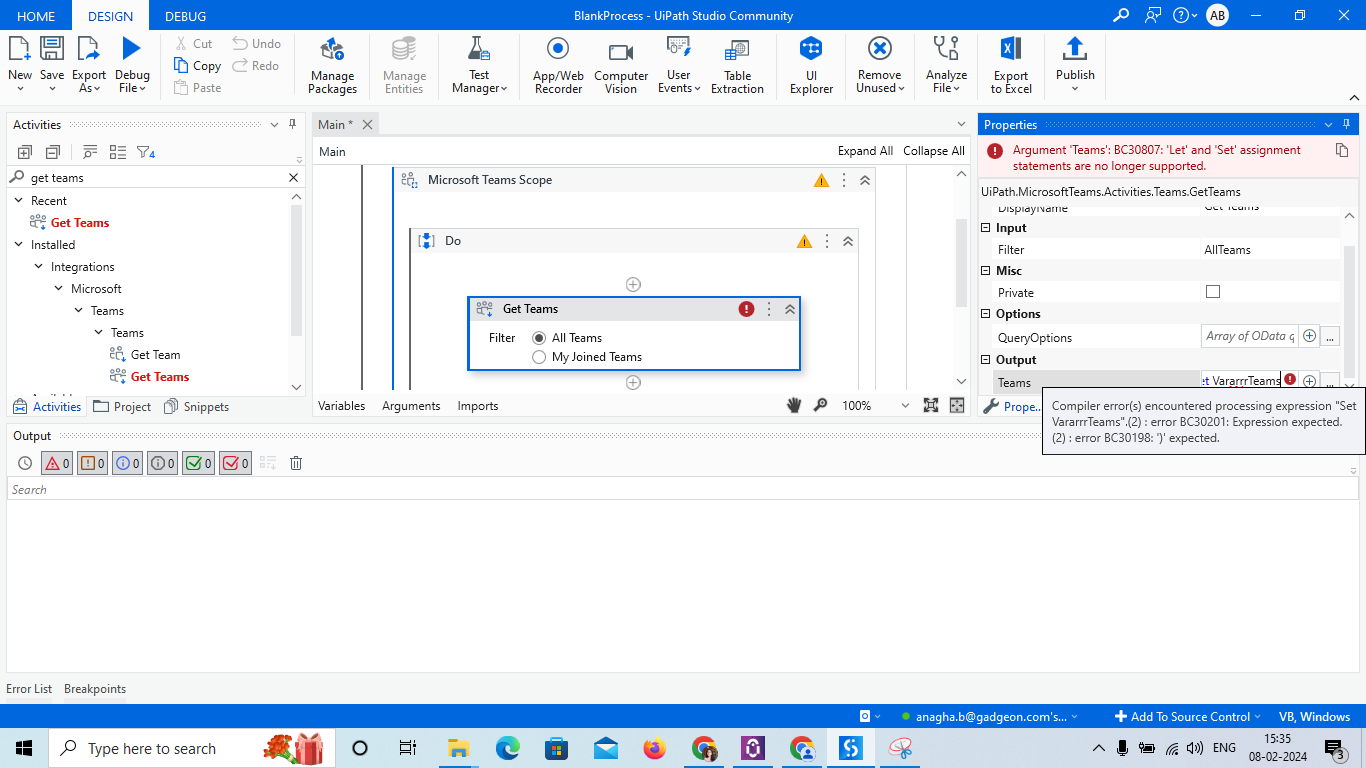
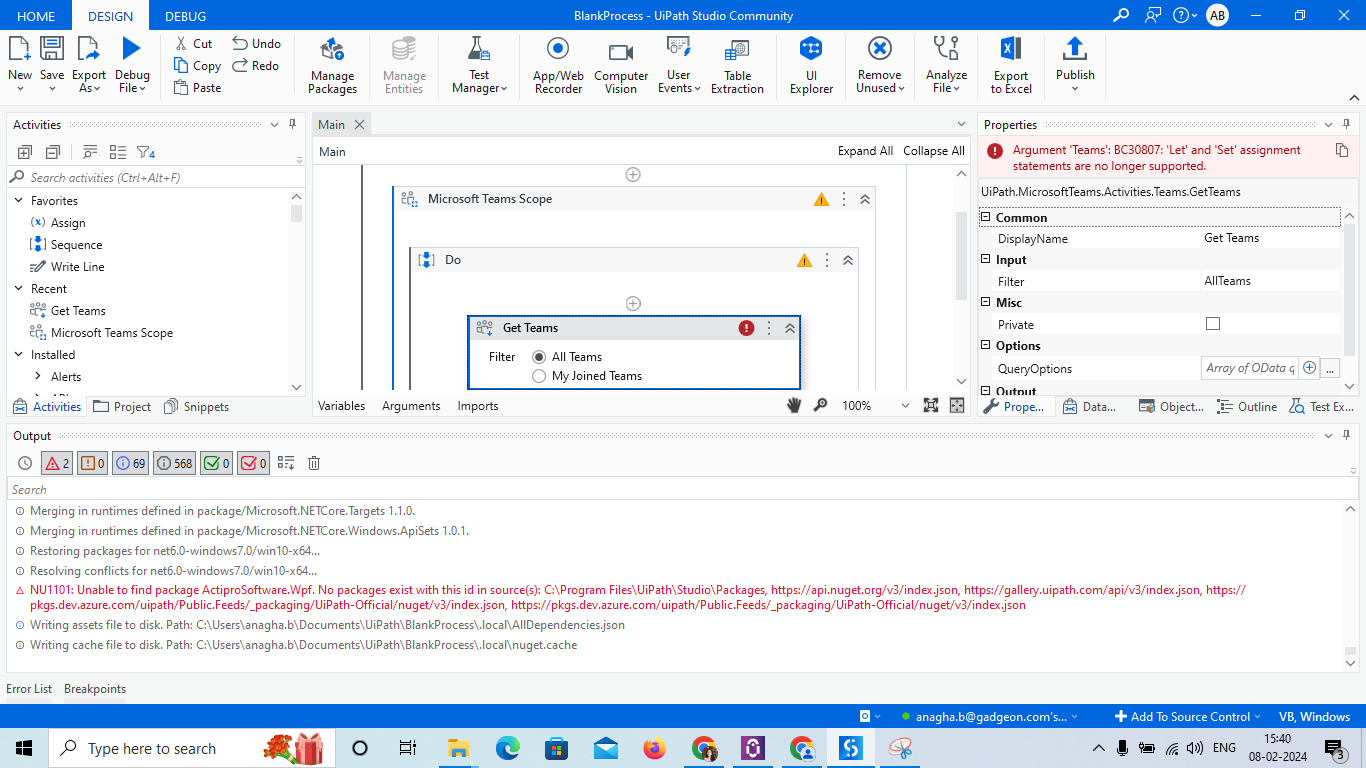
I’m trying to integrate MS-Teams with UiPath. When I am setting variable and installed Teams package I got error like “NU1101: Unable to find package ActiproSoftware.Wpf. No packages exist with this id in source(s): C:\Program Files\UiPath\Studio\Packages, https://api.nuget.org/v3/index.json, https://gallery.uipath.com/api/v3/index.json, https://pkgs.dev.azure.com/uipath/Public.Feeds/_packaging/UiPath-Official/nuget/v3/index.json, https://pkgs.dev.azure.com/uipath/Public.Feeds/_packaging/UiPath-Official/nuget/v3/index.json” and warning when i trying to setting value got warning like ‘Argument ‘Teams’: BC30807: ‘Let’ and ‘Set’ assignment statements are no longer supported.
Argument ‘Teams’: BC30451: ‘arrTeams’ is not declared. It may be inaccessible due to its protection level. Variable ‘Teams’ is missing. Please use Data Manager to recreate it.’.

Did you try creating a variable and assign it?
Alsoafter ctrl+k did you give variable name and click on enter
Cheers
@Anil_G Yes iam trying to create a variable and i didnt click ctrl+k. Do i need to do that ?
For creating a variable in any field…you need to select that field and click ctrl+k then type variable and then clcik enter the variable gets auto created
Cheers
@Anil_G Iam able to add the variable now by using the method u said, but getting a warning like
“Argument ‘Teams’: BC30807: ‘Let’ and ‘Set’ assignment statements are no longer supported.'” near the variable.
Can you show a screenshot how the variable looks and where you are getting error
Also alternately try to chnge the system activities pckage and teams package and check if that solves
Cheers
Hi @Anagha_B
See by upgrading the teams package from manage package if it works.
@sarvesh.b when i tried to install teams package got an error like NU1101: Unable to find package ActiproSoftware.Wpf. No packages exist with this id in source(s): C:\Program Files\UiPath\Studio\Packages, https://api.nuget.org/v3/index.json, https://gallery.uipath.com/api/v3/index.json, https://pkgs.dev.azure.com/uipath/Public.Feeds/_packaging/UiPath-Official/nuget/v3/index.json, https://pkgs.dev.azure.com/uipath/Public.Feeds/_packaging/UiPath-Official/nuget/v3/index.json
What version of UiPath you are on?
Did you try to change the teams package version and check?
Also why are you writing set in the variable?
Please write only the name of variable without anything else
Cheers
Enter ctrl+k and give a variable name in one word and then click enter.
Please refer this link. Hope you get some help from this query.
@Anil_G I’m using Studio 2023.12.0 community edition. I entered set var as the you tube tutorial i refferred is doing in that way . I’m a beginner.
@sarvesh.b Is that applicable in community version or do we need to take the paid one?
It can be used in community version too.
First you try crating a variable by following this “Enter ctrl+k and give a variable name in one word and then click enter”
There is no set you need to do at all…whrn you press ctrl+k set will automatically come you just need to create the variable name and click enter dont do anything else
Cheers
@sarvesh.b , @Anil_G Thanks, variable setting issue fixed.

Can you please show the locals panel and exception details from there if it is coming while running debug
if not can you show on what activity you are getting it
cheers
@Anil_G Iam getting an error ‘NU1101: Unable to find package ActiproSoftware.Wpf. No packages exist with this id in source(s): C:\Program Files\UiPath\Studio\Packages, https://api.nuget.org/v3/index.json, https://gallery.uipath.com/api/v3/index.json, https://pkgs.dev.azure.com/uipath/Public.Feeds/_packaging/UiPath-Official/nuget/v3/index.json, https://pkgs.dev.azure.com/uipath/Public.Feeds/_packaging/UiPath-Official/nuget/v3/index.json’ and the sequence i created is not running. Is that because of the teams package issue?

when i mouse hover to the actiprosoftware under depenncies got not resolved message.