πŸš‘ πŸ†˜ [FirstAid] Datatable: Debug & Analysis invalid DateTime Strings / String to DateTime Parsing Issues

This FirstAid Tutorial will describe how DateTime parsing issues can be analyzed and handled.

Click spoiler text when in a hurry:

The date formats displayed in EXCEL are not guaranteed to be in the same format after a read range in the data table. However, the format available in the data table must be used for the implementation details. Therefore, the contents of the data table must be checked if problems with the date format occur.

Example

Assignment

Following Excel data will be processed and the corresponding Quarter is to calculate for the particular task date

Input data:

Quarter Calculation

Quarter = CInt(Math.Ceiling(YourDateTimeVar.Month / 3 ))

Initial Implementation
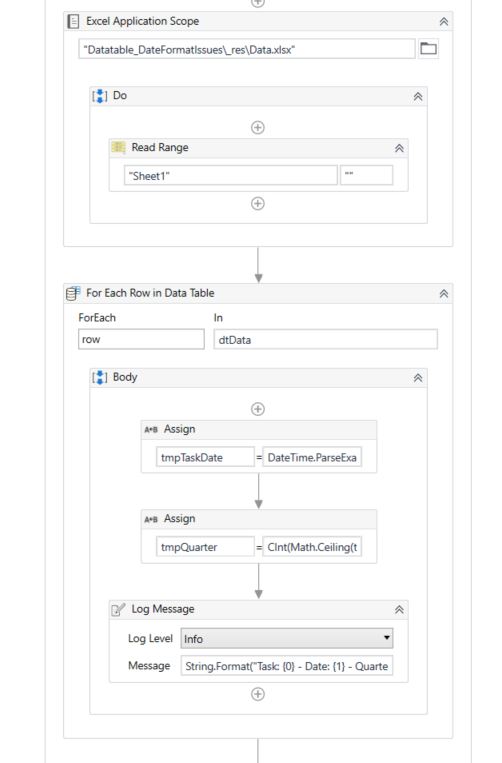
tmpTaskDate = DateTime.ParseExact(row("Date").toString.Trim, "dd.MM.yyyy", CultureInfo.InvariantCulture)

Issue

when executing the modeled flow, following exception occurs:
grafik

For any reasons the second row processing is failing

Analysis

Imports check

ensure that following namespace is imported:

Implementation check

The configured format pattern looks similar to the format from the excel data

A further analysis is needed

Option 1: detailed tracking within the watch panel

For a detailed tracking a breakpoint is set and the details will be analyzed within the watch panel

ACTION: Set breakpoint on the failing activity

Details

ACTION: Click Debug File and get paused by the breakpoint (ensure no other breakpoints ae set or continue till the relevant breakpoint)

ACTION: Configure the watch expression: row("Date").toString

Details

ACTION: Inspect the value displayed from the watch expression and verified it if the format is matching to the implementation

REPEAT: Click Continue till the analysis need is served or the execution fails

Details

Option 2: Direct inspections within the immediate panel

ACTION: Set breakpoint on the failing activity

Details

ACTION: Type in your statement and confirm it with ENTER (sometimes a second ENTER is needed)

Datatable row value check:

dtData.Rows(0)("Date").toString
change the row index to that datarow index that is to inspect

Summary

Datatable content check

For smaller data rows counts the datatable can be inspected by the following:
dtData

Summary

grafik

Analysis Result

Observation

Dates from Excel


are not in the same format within the datatable after the read range:

Error interpretation

Second row date: 05/07/2021 00:00:00 is not within the configured format defined for the DateTime.ParseExact method


dd.MM.yyyy vs. MM/dd/yyyy HH:mm:ss

Therefore the DateTime parsing is failing. A fixing strategy will be presented later in the tutorial.

Huge volume data analysis

In case a data table contains more rows as it can be inspected e.g within the locals / watch / immediate panel or the failing row is unclear following technique can be used for quickly identifying the failing parsings:

Check the count of failing formats

dtData.AsEnumerable.Where(Function (x) Not DateTime.TryParseExact(x("Date").toString.Trim, "dd.MM.yyyy", CultureInfo.InvariantCulture, DateTimeStyles.None, nothing)).Count

<Screenshot will be presented soon>

Filtering on the failing formats:

dtData.AsEnumerable.Where(Function (x) Not DateTime.TryParseExact(x("Date").toString.Trim, "dd.MM.yyyy", CultureInfo.InvariantCulture, DateTimeStyles.None, nothing)).CopyToDataTable
<Screenshot will be presented soon>

Fixing strategy

DateTime.ParseExact methods offers a method signature where an array with different formats can be provided. So the parseExact can handle multiple formats in one go

Modified Implementation

Variables:
grafik

Modified Flow:

Logs:

Conclusion

  • Excel values visually checked will not give a reliable representation on how values are later present within the datatable
  • DateTime failure issues are to analyze on the base where the values are passed to the conversion method (DataTable)
  • With a set of debugging techniques the issue can be quickly analyzed within the different debugging panels
  • With some LINQ statements also high volume data can be checked
  • a different call of the ParseExact method can also handle multiple formats for the parsing

References

Recommendations

  • Training courses from Academy
  • Debugging course from Academy (Highly recommended)

About the FirstAid Series

The first aid series offers various instructions on how to tackle a difficulty with the first steps

Questions

For questions on your specific case open a new topic and get individual support

20 Likes
Download email attachments from outlook, create folders in local directory
Linq to filter "Date" column in datatable
Datetime format in datatable
How to extract data for last 7 consecutive days from an excel data table
Remove the Rows from one data table who are matching in second datatable
Linq to compare dates
Remove duplicate rows if a column value matches
Filter dt based on Month
Doing Date Subtraction in Excel
Difference of date
Linq query to Update Datatable 1000 of Date format rows as "dd-mm-yy" from "DD/MM/YYYY HH:MM:SS"
How to convert date, if cell is empty
How to filter out the records in datatable for particular column having dates older than last 90 days?
ParseExact method throwing error
Write a time higher than the one obtained in string format
Compare two Columns in Excel and check if first columns dates are more than 30 days for the second column
Forum Engagement Daily Reports
Remove data row if the value cannot be find in an array
Error in data table LINQ query
Convert to DateTime that are in different formats
How to extract the date format from excel correctly?
Get Max and Min Date in Column
Printing Specific Columns
Convert String to DateTime throws Error
String was not recognized as valid date Time in C#
DateTime Manipulation - String was not recognized as a valid DateTime
Filter DataTable for Future Dates
Read the data as per the date and write that data in output
Message Box: String was not recognized as a valid DateTime
Specified cast is not valid on Assign Activity
Convert yyyy-mm-ddThh:mm:ss into date yyyy-mm-dd
Get Row Item Datetime Error
Getting error while converting String to datetime
Formatting date column
How to convert total time into hours
There is a column in my excel which contains DOB like Feb 03 2022, 2022/03/02 ,2022 03 Feb, Feb/03/2022
Conversion to DataTime
How to check if a string value is in correct date format (dd/MM/yyyy)?
Differences between Excel values and datatable values
Summing and Avg Excel Integer Values or Cell Values
Datetime convert error
Need help to Filter dates older than a particular date
How to filter data table with respect to Date and time?
Assign Activity LINQ Query
Convert Datatable column(string) to Date
Datatable convert object to date time field
Convert to date format -"YYYY-MM-DD"
Date Time Format change and comparison
String to Date
How to convert date in the format "Sat Dec 31" to "MM/dd/yyyy"
Check if date is still valid
LinQ to group by with two columns and count
EvaluateException: Cannot perform '<=' operation on System.DateTime and System.String
How to convert Generic value into Date and Time format
Not valid DateTime
Group unique rows from Column A and add other sum rows of Column B
Need linq query for multiple filter
Filtering Columns and removing the leading Zeros
Me sale el error String was not recognized as a valid DateTime
Date Time Parse
Date Time Parse
Filter Data Table: String was not recognized as a valid DateTime
Assign: String '11/1/2022 12:00:11 AM' was not recognized as a valid DateTime
Unmatched data table
Group By Sort with date col and get First Row off all Group.(Linq)
LinQ implementation
Copy date and change format dd.mm.yyyy
No aplica filtro en nΓΊmeros y fechas usando Filter Datatable y LinQ Select
How to filter 2 columns(one column is date type, another is string) at a time in a data table?
Date Type error, Date with year 1999 is not working but working on date with year 2000
If Condition: String was not recognized as a valid DateTime
Need to filter Excel Data based on Date
Could someone please provide step-by-step guidance on how to incorporate a DateTime activity into a UiPath sequence? I'm looking to create a process that involves handling date and time data, and I'm not sure where to start
Data column into Date type and sort from newest to oldest
Getting data first time in Array but not next time
Error when Converting String to Date format in data table
Assign: String was not recognized as a valid DateTime while trying to convert string to datetime data type
How to convert string to datetime - dd/MM/yyyy
Issue while formatting date from date time to string
"Sort Data Table" activity not sorting
DateTime Input to dd/MM/yyyy from "June 5, 2023 8:00 AM" format
Convert datetime
How can we check a specific language month names in an excel filename?
:ambulance: :sos: [FirstAid] - Topic Catalogue
In my Excel sheet, the actual data for 'valid until' is 28-12-2023. But when the bot types it into the text box, it appears as 12/28/2023 00:00:00
Error: String '' was not recognized as a valid DateTime
String was not recognized as a valid DateTime - Why this error is coming suddenly?
Input string format
HOW TO FIX BELOW ERROR
Send calender invite
Convert string into specific datetime format
Filter Current date and time (MM/DD/yyyy hh:mm)
Get number of holiday based upon array input based on LinQ, Below Query working working first time but not second time
Select a Date range using LINQ with Method Syntax
Overload resolution failed because no accessible 'Select'
Check if the date is valid and if it is in the correct format
Sort the data by latest date
Hi, I need to covert date to a particular format. Consider a string "06-23-3" which is in format MM-yyyy-dd . but the robo is reading the date as 23/06/2003 which is wrong
Remove or filter rows which are not of current year
My excel my data is in string format so sorting of ascending to descending order is not working
Change Format DateTime
My input data issue for automation
How to convert to date format from excel data
Linq code
How to get column values in the descending way
Compare dates from a Data Table
Filter all days to a specific date
Convert string to DateTime not working
Convert multiple date format into specific format
Filter DataTable(from Excel) on column containing Date
Adding Rows containing currency
DT.select