J_Crosby
October 11, 2023, 8:40pm
1
Hi guys,
In the ochestrator the job failed with Application Exception with this message;
Reason: Exception message: Can not assign ‘in_TransactionItem.SpecificContent(“FirstName”).ToString’ to ‘str_FirstName’. at source: Throw.
Details: Screenshot:
adiijaiin
October 11, 2023, 9:16pm
2
Hi @J_Crosby ,
Did you try to check the foldername, if that is correct or not, and it is referring to correct Queue.
If in case you modified the transaction data and the check for TransactionItem is Nothing got skipped and it processed to the next part?
1 Like
J_Crosby:
image1366×768 111 KB
Hi @J_Crosby ,
As you are already debugging the process, we should be able to identify the faults in the variable/argument data from looking at it from the Locals Panel or Immediate Panel. Check the in_TransactionItem argument value in the Debug Panel and analyse if all data required is present if possible send screenshots of the analysis done.
More on Debugging :
1 Like
J_Crosby
October 12, 2023, 7:11am
4
@supermanPunch @adiijaiin I am wondering, If my workflows were designed on shared folder in studio. Then the processes are on unattended folder in ochestrator.
@J_Crosby ,
I believe the same resources or data/entities would also need to be available in the Folder that the Robot is going to use.
1 Like
adiijaiin
October 12, 2023, 7:52am
6
Yes they should be present in the same folder, or else you would have to mention the folderpath in config.
1 Like
J_Crosby
October 12, 2023, 8:00am
7
@supermanPunch here is the screenshot
Sorry I am still very new that’s why I need an extra eye.
@J_Crosby ,
Was the tutorial on Debugging suggested completed ?
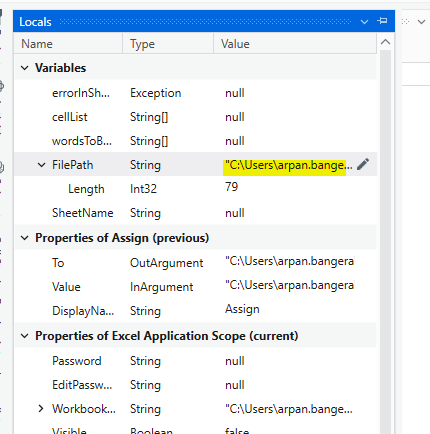
We should be able to check the values of variables or arguments like below :
As the source data is in_TransactionItem, request you to check this argument.
lrtetala
October 12, 2023, 8:25am
9
Hi @J_Crosby
Please check whether the data is present or not in the Queue in Orchestrator and also verify the key name in Queue
J_Crosby
October 12, 2023, 8:29am
10
@lrtetala yes the data is there in the queue.
lrtetala
October 12, 2023, 8:31am
11
@J_Crosby
Once check Key name in Queue and syntax key name matches or not
lrtetala
October 12, 2023, 8:39am
13
@J_Crosby
Can you show the variables panel
J_Crosby
October 12, 2023, 8:50am
15
@supermanPunch mine doesn’t seem to have the FilePath or did I open the wrong place? Yes I have finished the debugging tutorial u recommended
lrtetala
October 12, 2023, 9:00am
16
Can you please share the screenshot of queue transaction details i think there is some space in between First and Name in “First Name” @J_Crosby
lrtetala
October 12, 2023, 9:19am
18
@J_Crosby
There is a space between First and Name please check
J_Crosby
October 12, 2023, 10:13am
19
@lrtetala it worked,hurray
1 Like
lrtetala
October 12, 2023, 10:20am
20
Hope you got the solution for your question please mark it as solution to close the topic @J_Crosby
Forum FAQ - How to mark a post as a solution
This document is part of our beginners guide .
This article will teach you how to properly mark a post as a solution.
We were closely following our last UiPath Forum feedback round! topic and carefully extracted all the bits of feedback that was provided. As such, we would like to tackle the topic of solutions on our Forum and how to properly use them.