Hi everyone. I don’t know how I am getting this error, so let me explain. I need to get information in 15 different connections to SAP. I am using SAP Login activity. This works fine… except for one connection, that actually logs in (so it works), but throws an error (see screenshot below):
The weird thing here is… I am not using that selector! What I have in Selector input is this:
How am I supposed to get an error about not finding selector “< sap id=‘sbar’ >” when I’m not using that string in Selector input? When I try to log in with all other different connections it works just fine (same settings, as it’s a loop), so I don’t understand why this specific connection is looking for something I didn’t write.
Did that happen to someone else? How can I get through this?
Thank you for your reply. I don’t think I understand what you’re saying. The scripting settings are OK on the machine I’m using. Are you saying that I need to check the settings from the server?
What I don’t understand is, if there’s a problem with the scripting interface, how can I log in to SAP, but then get an error? I mean, if there’s a problem with the scripting, I shouldn’t be able to log in in the first place, should I? The robot has been able to select the connection, send username, password, client and language, and log in, so why do I get an error after that?
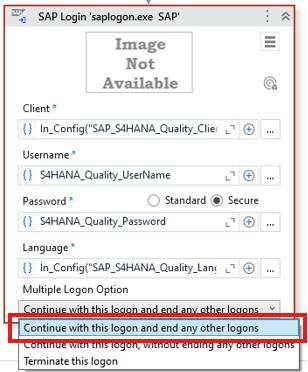
The thing is I DO log in, I always log in, it works with “Terminate this logon” option as well, but right after logging in, UiPath throws an error.
That’s why I can’t understand how it is possible to use Login Activity, log in SAP and then get an error. That activity is supposed to be used to log in SAP, and that it happens. Why throwing an error about a selector I am not using right after logging in successfully?
Plus: I cannot use the option “Continue with this logon” because I need to log in 15 different connections, so in case someone is inside, I need to terminate my logon to avoid any interference with any other execution).
I come back to you because finally found out what was going on. UiPath was doing perfectly fine, the problem was a security setting on the server I was trying to access. The scripting was enable (that’s why I could enter user and password and log in), but right then, UiPath threw an error because on the server there was another permission I needed, a transaction that an administrator needed to change to give access to the robot, so right now I’m able to work on all the conections.
Thank you so much for taking your time replying to my problem, I hope that this helps someone in the future if they face a problem like mine, hehe.