I am new to UiPath and have been using UiPath Academy to learn. In my first case, I was trying to find the Excel Process Scope, but I was not able to locate it. Can anyone help me out? I am having difficulty finding certain activities. Thank you in advance
Hey,
you can simply find the activities if you will use the search field:
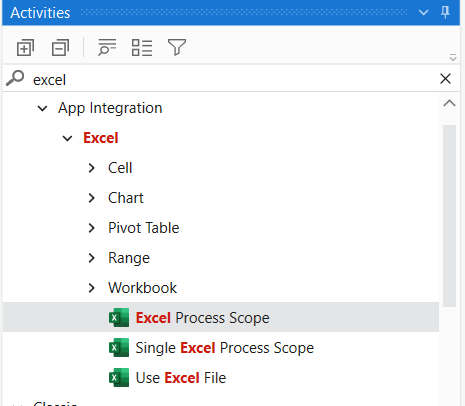
Thank you so much @pikorpa . I have tried the method you mentioned, but I am still getting the same result. I have attached a screenshot of the result after entering it.

Excel Process Scope is Modern acitvities. If you are using 23.10.2 version of UiPath Studio UiPath.Excel.Activities are already installed. If you don’t have the package installed you can install the dependency UiPath.Excel.Activities.
Go to Manage Packages=> All Packages=> Type the package name=> Click Install => Click save.
Hope it helps
Check the below images

Follow this process to install the dependency.
Go to Manage Packages=> All Packages=> Type the package name=> Click Install => Click save.


Hope it helps!!
Hi @Parvathy, thank you for helping me out. I have already installed the package, but I am still unable to access it. I have attached a screenshot


@mohammedsheeth
Ach. You have the classic view. You need to switch to modern here:

You can also enable the modern view in the Studio Settings for the future projects here:
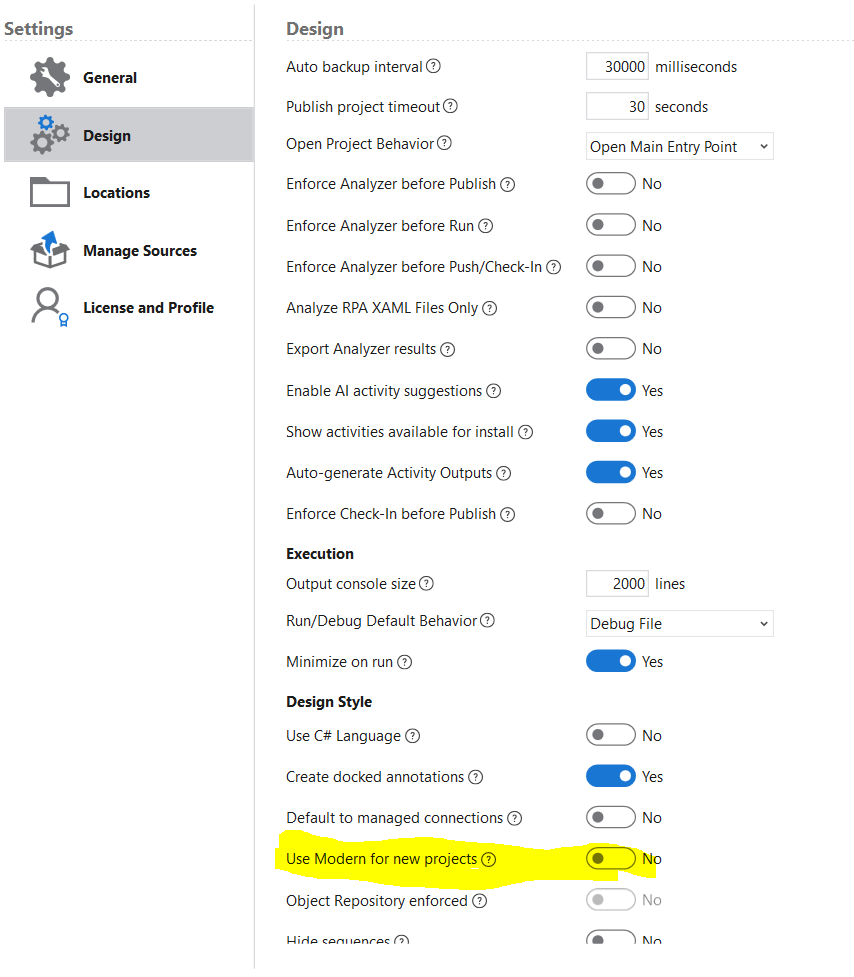

Try enabling the modern experience
Go to settings in Project Panel=> Enable Modern Design Experience
Or other way:
Enable Modern filter option present in Activities Panel. You can find the activity


Cheers!
Got it, @pikorpa. Thanks a ton!
Thanks a lot, @Parvathy
1 Like
@mohammedsheeth You’re welcome 
BTW. To close the topic, please select ‘solution’ on the post that solved your problem. You can only mark one post this way.
If you are satisfied with the answer please mark it as solution to close the loop.
Happy Automation
Regards