Hello,
I want to automize the SAP Generic Object Services (GOS). This is an additional toolbar in the title of an SAP window.

As you can see it is divided into two different buttons, but it is one control.
Here the analysis of the SAP GUI Scripting tree:

Here the analysis of a window detective:

Here the result in UiPath, first the selection of the recording and second the result:

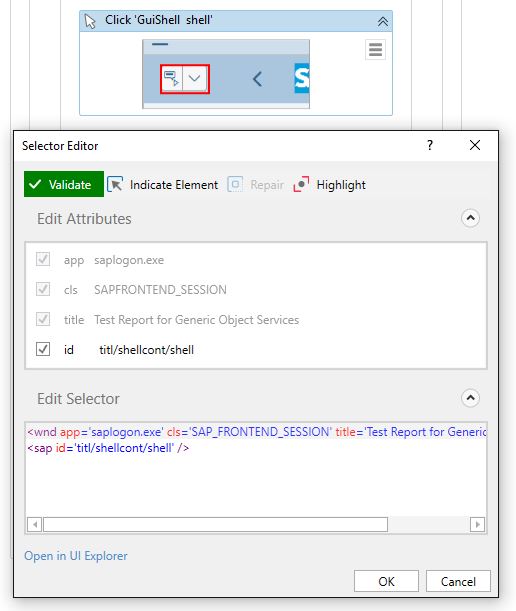
It is one container and it seems not possible to click one of the buttons separately.
But with SAP GUI Scripting is it possible. There are two methods to do that, pressButton and pressContextButton. Both refer to one control, but with the different methods the left and the right button can be used separately.

It makes not difference which button is pressed. If I use the left button, I get this problem.

And the recorded code, of SAP GUI Scripting, is in both cases the same.
How can I realize the using of SAP GOS with UiPath?
Before I forget it, everyone can easily reproduce it with the transaction code SGOSTEST.
Thanks for tips and hints.
Best regards
Stefan