MF.RPA
July 9, 2024, 7:17pm
1
Hello everyone,
I am struggling with an assignment where I need to obtain a list of data from a screen and write this to a data table.
Process:
Use get visible text activity to obtain a list of locations
Use the for each activity to write each row of data to a data table
Issue:
I receive an error message that I cannot convert an IEnumerable Textinfo variable to a data table.
Can someone please help me better understand why I cannot write this data to a data table?
Thank you,
adiijaiin
July 9, 2024, 7:31pm
2
Hi @MF.RPA
You would have to see the data present in the String variable.
MF.RPA
July 9, 2024, 7:40pm
3
strClausePlant1 Example:
arrClausePlantList1 Example:
Thanks for the response!
adiijaiin
July 9, 2024, 7:43pm
4
Hey,
Is there a fixed column width for each column?
MF.RPA
July 9, 2024, 7:45pm
5
Hi,
The first column will always be two characters, the second column is variable.
Yes, I need both columns.
adiijaiin
July 9, 2024, 7:46pm
6
Can you just give me first 2 rows data, with Name values as variable length.
This is one way I did you can try using Generate DataTable Activity with these parameters.
MF.RPA
July 9, 2024, 7:51pm
7
When I try this option the column headers are merged into one row alone with the plant abbreviation and plant name.
adiijaiin
July 9, 2024, 7:53pm
8
That’s why just asking you to copy the data from your variable and write it in a text file.
MF.RPA
July 9, 2024, 7:58pm
9
Does this data set help you?
Plant
Name
AA
Detroit Manufacturing Inc.
AE
Precision Fastener Of Mexico
AF
ACME
AI
Aluminum Forge Co.
AK
Alaska Metals LTD.
AN
ANSI
AS
ASHA
MF.RPA
July 9, 2024, 8:00pm
10
If there is a way to capture only the first column, I can work with this.
This might be easier.
MF.RPA
July 9, 2024, 8:07pm
11
I also need to page down to scrape data from 5 screens.
Will the generate data table activity actually work?
I was trying to use the “add data row activity” so I could include all line items in one data table.
Thanks!
adiijaiin
July 9, 2024, 8:16pm
12
Hi @MF.RPA
There you go
Solution:DTCreation.xaml (13.0 KB)
Testing Data:Testing.txt (147 Bytes)
Yes you can scrape the data again and again, and then use Merge DataTable Activity.
Hope this helps!
Happy Automation!
MF.RPA
July 9, 2024, 8:28pm
13
I cant seem to open the xaml file. Could you provide screenshots?
adiijaiin
July 9, 2024, 8:38pm
14
hi @MF.RPA
Sure,
There you go!
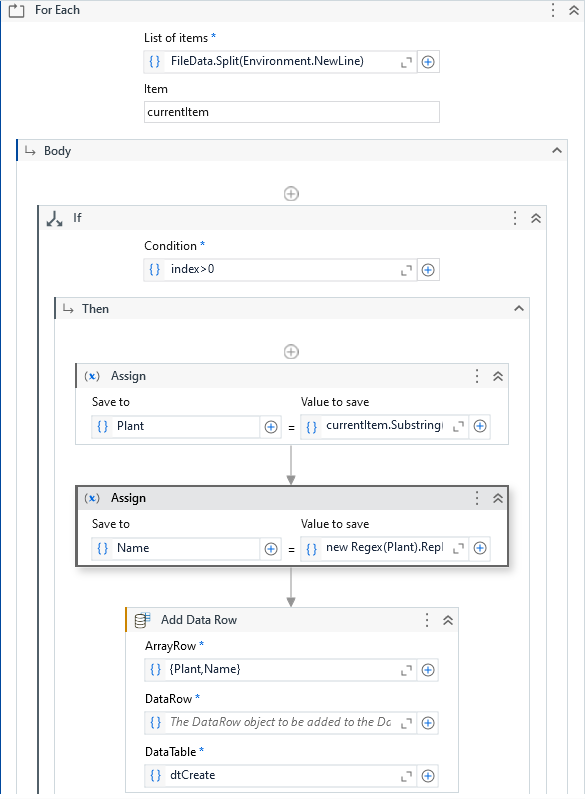
Use your String variable : strClausePlant1 instead of FileData
Plant = currentItem.Substring(0,2)
Index is used to ignore the 1st row with headers.
MF.RPA
July 10, 2024, 3:39pm
15
Hello,
Thank you for your response.
Your solution has got me going in the right direction.
With the current solution I only add “Plant” and “Name” in the top row of data and I do not add all of the data in the following rows.
postwick
July 10, 2024, 3:43pm
16
Who is writing these assignments? Get Visible Text isn’t how you get data from a page.
Anyway, you have to Split the original string on VbCrLf to get it into individual rows, and loop over that. Then you have to Split each row into the individual column data and then provide that to ArrayRow.
MF.RPA
July 10, 2024, 4:03pm
17
What is the best practice to scrape data from a terminal screen? I found the best results with “get visible text”.
I believe what you are suggesting is what I am doing. I think I might need to increment the index.
Also, I am only pulling the plant now to keep things simple.
postwick
July 10, 2024, 4:07pm
18
If it’s a terminal screen you shouldn’t even be using UI Automation activities, you should be using UiPath.Terminal.Activities and the terminal-specific activities.
postwick
July 10, 2024, 4:10pm
19
Just use…
Split(strClausePlantList1,VbCrLf)
Put that into For Each and it’ll loop through the rows in the text.
Then in your Add Data Row you’d do something like…
{Split(currentItem," ")(0),Split(currentItem," ")(1), etc}
That assumes each row needs to be split on space (" ") and then the (0) (1) etc gives you the first element, second element, etc from the Split results.
ArrayRow has to be an array, which looks like {“value 1”,“value 2”,value 3"} etc
MF.RPA
July 10, 2024, 4:13pm
20
After comparing your suggestion to my code, it appears that we are doing something very similar. I am using C# which is a slightly different syntax.
The issue is that the application is not looping through the for each.