I’m using the ‘Get Queue Items’ activity to get all queue items from the previous day using the ‘From’ argument and I keep getting this error message.
RemoteException wrapping System.Exception: Invalid OData query options. Error code: 1000
   at UiPath.Core.Activities.TaskExtensions.ThrowIfNeeded(Task task,
Boolean suppresThrowException)
   at UiPath.Core.Activities.Orchestrator.BaseOrchestratorClientActivity.ThrowIfNeeded(AsyncCodeActivityContext ctx,
Task task,
Boolean suppressThrowException)
   at UiPath.Core.Activities.Orchestrator.BaseOrchestratorClientActivity`1.EndExecute(AsyncCodeActivityContext context,
IAsyncResult result)
   at System.Activities.AsyncCodeActivity`1.System.Activities.IAsyncCodeActivity.FinishExecution(AsyncCodeActivityContext context,
IAsyncResult result)
   at System.Activities.AsyncCodeActivity.CompleteAsyncCodeActivityData.CompleteAsyncCodeActivityWorkItem.Execute(ActivityExecutor executor,
BookmarkManager bookmarkManager)
I was able to retrieve all queue items just fine up until I used the ‘From’ filter. I’ve used this in the past with no issues. All the ‘fixes’ I’ve seen have been telling me the input format was wrong so I used the date picker to choose yesterdays date instead of Today.AddDays(-1) and it was still giving me the same error message. Is it possible that this input no longer works because they removed the date field that the ‘From’ field is referencing? Here are my inputs for the ‘Get Queue Items’ activity.
From: 6/18/2025 (From the date picker)
Queue Item States: New, In Progress, Failed, Successful
Filter Strategy: Starts with
Continue on error: False
Output - Queue Items: enum_QueueItems
Again, everything was working fine up until using the ‘From’ field.
Thanks Anil, that is what I tried previously and it was still giving me that same error. I used the date picker/date calendar first, I tried Today.AddDays(-1), and I tried Now.AddDays(-1). Still no luck.
I just tried and I’m still getting the same error. I went back to a version I know worked for me in the past (UiPath.System.Activities 23.4.3). I’m curious if the more recent ‘Add Queue Item’ activity removed the object in all queue items that the ‘From’ field is filtering on.
after a set of test we can confirm that there is an issue..looks like its an issue at api end itself. as the filter from api directly also is throwing the same error as verified from swagger
creationtime is present but filtering is not happening on it..
for now you might need to get all queue items and play with top and skip in loop to get items and filter on records you need
@loginerror - this looks like an issue…screenshots from swagger
filter used - CreationTime gt 2025-06-04T00:00:00.000Z
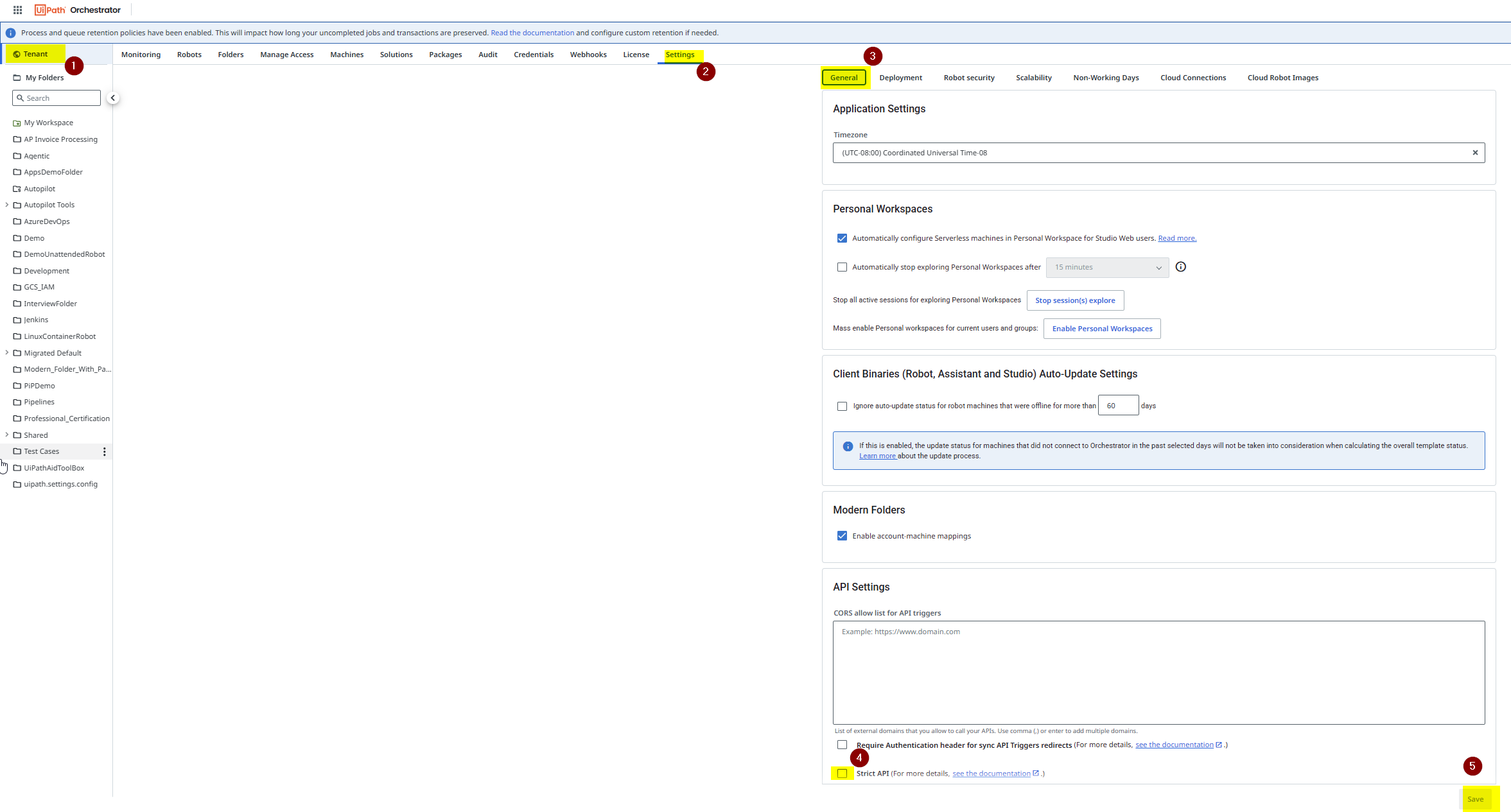
If the time filter doesn’t work for you anymore, I think someone enabled the Strict API in your Orchestrator → Tenant → Settings
If Strict API is enabled, certain API fields become non-filterable and/or non-sortable, thus helping prevent performance issues. You can see a list of these fields in the dedicated page.
This setting is enabled by default for new tenants, but existing tenants need to be opted in manually.
Keeping this option enabled at all times is a recommended best practice in API integrations.
References:
Try to disable that Strict API option, retry the new behavior in the Get Queue Items activity and in the Orchestrator Swagger.
Thank you for the response Anil. It seems as if there is a setting in orchestrator under General called ‘Strict API’ that needs to be toggled off given the other responses. Thanks so much for your help!