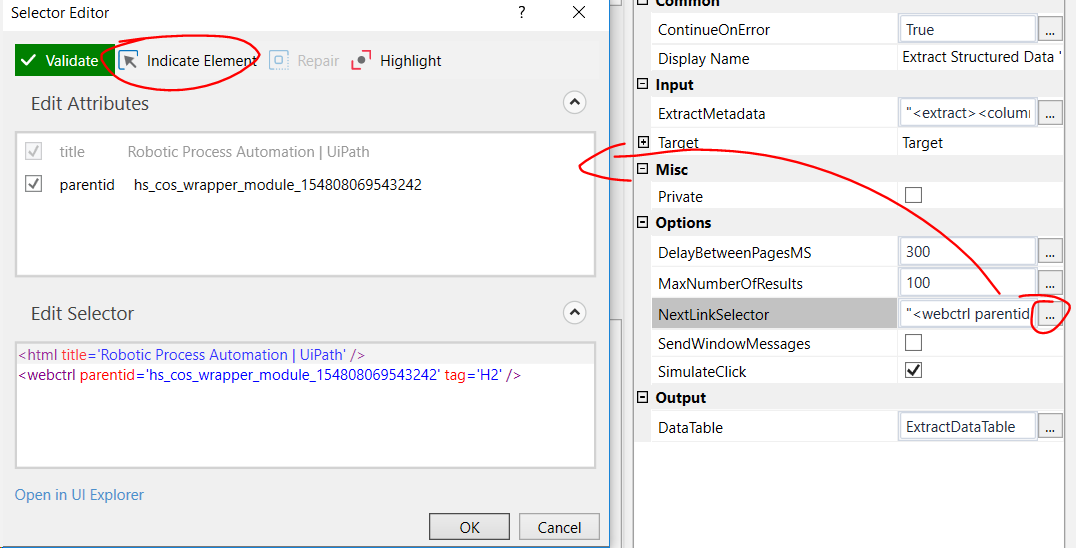
I’m trying to extract a Table from a web page using the Data Scraping wizard. Everything works fine for the first page, but it does not click the arrow for the next page.
If I copy the selector from the NextLinkSelector property and use it in a Click activity, it clicks the button. Why does it not work in the Extract Structured Data activity?
The only thing I can find is that the Next button itself is ‘part’ of the table, both have the same parent ID (EgoItemAssignedOrgTable). And according to the documentation, the NextLinkSelector should be relative to ExistingUiElement. Could this be an issue?
The selector that identifies the link/button used to navigate to the next page. Should be relative to the ExistingUiElement property.
I already tried a full selector, but does not solve the issue…
Hello.
I have the same problem.
At work, I use a web application dedicated to Internet Explorer. I am trying to download the table but
Data Scraping does not click next page button.
The problem is on Internet Explorer.
In Chrom works properly with the same selector.
I have a problem because I have to do it in Internet Explorer. In Chrome, the app does not work correctly.
Thanks for the help so far!
Have you tried with the latest version 2019.3.0 and the activity packs updated to the latest version? The next page selector is accessible now so that you can tune it
Hello,
I am working with the link instead of button for navigating to the next page. But the issue that I am facing is that even after the last page arrives link is not disabled,I tried to work with it but it is clicking on the next link even after it has reached the last page and is going into an infinite loop.
I visited almost all the forums to find the solution but could not find one.
Can you please suggest any way by which I can get through this issue.
It is very possible that there is a property of the link in UiExplorer that shows if the link is active or not. You could then include that property with an active state in your selector to be able to stop when the property state changes to inactive.
It would help if you could post a screenshot of the element as seen in UiExplorer.
 ,However i see MaxNumberOfResult set to 0
 can you please click no and start in conventional way choosing one by one column if possible and then finally next page button.