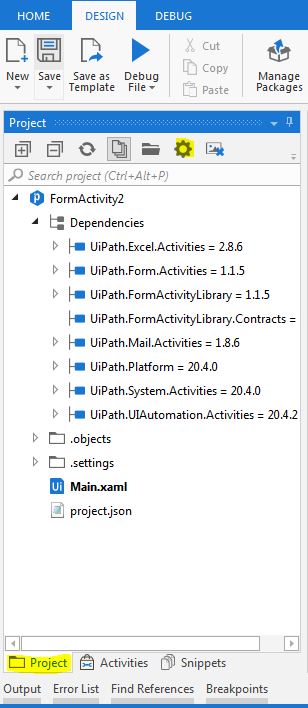
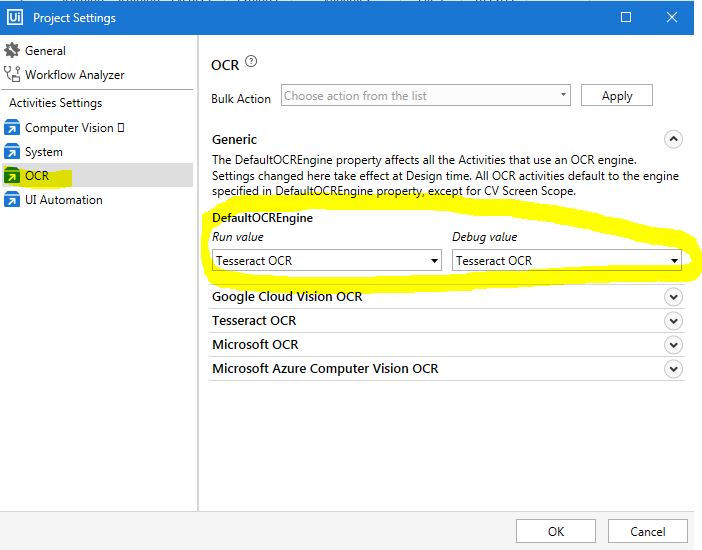
@manojghosh89 found the solution. so go to project settings–> OCR–> select correct ocr engine from dropdown → click OK and then try. Vision will then use the OCR engine you select. Mark as solution if this helps you.
shetanshudhar
(Shetanshudhar)
6
Related topics
| Topic | Replies | Views | Activity | |
|---|---|---|---|---|
| OCR doesn't work in Computer vision | 21 | 5836 | July 15, 2021 | |
| Computer Vision / OCR configuration error | 22 | 5624 | June 18, 2020 | |
| Unable to find OCR Engines in Activities panel | 1 | 849 | June 1, 2019 | |
| Tesseract Ocr - Ui Automation 2019 | 16 | 4769 | April 8, 2019 | |
| CV Vision OCR not working | 3 | 1391 | January 29, 2020 |