HI I WANT TO EXTRACT A HORIZONTAL AND VERTICAL SCROLLABLE TABLE ON VIRTUAL ENVIRONMENT, SO HOW I EXTRACT , THE TABLE IS SCROLLABLE AND CONTAIN 500 TO 800 HUNDRED RECORDS, I AM USING CV SCOPE FOR THIS , PLEASE SUGGEST A GOOD METHOD TO EXTRACT SCROLLABLE TABLE
Dear @Arvind1,
Please use extract CV table activity to extract table.
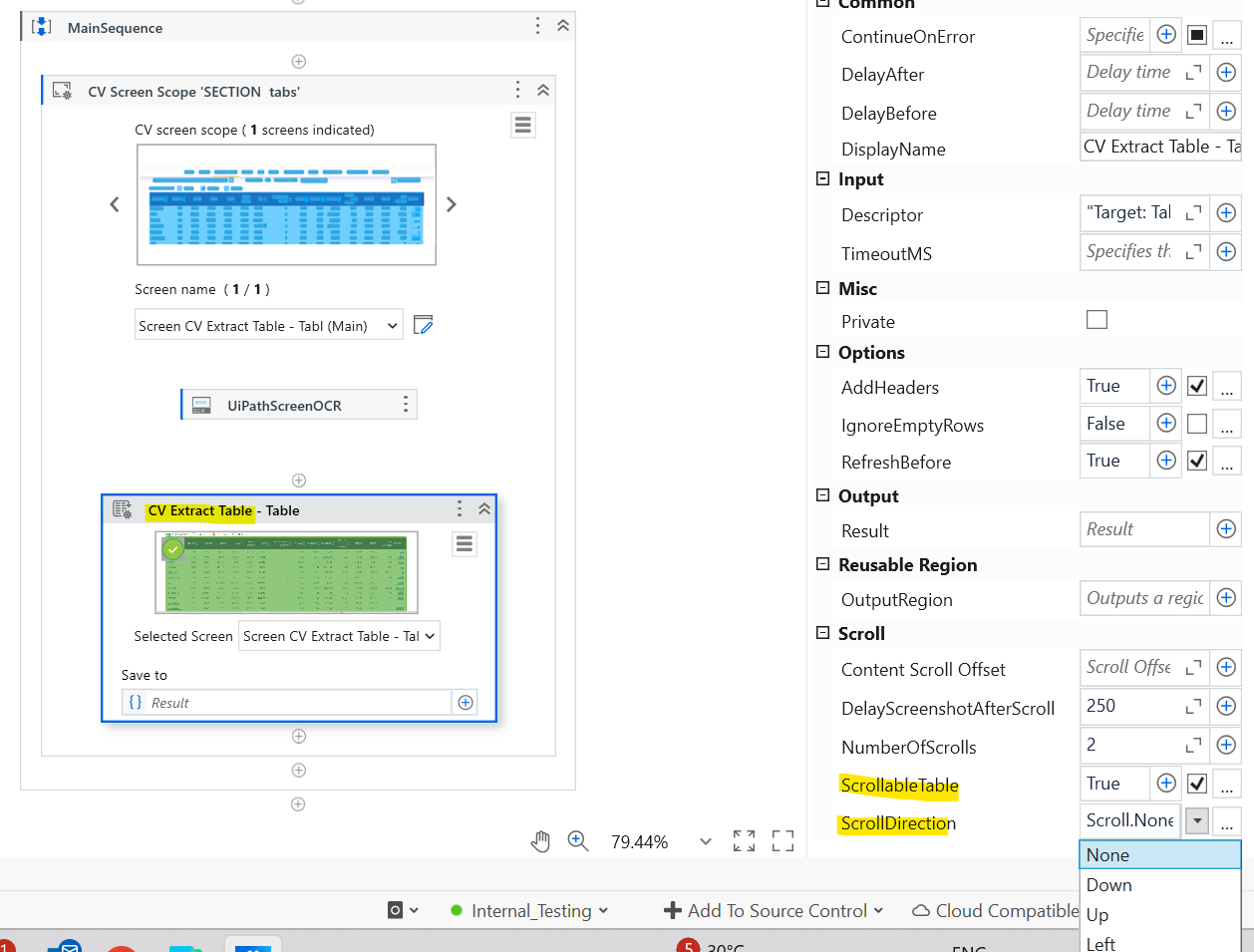
Here you can make use of scroll properties to scroll vertically/horizontally.
→ In the Scroll options, Check the Scrollable Table option to True.
→ In the Scroll direction, select the Down option from dropdown.
PFB below snap for reference:
Kindly mark as solution, if it solves your issue.
Br,
NikZ
Hi Nikhil,
The particular properties works well for vertical table for some data, not for the horizontal table, but my table is vertical as well as horizontal, or the activity is just extract some data , but i want to extract 500 data from the table, any suggestion
Hi @Arvind1
Have you tried like below?
When you indicate scope for CV, pressing F2 and then doing both the scrolls. After that extracting table data from the screen?
CV records the scrolls/application state during capture time.
Please try and see if this helps.
Hi @ Sonia
Thanks for replying , i understand your concerns , but when the table is very long then it struggle to extract table, it will help when the data table have 50 -80 records,
yes, and need scrolling both side means down and right
Hi @Sonali,
can we make code with do while activity and with take care of scrolling and last rows which we extract before and append the data to main table at every scrolling
Please refer below, if helps

You can also give a try to non CV based table extraction wizard activity.
Refer more for details

Also refer below post, it has some tips. If none of the above solution works. May be put your extract table activity in a loop, after each extraction , scroll using scroll activity specifically and then next extraction happens.
Hi @Sonali,
Thanks for recommendation,
i will try
Hi @Arvind1
Try to use CV Scope with Anchor Base to identify the table header. Scroll vertically and horizontally in loops, extracting visible data chunk by chunk using OCR or Find Children activities. Append each extracted part to a DataTable. Use Image Exists or Element Exists to detect when you reach the end of the scroll.
If helpful, mark as solution. Happy automation with UiPath
- Try to install runtime if that is done then you can use normal activiites
- If 1 is not possible then implementing loop and doing some data massaging is what we need to do
First extract the data with vertical scrollong ..then scroll horizontal from first and extract again..then the tables can be written sixe by side on excel
Cheers
You can enable scrollable table = true in table extraction property setting