I have a scenario where I need to check if the checkbox/radio button is checked or not. I tried using the Get Attribute function, but it always returned false. After some investigation, I realized that the selector did not include a ‘checked’ attribute.
Note: The application is in a non-editable state.
When it is about Web checkboxes we can do:
Using Get Attribute Activity:
Selector to the checkbox e.g.
<webctrl tag='INPUT' type='checkbox' .... />
and checking for the attribute with the name: checked
Value 1 = checked
Value 0 = unchecked
Hi Peter,
Thank you for your response, But I’m unable to get any attribute as checked/role/Arial role. Do we have any other options for checking
Try inspecting the element to find its attributes.
Steps:
- Right-click on the checkbox and select “Inspect.”
- Click on the arrow icon in the HTML inspector and choose the checkbox.
- Check the input type to identify the attribute.
Here is the screenshot below; it might help you find the attribute.

Hi Manas,
Application is in non editable state we cant check for inspect elememts

Hey @Surendra_Bonu use get attribute activity create a boolean variable and pass it into the get atribute activity as shown in the image now use if condition and in the attribute pass Checked as shown in the image .so that way you can check if the box is check or uncheck

cheers
Hi Sumit,
I tried with get attributes but there is no attribute with name checked, role, Arial role
Don’t play with the selector just use get attribute activity , and create a boolean variable i will share a demo case.
Check uncheck box.zip (2.0 KB)
cheers

I have created a demo for you.
Open the URL: https://artoftesting.com/samplesiteforselenium.
Keep the page open, select different radio buttons, run the automation process, and check the output.
Checkbox Testing.xaml (15.2 KB)
Cheers😊

1 Like
let us clear seperate between:
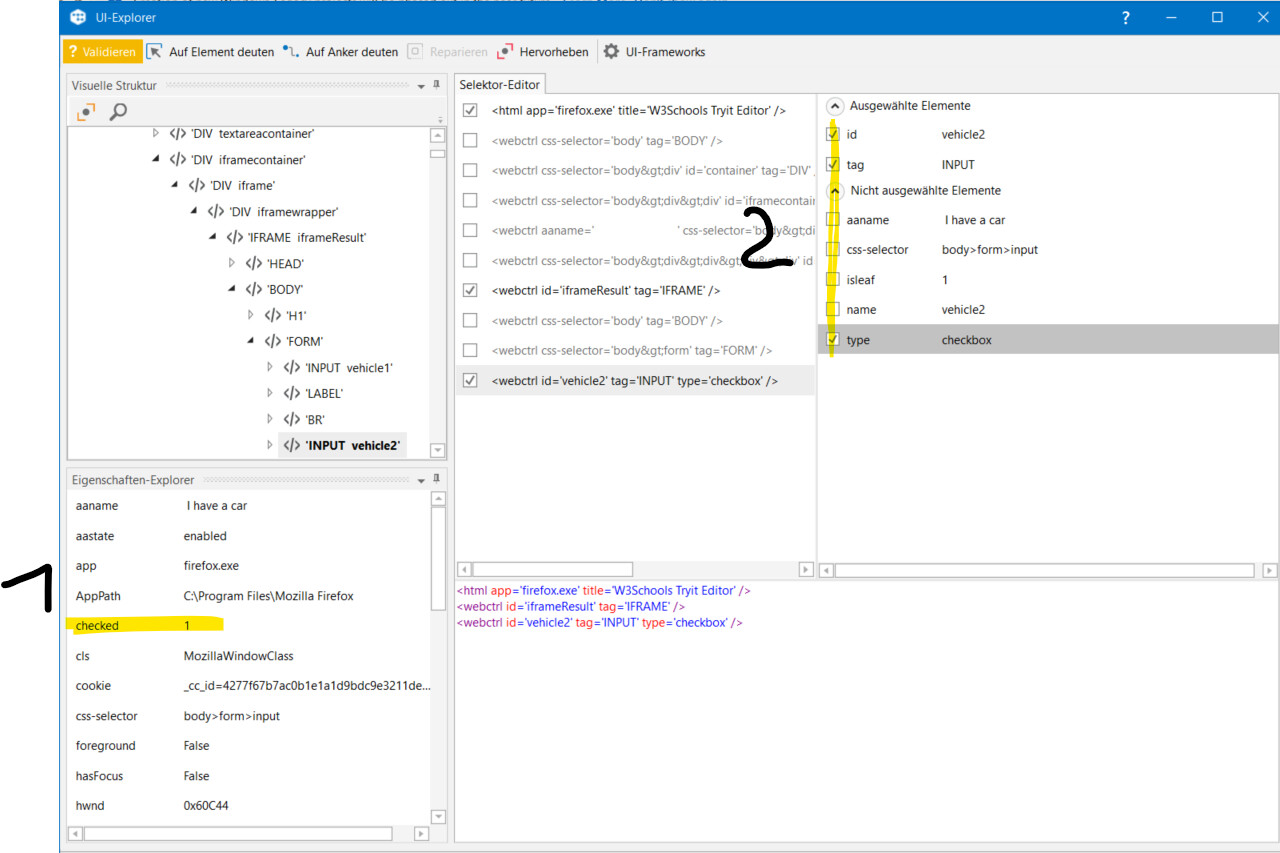
1: available attributes
and
2: offered selector attributes
when telling:
it sounds like referring to 2: offered selector attributes
with the feedback:
we are referring to 1: available attributes and did also not use within the selector
for analysis we use:
- UiExplorer and/or
- Browser F12 Web tools, which we already can open by F12 e.g. when right click inspect element is blocked
as a first step try to open ui explorer indicate the element when check and uncheck and see what proeprty values are changing
that si the property that you need to check
as it is iframes and divs there might not be checked proeprties but the class might different etc which can trigger scripts
cheers
Did you tried using below activity ?? If the element is check box - It should work without any error
I have tried multiple times in my project. Do let me know if there is any challenge in using this activity

Thank you for the responses. It got resolved by using the Get Attribute activity. The checked attribute was present in the outerHTML attribute, as it is an HTML-based app.
This topic was automatically closed 3 days after the last reply. New replies are no longer allowed.