how config file invoke in invoke activity and use config file in other workflow
thats what use of arguments , just try to understand the how arguements work

Duplicates being posted in different threads:

Their is two workflow Read config and unique their is error
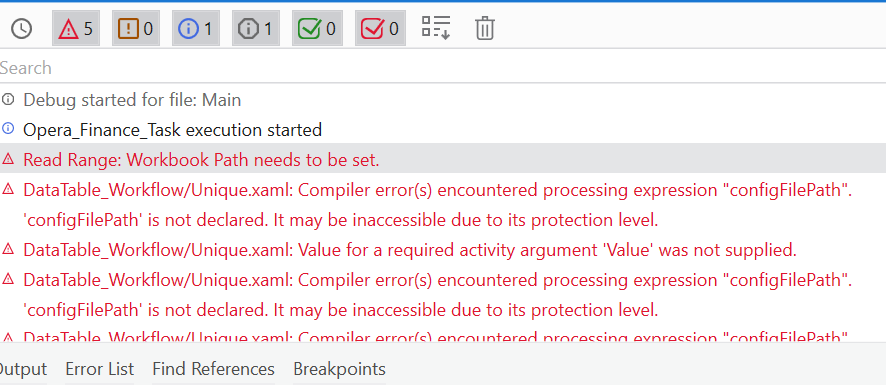
how config file argument pass in unique workflow
Hi for the output of “config” you can set the arguments as “OUT” in the read config paramaters
set the arguments as “OUT” it will make the value from inside " read config " workflow will act be able to transfer outside of the “invoke workflow” and you can assign the “OUT” arguments into a variable in the “MAIN” workflow
hope this helps
regards
ahmad
can you upload the xaml @Yogita_Gaikwad
Hi @Yogita_Gaikwad,
You have been posting duplicate threads on the same question. This is not good practice in any public forum. Many members waste time reading duplicate posts.
Multiple posts only will delay response time and can result in orphan threads.
Ask your question once and reply to the same thread.

this my error while reading config file and assigning to the variable it gives an error object reference not set to an instance of an object. can u tell what is the problem
can you show full syntax that you using in assign activity?

your config argument or varibale doesnt contains the value may be the chec variable by debug mode from watch panel
Add .tostring in the assign value
out_ConnectionString = in_ConfigDictionary(“CompanyFilePath”).ToString

Check CompanyFilePath Key exist in config file,
Also Just to get a clear picture, have you read all the config values before and stored in in_ConfigDictionary Variable?
yes i have CompanyFilePath key in the config file and all values are read while storing in ConfigDictionary variable
Try changing the datatype as Dictionary<string,object> for config variable
Duplicates reported :

while reading config file and assign to the variable it gives an error to the processing folder i.e Object reference not set to an instance of an object
Duplicates reported in the following thread :