UIPATHでのVBSCRIPTの実行に関してお聞きしたく思います。
現在、UIPATHでのVBSCRIPTの実行は、cmd.exeを起動させ、例として下記内容を貼り付け
実行していました。(引数2つ)
wscript excel2.vbs “d:\uipath\excelvbs” "d:\uipath\excelvbs\result\test.xlsx
start processあるいはInvoke Power Shellで実行できるか試していますがうまくいきません。
1start process
“cmd /c wscript ‘d:\uipath\excelvbs\excel2.vbs’”
引数
VPath01 + " "+ VFile01
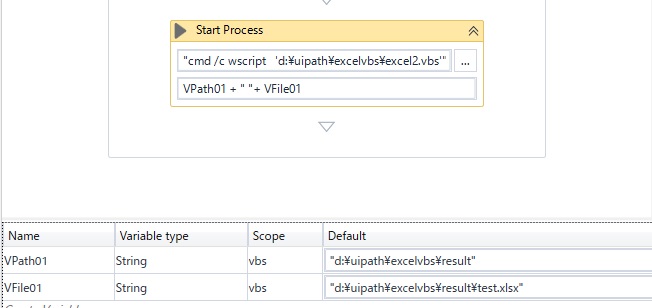
指定されたファイルが見つかりませんでエラーがでます。
2 invoke Power Shell
“cmd /c wscript ‘d:\uipath\excelvbs\excel2.vbs’”
パラメータを下記のように設定しました
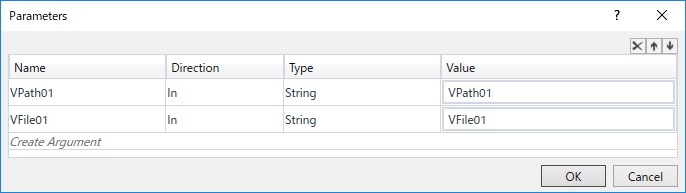

エラーが下記のようになります。
Source: Invoke Power Shell (Throw)
Message: The term ‘cmd /c wscript ‘d:\uipath\excelvbs\excel2.vbs’’ is not recognized
as the name of a cmdlet, function, script file, or operable program. Check the spelling
of the name, or if a path was included, verify that the path is correct and try again.
Exception Type: System.Management.Automation.CommandNotFoundException
多々試しましたがvbsがstart processあるいはInvoke Power Shellで実行できるかご教示いただければと思います。
