Hello, everyone, I’m a newbie to UiPath Studio and currently learning how to use strict selectors for UI activities. I’m working on automating login for a web dashboard (let’s say it’s XYZ dashboard) and I’m facing some challenges when it comes to choosing the right attributes or tags to make my selectors very specific. Specifically, I need to target the username and password fields for login. I want to make sure that these fields are uniquely identified in my automation, even if there are dynamic changes on the page.
Could anyone share best practices or advice on, how to choose the right attributes (e.g., ID, Name, Class, etc.) for strict selectors? Which combination of attributes or tags should I use to avoid ambiguity in selecting elements?
aaname is always good to use, and can often be used alone as it’s typically unique on a web page. id is pretty good, but can change depending upon how the web page is written. Class is bad to use, that can easily and often change. Name is similar to aaname in its quality, but again whether it changes depends on the way the web page is written.
Thanks for the insights,
Is there a specific checkpoint or tool you use to identify when an id might be unreliable? It would be helpful to know when it’s better to avoid id selectors entirely, especially when dealing with dynamic elements or when working with third-party web applications.
Sometimes, after selecting a target and then refreshing the webpage, the automation doesn’t seem to validate the selector anymore. Any idea why this might happen?
No it just comes from experience with a particular app or web site/page.
That would depend on the selector, and that something changed. If you have a specific example then post it.
Hi,
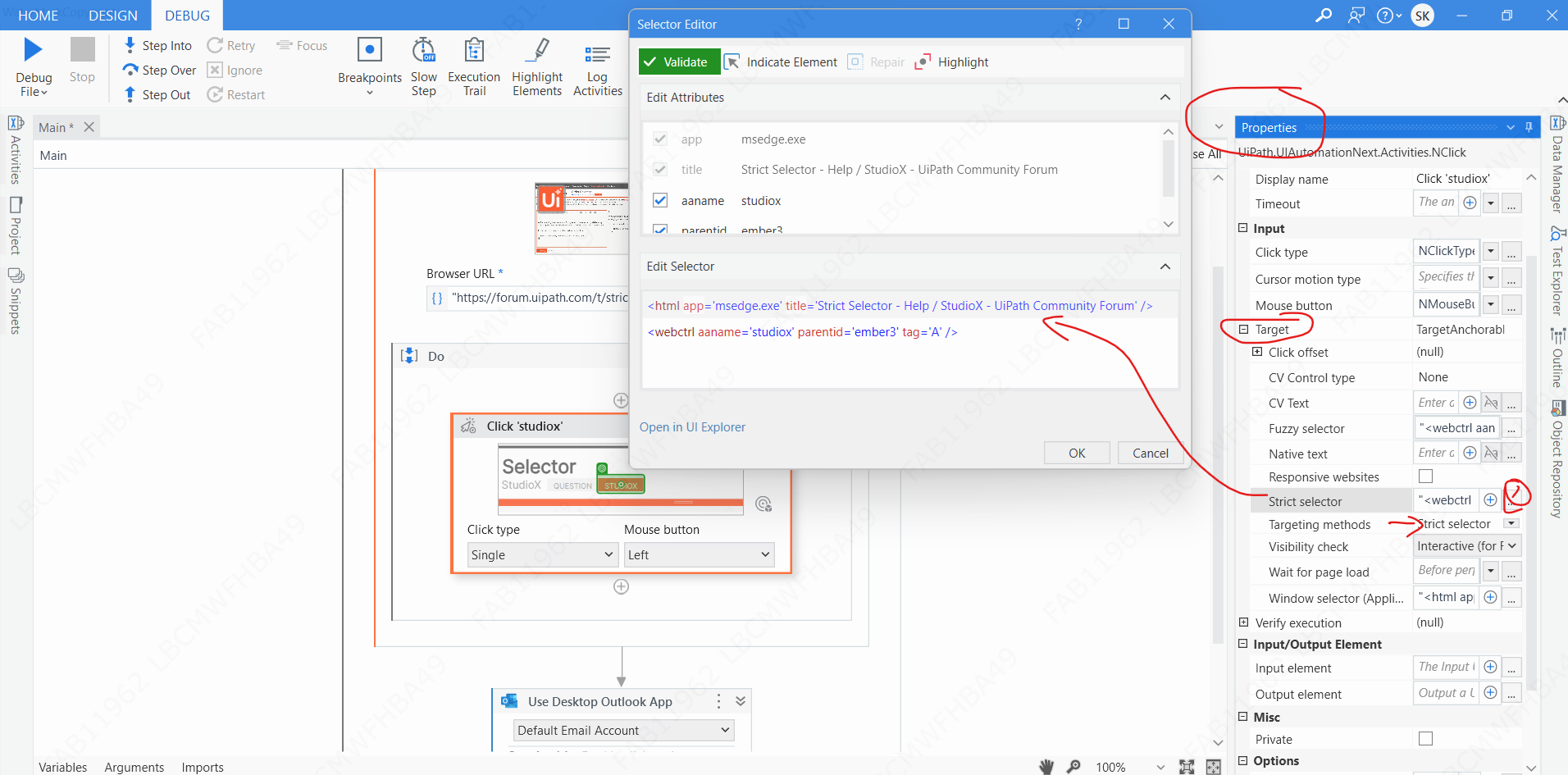
While selecting the selectors - Fuzzy selector is selected by default. try changing to strict selector so that it will automictically pick the properties
To change from fuzzy selector - follow below steps
- Click on the activity where you have selector issue
- Expand target
- Select Targeting method as Strict Selector only
- See the properties and modify if required
Let me know whether this solved your issue or not