I am trying to separate a DataTable from excel file below between each empty row. For example, the below would be split into 3 excel files all having the same headers. The first file would have 2 rows, the second 3 rows and the third 1 row. Thank you in advance for any help.

Try this workflow

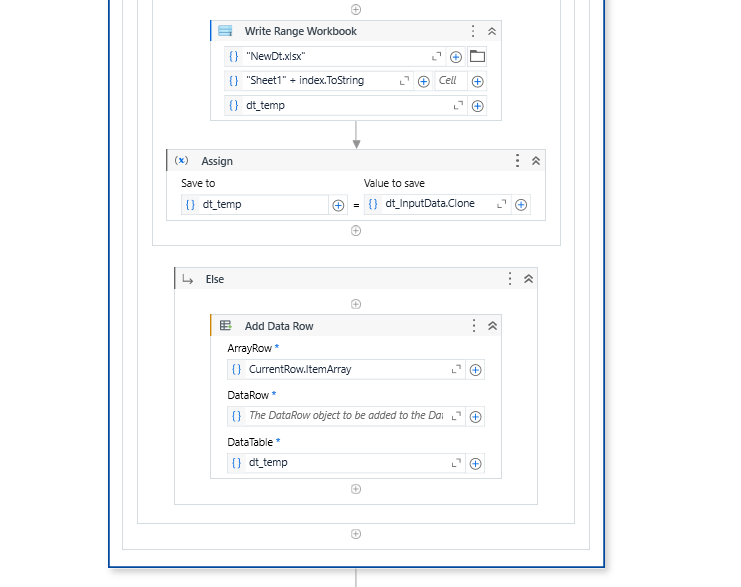
I have tried with a sample input and output and it works!
Do mark it as a solution of it helps  !
!
2 Likes
Hello and thank you for helping and getting me closer to a solution. I ran it and it gave me new file with 2 sheets but it didn’t grab the last one with 1 row from the original file. Also named the sheets in the new file “Sheet12 and Sheet16”. Would like to have them named Sheet1, Sheet2, Sheet3, etc.
I got the Sheet# situated. The only thing left is to get that last row in the next sheet.
Check the if condition logic I have changed it
CurrentRow.itemArray.All(Function(x) String.IsNullOrWhiteSpace(x.toString)) Or index = dt.inputdata.rowcount - 1
1 Like
It created the last sheet but did not write the row to the sheet. If I add data to the rows under row 9 (example - added data to rows 10 and 11) then it wrote rows 9 and 10 to Sheet 3 but did not write row 11.
Think I figured it out. Instead of adding “Or index = dt.inputdata.rowcount - 1” to the first If activity, I added another If activity after the first If Activity with the condition “index = dt.inputdata.rowcount - 1” and Write Range Workbood under Then with the same info from before.
Thank you so much for all your help. I really appreciate it.
1 Like
This topic was automatically closed 3 days after the last reply. New replies are no longer allowed.