1150723433
December 5, 2022, 2:56pm
1
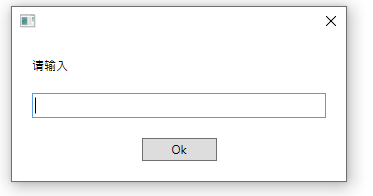
When I put an input dialog and press debug , it report errors and cannot proceed:
Gokul001
December 5, 2022, 2:57pm
2
Hi @1150723433
Re enter the value in the Input dialog box. It is the issue of Double Quotation ""
Check out this thread
I did, but it is surprisingly always with type into and check if file exists with date formula’s in there like this one:
“\kotvs003\KOT\Works\Poldat\Controlling\PBI\MPZW\InventoryPBI\Material Usage Per Month\Material Usage Per Month”&now.AddMonths(-1).ToString(“MMyyyy”)&“.xlsx”
[image]
[image]
Regards
Anil_G
December 5, 2022, 2:58pm
3
Hi @1150723433
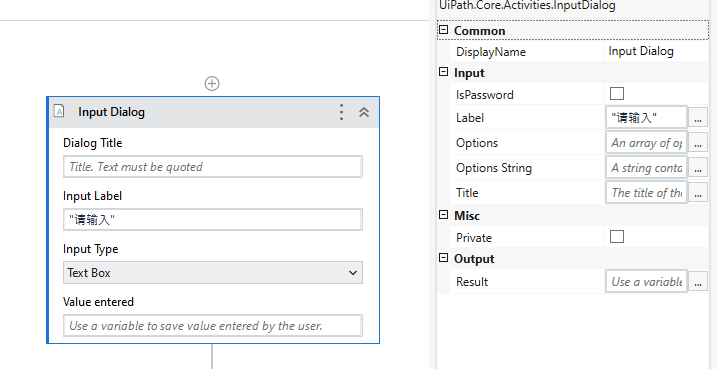
Can you share what you gave in properties of Input dialogue
And also what version of studio and system packages are you using?
cheers
postwick
December 5, 2022, 3:06pm
4
There are many posts on this error. Please search the forum. It’s related to use of the Window compatibility mode.
1150723433
December 5, 2022, 11:07pm
5
This is what I assign for the input dialog
ppr
December 5, 2022, 11:09pm
6
as mentioned above by others:
replace the doublequotes by
"
Hi,
In windows legacy, it seems double quote is normalized and any double quote characer is accepted. However, at this time, in windows (.net6) ,in fact, only " (0x22) is accepted to express string literal. To make matter worse, it seems to occur only compiling. (Expression validator don’t raise an alert.)
FYI, the following is sample for reproducing. The first Assign uses " 0x22 and second Assign uses “ and it fails in compiling.
Sample20221013-2.zip (2.1 KB)
[image]
Regards,
Anil_G
December 6, 2022, 2:01am
8
@1150723433
As detailed the inverted comma used are not valid please replace them. I guess you would have copy pasted it… just replace them in the advanced editor and it shpuld solve the issue
Cheers
Gokul001
December 6, 2022, 4:38am
9
Hi @1150723433
Re enter the value in the Label
“请输入”
You can find the different of the double quotation
"请输入"
Regards
Hello @1150723433
The double quotes is making the issue for you. So just replace it as below and it should work.
"请输入"
Thanks