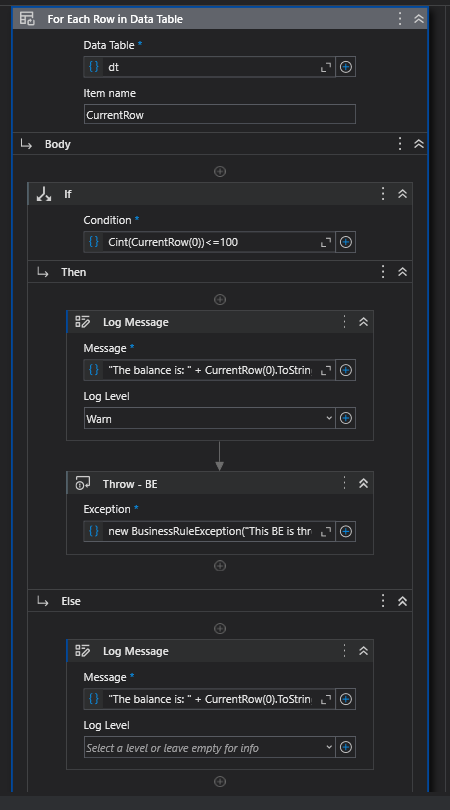
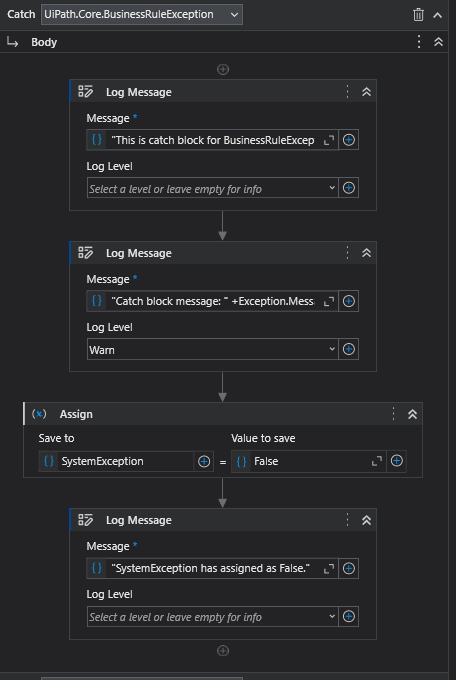
I’m trying to understand Retry Scope-Try Catch-Throw and Rethrow mechanism. I have created a simple sequence. To sum up, I’m reading an excel file with only one column with integer values and I’m checking if the number is greater than 100 or not. If it’s greater than 100, system works. But if it’s less than or equal to 100, it throws Business Rule Exception.
I have created a Boolean variable as SystemException. The thing what I wanted to do is, if it’s BusinessRule Exception, then retry mechanism works but if it’s System Exception, retry mechanism doesn’t try retry and ends.
With 3 retry attempts, I’ve tried to run my file in debug mode and you can see the logs in output panel in 2nd image. when it starts it throws a BusinessRule Exception because the values is “<=100”, then when it does a retry I’m opening the excel file, so it gives a System Exception.
In check true activitiy - ErrorMessage it says:
“Checks if a given boolean expression is false and generates an error with a specified message when the expression is false.”
However when the boolean expression is False it doesn’t jump to the Condition part of Retry Scope activity after Action. However it jumps to Condition part of Retry Scope activity when the boolean expression is True.
So, I’m not able to see the ErrorMessage in any case. I was expecting that it will jump to Condition part of Retry Scope activity if it doesn’t throw an exception from The catch part of the Try Catch activity. However it doesn’t work like this. It directly retry again if the boolean value is False without jumping to the Condition part of Retry Scope activity.
What am I doing wrong? Maybe I know something wrong, if you inform me about it I’m glad. And in which situation that ErrorMessage can work? What should I do for this ErrorMessage in Check True activity works?
@singh_sumit Besides, if I add an rethrow in catch block for System Exception, it directly retries without jumping and checking the Check True Activity in Condition part of Retry Scope Activity.
@singh_sumit You can also check this one. It doesn’t matter what you assigned for retryFlag if you put a throw in catch block. In any case, it retries if there is throw in catch block of Try Catch activity.
The point is that “Retry Scope” expects a conditional activity in the “Condition” block.
Conditional activity is one that outputs true/false, like “Image Exists” activity. Any other output produced by the activity in “Condition” block is not accepted, not even any log output.
So in your case you should make “Check True” the last activity in “Action” block to see the log.