Hi Automation Masters,
I am using StudioX… I want to delete some data row in excel 1 from excel 2.
in excel 2 i have more than 10 rows data and in excel 1 there are hundreds of match data to be deleted based on excel 2 data.
right now i am using filter data table. but i can’t work it out… and I don’t know how to use the Remove Data Row in StudioX EXCEL 2.xlsx (8.0 KB) EXCEL 1.xlsx (8.8 KB)
You want to delete the row data in excel1 which is matched with excel2 data.
If yes, you can delete the matched rows in excel1 by using LINQ Expression,
→ Use two read range workbook activity to read the data in excel1 and excel2 and store in Inputdt1 and Inputdt2 datatable variables.
→ After two read range activities use the Set variable value activity for the LINQ Expression,
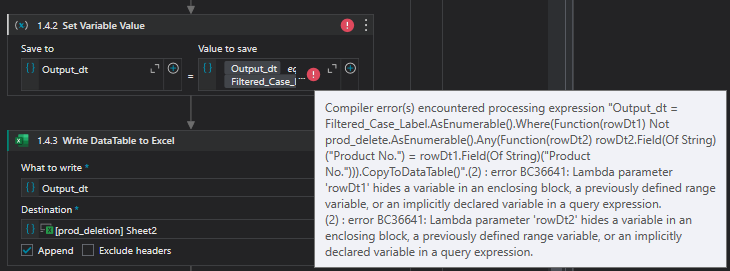
Output_dt = Inputdt1.AsEnumerable().Where(Function(rowDt1) Not Inputdt2.AsEnumerable().Any(Function(rowDt2) rowDt2.Field(Of String)("column1") = rowDt1.Field(Of String)("column1"))).CopyToDataTable()
→ After assign activity use the write range workbook activity to write the outputdt to the excel file.
You can use the LINQ Expression for this.
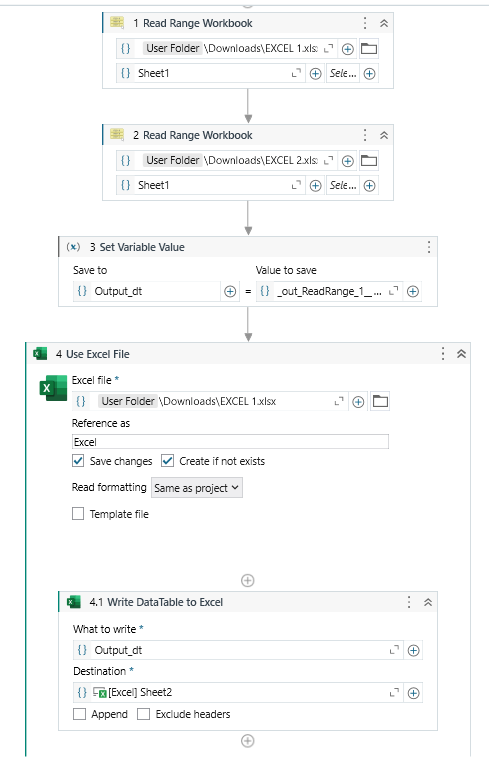
→ Use two read range workbook activity to read the data in excel1 and excel2 and store in Inputdt1 and Inputdt2 datatable variables.
→ After two read range activities use the Set variable value activity for the LINQ Expression,
Note - In the above LINQ Expression replace the dt1 and dt2 variables with your created variables.
→ After assign activity use the write datatable to excel activity to write the outputdt to the excel file. Use this Write datatable to excel activity inside the use excel file.
Check the below workflow for better understanding,