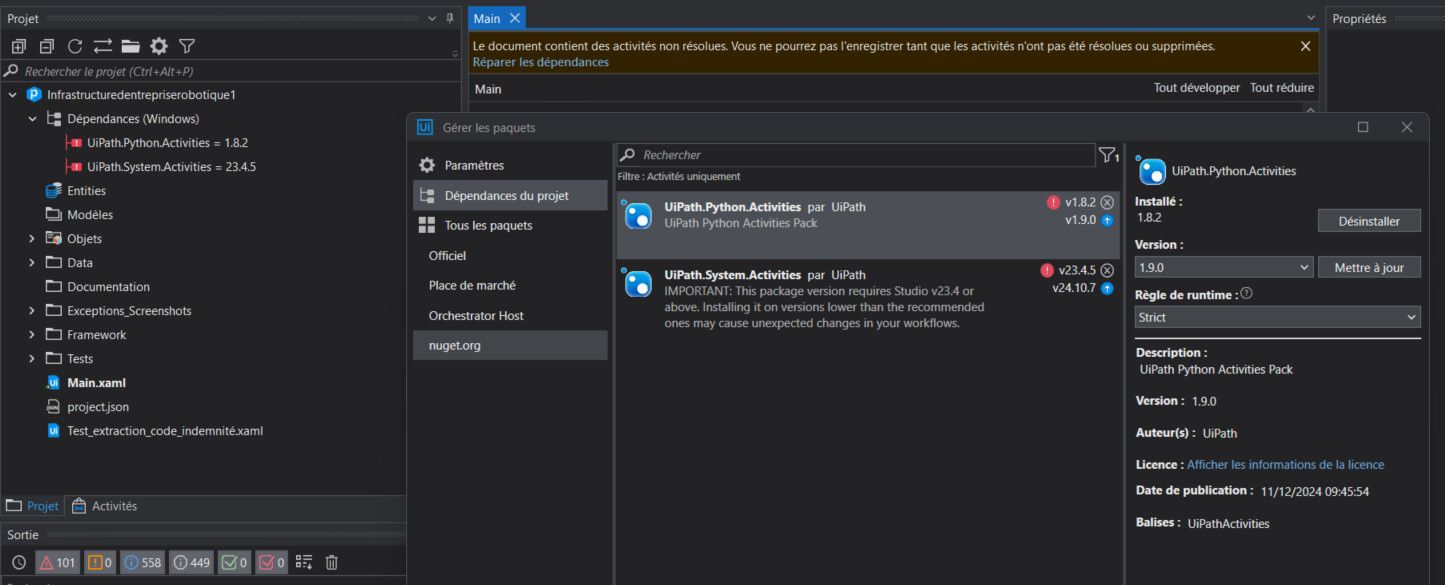
I am currently using “UiPath Studio version 2023.4.6”. I am working on a project that requires using Python, and I have downloaded the “UiPath.Python.Activities” package. However, I am encountering an issue with the dependencies, as they are all marked in red.
I have tried changing the version of “UiPath.Python.Activities” from “1.6.0” to “1.9.0”, but the issue persists.
In the Manage Packages → Settings → check if the Official feed is set to be https://pkgs.dev.azure.com/uipath/Public.Feeds/_packaging/UiPath-Official/nuget/v3/index.json (the packages are stored in an Europe storage location)
Note: For the packages are stored in an USA storage location, use https://pkgs.dev.azure.com/uipath-us/Public.Feeds/_packaging/UiPath-Official/nuget/v3/index.json
If it is not, create a new source in the User defines package sources.