Hi Everyone, I hope you doing well!
I am facing a challenge while trying to split a variable named ‘StrExctractedText ’ into an Array by splitting it with a newLine delimiter
that contains the following text:
I tried to use the split function but the result after Looping inside the Array is a single-element array instead of three elements as expected. as you see here:
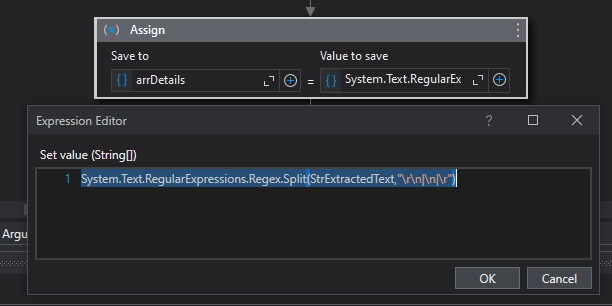
After several tries, I changed the way to Regex, here:
and the output is a 5 Elements array instead of three elements also
Can anyone provide guidance on how to correctly split the ‘StrExctractedText’ variable into an array where each line is a separate element?
ppr
January 9, 2024, 8:49pm
2
give a try at trimming
YourTextVar.Split({Environment.NewLine},StringSplitOptions.RemoveEmptyEntries).Select(Function (x) x.Trim())
You can prototype it within the immediate panel as well
1 Like
Yoichi
January 9, 2024, 11:42pm
3
Hi,
Another approach:
It may be linebreak matter. Can you try the following expression?
StrExctractedText.Split(vbcrlf.ToCharArray,StringSplitOptions.RemoveEmptyEntries)
If you need to trim each item, @ppr 's LINQ expression will help you.
Regards,
1 Like
Parvathy
January 10, 2024, 12:44am
4
Hi @Islam_ISmail
Try the below following way:
StrExctractedText= "Client ID: BL17488
                    Client Name: Mabel Suttle
                    Client Country: Romania"

arrDetails= StrExctractedText.Split({Environment.NewLine}, StringSplitOptions.RemoveEmptyEntries)
Hope it helps!!
1 Like
SplitAndTrim.zip (2.7 KB)
Use this Workflow
1 Like
postwick
January 10, 2024, 6:43pm
6
Use Split(yourstring,delimiter) instead of yourstring.Split because the former accepts a string instead of character array.
1 Like
Thank you for your response that helps me!
ppr
January 10, 2024, 6:54pm
8
@Islam_ISmail
Forum FAQ - How to mark a post as a solution
This document is part of our beginners guide .
This article will teach you how to properly mark a post as a solution.
We were closely following our last UiPath Forum feedback round! topic and carefully extracted all the bits of feedback that was provided. As such, we would like to tackle the topic of solutions on our Forum and how to properly use them.
1 Like
Thank you for your response I’ll try this out !
Thank you for helping me out !!
system
January 13, 2024, 6:56pm
11
This topic was automatically closed 3 days after the last reply. New replies are no longer allowed.