Hi All,
I am trying to pass string variable in the Body in Post HTTP request but unable to pass and it is not recognizing below is my syntax.
“{”“Name”“:”“Variable1"”,““AccoutnNo””:““Variable2"”}”
Am I doing anything wrong over here in the above syntax?
@srinucslt hello, I also tried defining the parameters in the HTTP body pane as you said in one post but still facing an error saying unrecognized
Hi @Pavan_Srikar
Write the below data in txt file
“{”“Name”“:”“Name1"”,““AccoutnNo””:““AcctNo2””}"
And save it
Now in Uipath
-
Use read text file activitiy to read the above text file and store in string varaible "input*
-
Now use below assign activitiy to replace the varaible1 and varaible2 text with values in varaible 1 and varaible2
input=input.Replace(“Name1”, varaible 1).Replace(“AcctNo2”, variable 2)
Now put the input varaible in body of http request.
This will help
Mark it as solution if it solves ur query.
Regards
Nived N  .
.
Happy Automation 
Hi, @NIVED_NAMBIAR Tried the above scenario as is , getting an error below.
Used this below
“{”“Name”“:”“NAME1"”,““AccountNo””:““ACCOUNTNU1"”}”
Input.Replace(“Name1”,NAME1).Replace(“AccountNo”,ACCOUNTNU1)
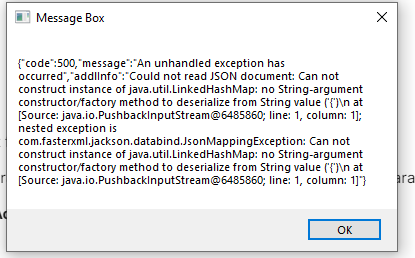
1996
(Neelima G)
5
Hi @Pavan_Srikar ,
You can try passing variables like this
“{”“Name”“: " &Variable.ToString & “,”“AccountNo”: “&Variable2.ToString &”}”
Hope this helps
Regards,
Neelima.
Hi, @1996 Thanks for the reply, tried the above one did some tweaking as per my API expecting it
“{”“Name”“: “”” &NAME1.ToString &“”“,”“AccountNo”“: “”” &ACCOUNTNU1 &“”“}”
Thanks