Hi i’m have 2 names that i need to verfiy that both names are partially matched or not in names it may have special characters also and if any one of the word is present in those names it consider as partially matched and those names comes in different patterns it should accept every possible way.
i have tired with a synatx
(Boolean)Ismatch = fullname.any(function(x) Name.indexof(x, stringcomparision.ordinalignorecase)>=0) but its not giving exact results
Any solutions on this?
Hi @smarthari1997 ,
Could you maybe also provide us with some example data. This way we would be able to help you better.
Say the name you need to verify is in str variable…and the names you want to compare with are in array variable arr1…
Then arr1.Any(function(x) str.ToLower.Contains(x.ToLower))
This would give true if atleast one value in arr1 is present in str name
Cheerd
These are some eg: "michael a. pangalangan ", “MICHEAL DILIA S PANGALANGAN”, “lai wing cheung-nel”, "Emma J Olivia, JR"like these and still different kind of patterns its appearing
i tired this anil but its not working for every pattern if any special characters are appearing its not working properly even i used the trim function but i cant the get proper output pls provide me some other better options for this case.
Can you please show for what it is not working?
Few examples will help here…
Are the names you are searching are not of exact same characters?
Cheers
Can you give correct inputs specifying what is Name1,Name2 and what is required output.
Regards
name1 = “MICHEAL A. PANGALANGAN”,
name2 = “MICHEAL DILIA S PANGALANGAN”, like these but still it also appears in different patterns like you can consider US based names
I tired before few days it works after that it failed so i changed synatx now i dont have the eg to show you i have provided some names above like how it will appear can you help me with that eg data?
Check if the below syntax is working for you. If you have more inputs please share here. If not I will help you with modified code.
Assign -> name1= "MICHEAL A. PANGALANGAN"
Assign -> name2= "MICHEAL DILIA S PANGALANGAN"
Assign -> words1= System.Text.RegularExpressions.Regex.Split(name1, "\W+").Where(Function(s) Not String.IsNullOrEmpty(s)).ToArray()
Assign -> words2= System.Text.RegularExpressions.Regex.Split(name2, "\W+").Where(Function(s) Not String.IsNullOrEmpty(s)).ToArray()

Message Box -> words1.Any(Function(word1) words2.Any(Function(word2) word2.IndexOf(word1, StringComparison.OrdinalIgnoreCase) >= 0))
words1 and words2 are of DataType Array(System.String).

Regards


Check that name1, name2 is of DataType System.String. words1, words2 are of DataType Array(System.String).
Output if you are storing it in a variable then the datatype is System.Boolean.
Change the datatype accordingly and if you face any issues, I’m happy to help.


Instead of directly using the condition in If use the below way:
isPartiallyMatched = words1.Any(Function(word1) words2.Any(Function(word2) word2.IndexOf(word1, StringComparison.OrdinalIgnoreCase) >= 0))
isPartiallyMatched is of DataType System.Boolean
After use the below condition in If
If isPartiallyMatched
Then
    -> WriteLine-> "Names are partially matched."
Else
   -> WriteLine->"Names are not partially matched."
End If
Regards

@smarthari1997
Can you share your workflow once?
Regards
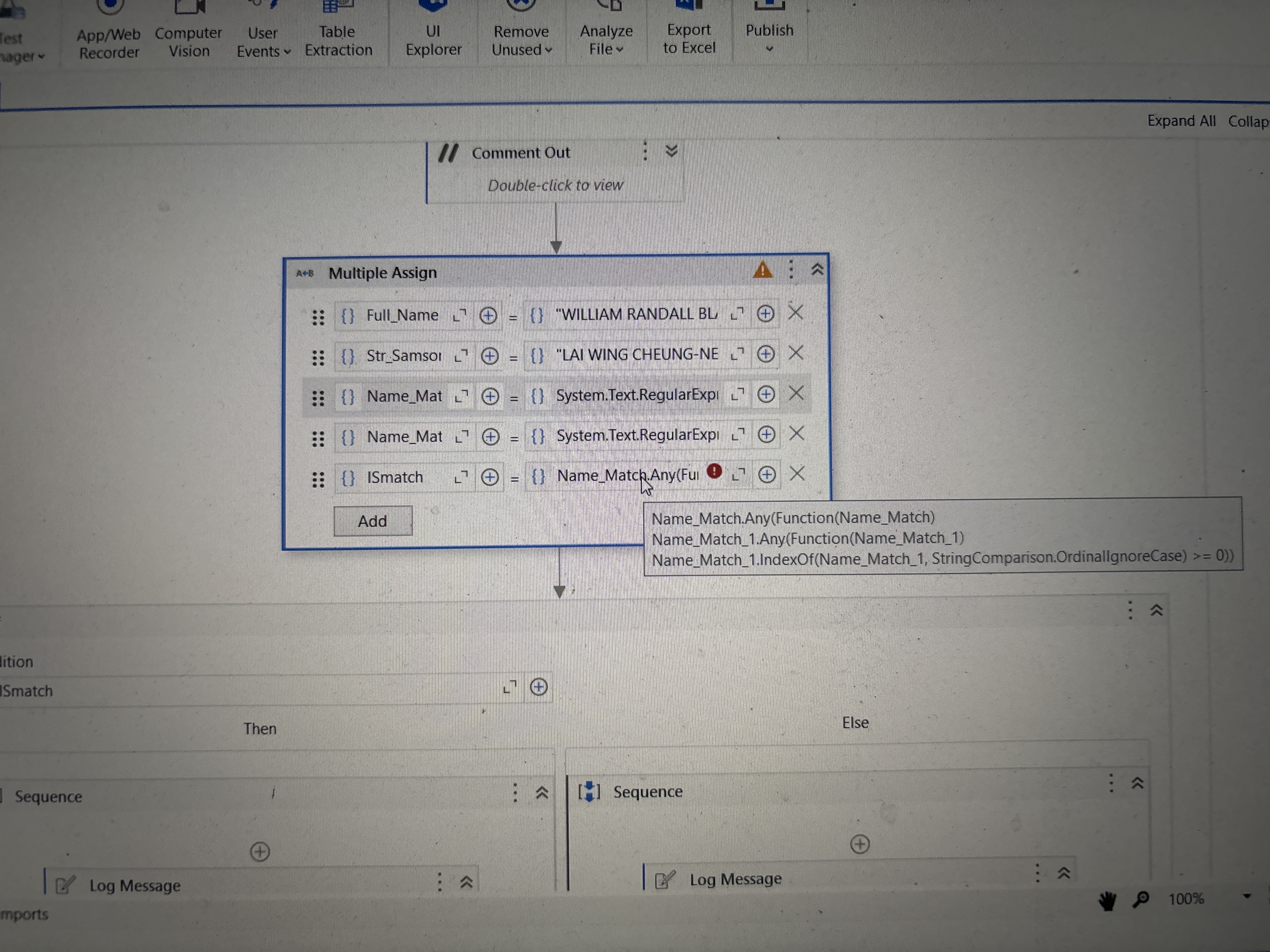

I am sharing the workflow below. Try running that workflow and check whether it’s working fine. I have also used the same code which I gave you I didn’t face any errors. So check the workflow once. if possible share the workflow of yours too.
Sequence11.xaml (10.5 KB)
Regards
Ok I check nd update do I need to update any packages so it might resolve this problem?
You can do that to update all your packages to latest version by keeping RunTime rule as Lowest As Applicable.
Regards