Check two strings

Hello everyone, I would like to check two strings and find out if they are similar, ignoring upper and lower case.

I found the following in the forum as a basis for this:

in_company_name_from_registration.Contains(strCustomerName_HitList,StringComparison.InvariantCultureIgnoreCase)

However, it does not work with my example.

in_company_name_from_registration = ‘Test GmbH’
strKundenName_Trefferliste = ‘TEST Bau GmbH’

In this example, there would be a hit for my case that it should output to me because two words match.

Hi @NHoe

Try this:

Assign activity -> in_company_name_from_registration As String = "Test GmbH"
Assign activity -> strKundenName_Trefferliste As String = "TEST Bau GmbH"

Assign activity -> isSimilar As Boolean = in_company_name_from_registration.Split(" "c).Any(Function(word) strKundenName_Trefferliste.ToLower().Contains(word.ToLower()))

If 
 isSimilar 
 Then
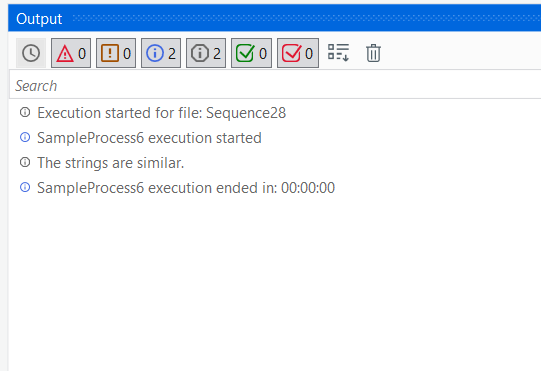
    Console.WriteLine("The strings are similar.")
 Else
    Console.WriteLine("The strings are not similar.")
End If

Variable DataType:

Output:
image

Hope it helps!!

We can condense by using an StringComparer Option.

Kindly Note:
Bauer Gmbh check on Müller GmbH will also return true as Gmbh is matching, but Bauer is not Müller

Basically it works as desired, but I have just tested it with the GmbH example. How could you exclude some defined text parts?

We recommend to resharpen the translation of the use case to its implementation strategy (einmal durchatmen und das ganze von einem Schritt zurück betrachten)

taking out parts like GmbH, Gbr… again would lead to the following failure

Müller Gmbh is not Müller Gbr

Many thanks for the tip :wink:

In my case, I get a kind of rough filter via a grid, where I can exclude the company name for the time being. If I get a hit, as in the example Müller Gmbh is not Müller Gbr, the RPA then opens the entry and receives further check criteria. I could therefore exclude the company name.

not sure if we got you in detail. However maybe you are looking for this

grafik
and can test e.g. with Any if the result does contains matching parts or not

A non matcher Case
grafik

And finally the case discussed from above
grafik

In our opionion we would have to rate this approach as not reliable

1 Like

Hi @ppr

I apologise for my late reply. I have just tested it and at first glance it works as desired. Now I would like to query the hit via a flow desicion, how can I achieve this?

Assign
IgnoreList = new List(of String) From {‘GmbH’, ‘GBR’, ‘AG’, ‘Co.’}
result = str1.Split(‘’c).Intersect(str2.Split(‘’c),StringComparer.CurrentCultureIgnoreCase).Except(IgnoreList).ToList

MsgBox = String.Join(‘,’,result)

We recommend using the immediate panels for inspections and prototyping
Understanding the 6 Debugging Panels of UiPath in the easiest way possible! - News / Tutorials - UiPath Community Forum

so just type in the variable name within the immediate panel

For Lists/arrays we would do: String.Join(“,”, result)

We are h Forum FAQ - How to mark a post as a solution - News / Tutorials - UiPath Community Forumappy to have helped. Lets get topic closed by

Hi @NHoe

Try below approach to match any word from str_Input1 in str_Input2, It will return TRUE


Split(str_Input1.ToLower," ").Intersect(Split(str_Input2.ToLower," ")).Count>0


You can modify this approach according to you requirement.

Happy Automation :slight_smile:
Cheers!!

This topic was automatically closed 3 days after the last reply. New replies are no longer allowed.