I/O error on GET request for "https://rpa.adidas.com/api/Account/Authenticate" PKIX path building failed: sun.security.provider.certpath.SunCertPathBuilderException: unable to find valid certification path to requested target; nested exception is javax.net.ssl.SSLHandshakeException: PKIX path building failed: sun.security.provider.certpath.SunCertPathBuilderException: unable to find valid certification path to requested target .
Error:
I/O error on GET request for "https:/rpa.com/api/Account/Authenticate": PKIX path building failed: sun.security.provider.certpath.SunCertPathBuilderException: unable to find valid certification path to requested target; nested exception is javax.net.ssl.SSLHandshakeException: PKIX path building failed: sun.security.provider.certpath.SunCertPathBuilderException:
Resolution: Export the Orchestrator certificate from the browser
- Click the Secure button (a padlock) in an address bar
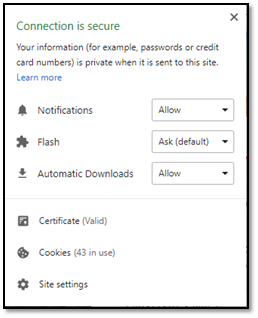
- Click the Certificate(Valid)

- Go to the Details tab

- Click the Copy to File… button
- Click the Next button
- Select the “Base-64 encoded X.509 (.CER)” format and click the Next button

- Specify the name of the file to save the SSL certificate to
- Click the Next and the Finish buttons.
Command for installation: keytool -importcert -trustcacerts -alias -file -keystore “” -storepass changeit
For me, the Command will be:
keytool -importcert -trustcacerts -alias repo -file C:\Users\DELL\Desktop\repo.cer -keystore “C:\Program Files\Java\jdk1.8.0_131\jre\lib\security\cacerts” -storepass changeit
Note:
- Using jdk1.8.0_131 so the cacerts file path for the system is “C:\Program Files\Java\jdk1.8.0_131\jre\lib\security\cacerts”. It may defer for others based on the system and jdk version.
- Given the alias name as repo and the path where the certificate is saved is C:\Users\DELL\Desktop\repo.cer
Actual Comment: keytool -import -alias adisas.test.com -keystore "C:\Program Files (x86)\Java\jre1.6.0_22\lib\security\cacerts" -file adisas.test.com.crt -storepass changeit
To Install the certificate follow below steps:
- Open Command Prompt as an Administrator. And Use the common for installation and press enter
- Once the command is executed it will ask for confirmation. Write Yes and the certificate will be installed with confirmation
- Then reset the VM else reset the JVM engine.