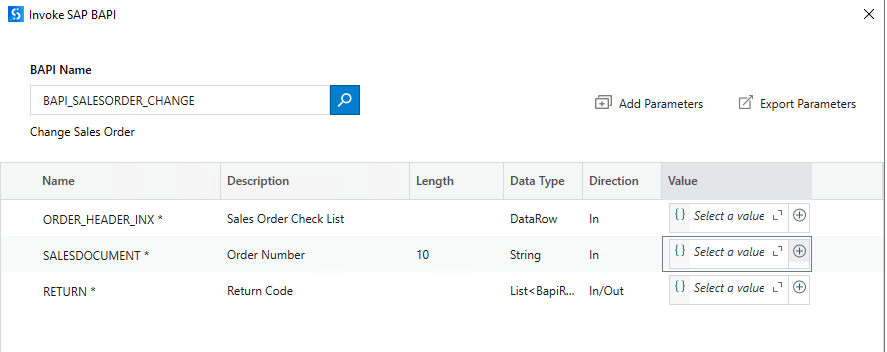
I have recently upgraded our Studio version to 24.10.15 and with this been able to create “Windows”-projects to use the Invoke BAPI Activity.
But since this, I am unable to add parameters values to the BAPI I am selecting.
If I for example try to add the “123” value into the “SALESDOCUMENT” parameter as shown below:
When I converted my projects from “Windows Legacy” to “Windows” all values was stored as they were before the convertion, but I am unable to change them.
I have tried using all available versions of the package without any luck.
Is there anyone that have seen this issue, and/or know how to help?
If there are no one that have seen this before, I will create a support ticket on the topic. Just want to check with you Forum Members first.
Hi @Mir.Jasimuddin,
I have tried with both, and he pictures attached where just fictive input, to replicate the issue.
The issue is with any given input value, any type of data type as a variable and as default string value.
If I open a “Windows - Legacy” project, I am able to add values etc. so the issue is only occurring for “Windows” projects and the newest versions of the Invoke BAPI activity.
@Mir.Jasimuddin as mentioned, I have tested with all versions available.
Also, the the “Private” setting is just regarding logging and has no impact on setting values.
I will see if there are any other users experiencing the same issue, or else I will create a support ticket.
I created a support ticket for this topic, and it seems like they are also experiencing the same issue.
This is the response I got from the UiPath Support team:
We’ve tried to replicate the behaviour on our end and can confirm that we’re experiencing the same issue and we are actively investigating it further.
In the meantime, there is a temporary workaround:
You can directly enter the variable or expression into the field without opening the Expression Editor. This method seems to work reliably.
I will update this post with more information when I get that.