Hello @postwick ,
This is by design. There is no support for Fuzzy Selectors in UI Explorer and as such we can only open the regular Selector.
When both Selector and Fuzzy selector targets are selected, the Open in UI Explorer button is shown only for the Selector target. If we deselect the Selector target, the associated UI Explorer button is disabled, and the button is shown for the Fuzzy selector.
With this approach, the user is given a chance to open the selector in UI Explorer and auto-update the corresponding Fuzzy selector.
As we can see from the attached screenshots, if the Selector was changed by removing the id attribute and adding the innertext attribute, the Fuzzy selector has been updated as well.
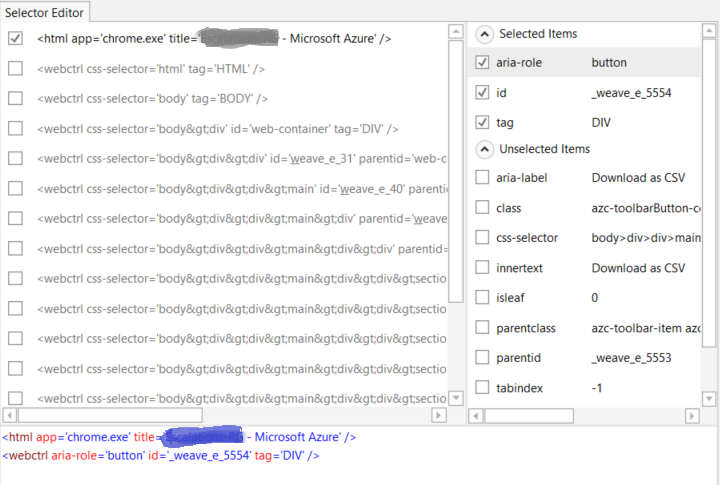
This is in fact the selector you can see when the “Strict selector” check-box is checked (together with the Window selector<html app='chrome.exe' title='...'>):
What I was trying to explain is the fact that UI Explorer opens the Strict selector (even when the “Strict selector” check-box is unchecked), because there is no support for the Fuzzy selector in UI Explorer.
The type, class, and aaname properties are part of the Fuzzy selector. That’s why they do not appear in the selector displayed in UI Explorer.
After editing the selector in UI Explorer and saving the changes, the displayed Fuzzy selector includes also the changes applied to the Strict selector.
This is very confusing and not intuitive. If you can’t edit the Fuzzy selector then there shouldn’t be a UI Explorer icon next to it, or UI Explorer should be updated to support Fuzzy selectors.
And I’m not sure why type, class, and aaname are not displayed, they’re not special selectors like checktext. They’re just regular attributes that can be used in a strict selector, too.