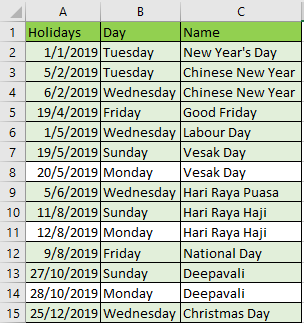
I want to read this Data Table as an array. I have tried for each row to convert it to an array but it still does not work. Below I have attached the data table. I would like to convert column “Holiday” to an array.
Hi,
Probably it will be the following.
arrObj = dt_datatble.AsEnumerable.Select(function(r) r("Holidays")).ToArray
or
arrStr = dt_datatble.AsEnumerable.Select(function(r) r("Holidays").ToString).ToArray
Regards,
Thanks for your help, but when I try to display the variable with a message box, it returns as “System.String” and not the date format @Yoichi
@kieranwong You can’t display whole array value in message box but you can display single array value by using its index example arrvariable(0).ToString

this is because you are using an writeline to write an array, use a for each, take a look 
table_Toarray.xaml (6.8 KB)

Don’t forget to like our post, and mark this post as solve if this answer your question.
Happy Automation
If you want to print that array values then use For Each loop and pass that array into it and inside that use Message box activity. It will print one by one value.
@beesheep I can like your post but I can’t mark post as solved because i am not post creator 
@lakshman and @indra haha I just got confused…hahaha
@kieranwong let us know if this solve your question.
Your Welcome!
Don’t forget to like us 
Happy Automation!
@kieranwong no worries man! (Asuming gender here–haha) It’s a pleasure to help.
string.join(“;”,arrStr)


Don’t forget to like us
Happy Automation!
May i ask if the array string can be converted to date time format? Right now it is in string format but i need it in Datetime format, I tired convert.ToDateTime however it gives me an error and I also tried to change the variable type.
Really sorry to bother you again. @beesheep

sure

Sorry but I would like to extract the dates in excel into a Datetime Array not into String Array.