Hi all,
I have created Project 1 (Object Repository) using create Library and i have published to orchestrator. I have created Project 2 using create process and using manage package i have installed the project 1 object repository. Here how to pass the variable from Project 1 to Project 2.
How to create variable or Argument in Project 1. How to replace the selector using variable.
Thanking you…
When you create a library project (1) then every workflow in the project (2) represents one activity in the library. Arguments (3) of the workflow represent parameters of the activity. E.g. in the screen below

After publishing the library you could link to your project via Package Manager. Activities (1) from the library cold be used in your project (2) and you could also provide parameters (3)

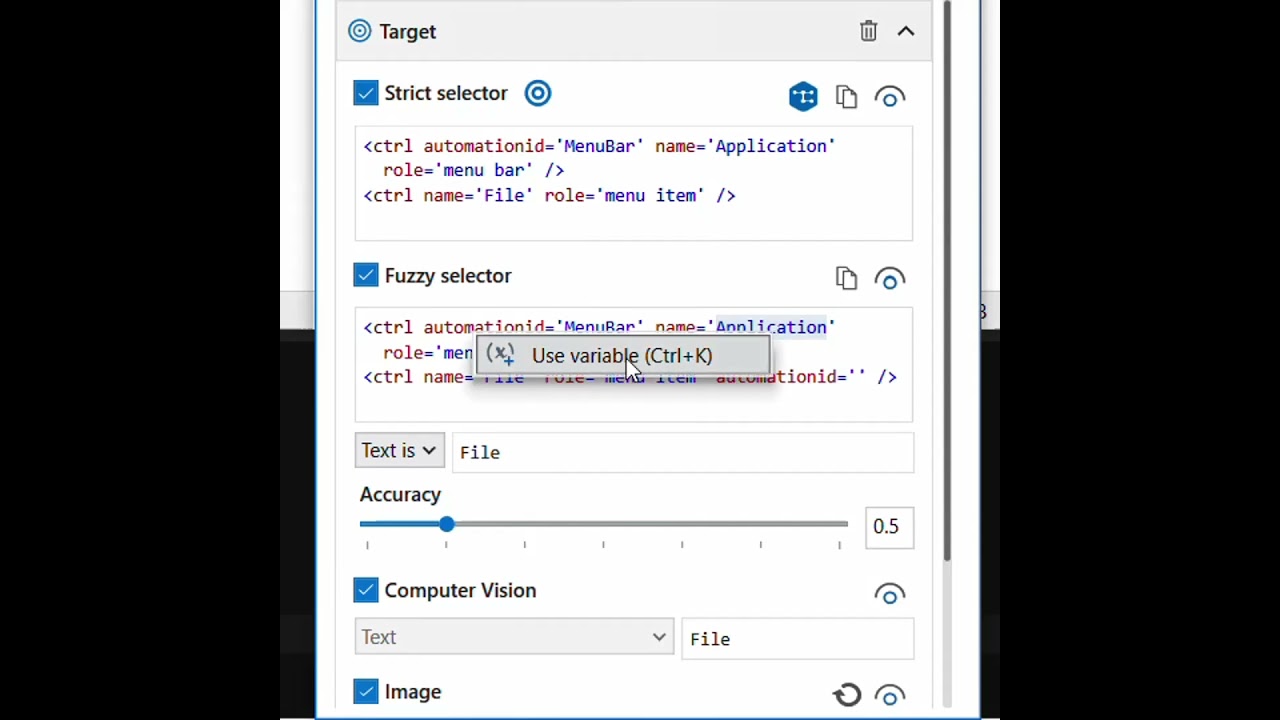
For creating dynamic variable: Just follow these steps as in below image.

Hi @Vanitha_VS
you cannot directly share variables with another project, so you must define arguments in the workflows of Project 1. Arguments are created in the Arguments panel, with In arguments used to receive values from Project 2 and Out arguments used to return values back.
After publishing Project 1 to Orchestrator and installing it in Project 2, the arguments appear as properties of the custom activity generated from the library, and you can assign Project 2 variables to those properties to pass values. Variables inside Project 1 remain internal and are not exposed, only arguments can be mapped across projects. To make selectors dynamic you reference the argument inside the selector expression, either by concatenating the argument into the selector string or by using String.Format, so the selector changes based on the value passed from Project 2.
Happy Automation
Hello @Vanitha_VS
It sounds like you have created a library by clicking the Extract as UI Library Project from the Object Repository - is that the case?

In that case your library most likely only consists of Object Repository elements.
What is your use case/requirement to pass arguments via this library?
Is it because you have defined variables in your Object Repository elements?
In that case you need to create them in your project workflow files.
Regards
Soren
Hi @Vanitha_VS
An Object Repository (OR) Library does NOT support variables or arguments inside the UI Descriptors.
It is meant to store reusable static selectors
But you can make selectors dynamic in your process by overriding the attribute values at runtime using:
- Use Application/Browser
- Descriptor strictness
- Target attribute override
However, you cannot create arguments inside an OR descriptor itself.
If you want to pass variables from Project 1 → Project 2
You cannot pass arguments inside the OR items but you can pass variables to:
- Activities inside the Library workflows
- Library Invoke Methods
- Library Custom Activities
So the correct architecture would be:
Create a Workflow in Project 1 (Library) with Arguments
Example:
- In Project 1 → Add a new workflow (e.g.,
Login.xaml) - Create arguments:
in_Username(In)in_Password(In)
- Inside this workflow, use OR elements + variables.
- Publish the Library.
- In Project 2, install the updated library.
- Use Invoke Workflow File → It will show those arguments.
This method supports variable passing between projects because workflows can have arguments.
Object Repository alone cannot have arguments
UiPath does not allow:
- Creating arguments in object repository elements
- Passing variable values inside the OR element itself
But OR lets you override attribute values dynamically in the activity.
Instead of creating Project 1 as library, create a simple process and invoke it in the Project 2, that way you will be able to pass values to the arguments in Project 1
in the object repository while creating the element and adding selector..in the same selwector give a name of the variable
which would be added to the project2 automatically when you drag the element on to any activity
there is no separate argument that is needed as that is how object repository work
cheers