Hello Please how do i edit this meta data to pick just two columns only , currently it only scrapes a single column
<extract> <column exact='1' name='Column1' attr='text'> <webctrl tag='tr' /> <webctrl tag='td' idx='4' /> </column> </extract>
here is the table:
and here is what it returns
but i would what it to return column Transaction ID & Docket Text
ppr
May 16, 2022, 6:02pm
2
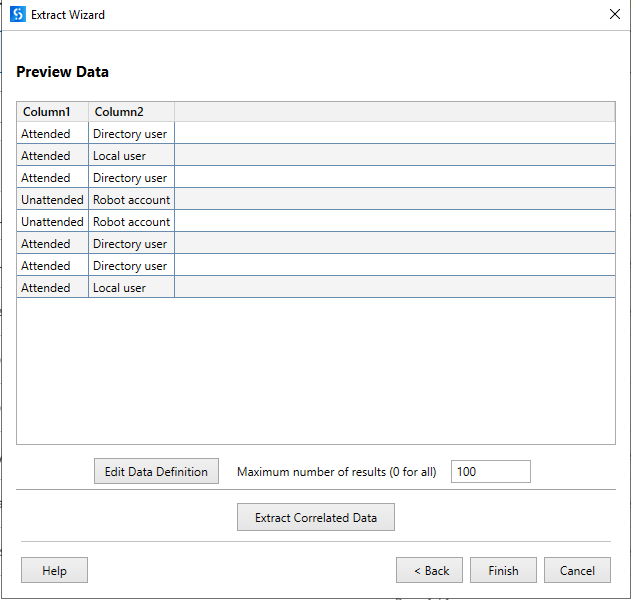
while working with the wizard we can configure additional columns by defining correlated data. Also have a look here:
how to loop data scrapping in a web page. Where the table is spanning over multiple pages and it is inside the pallet.
[image]
In this case the once the inner page (1-18) is done then it move to next page Outer(1 of 3)the do the data scrapping.
ushu
May 16, 2022, 6:10pm
3
@MasterOfLogic Try this
<extract> <column exact='1' name='Column1' attr='text'> <webctrl tag='tr' /> <webctrl tag='td' idx='3' /> </column> </extract>
Hello, thanks but it didn’t work for me , <extract> <column exact='1' name='Column1' attr='text'> <webctrl tag='td' idx='4' /> </column> </extract> returns a single column but i want to return 2 columns
ushu
May 16, 2022, 6:25pm
5
@MasterOfLogic Follow the below steps
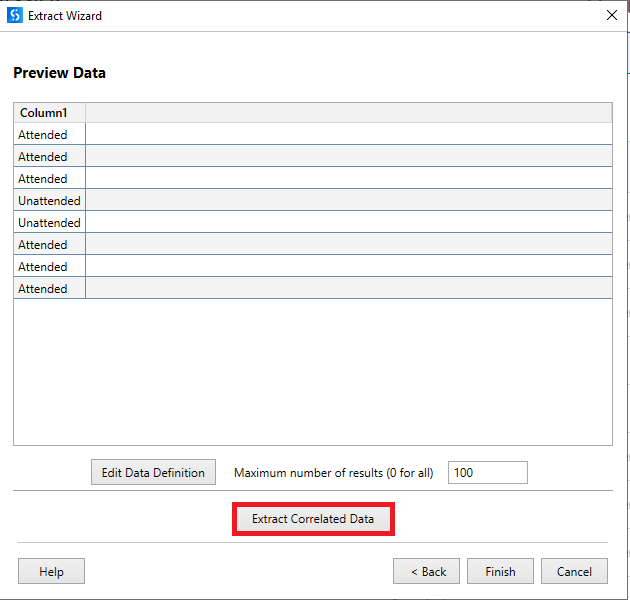
Once you indicated the column using data scraping, you can see an option called Extract correlated data
Click on it and do the same steps (that you follow for previous column) for another column that you want to extract. Output should look like below one