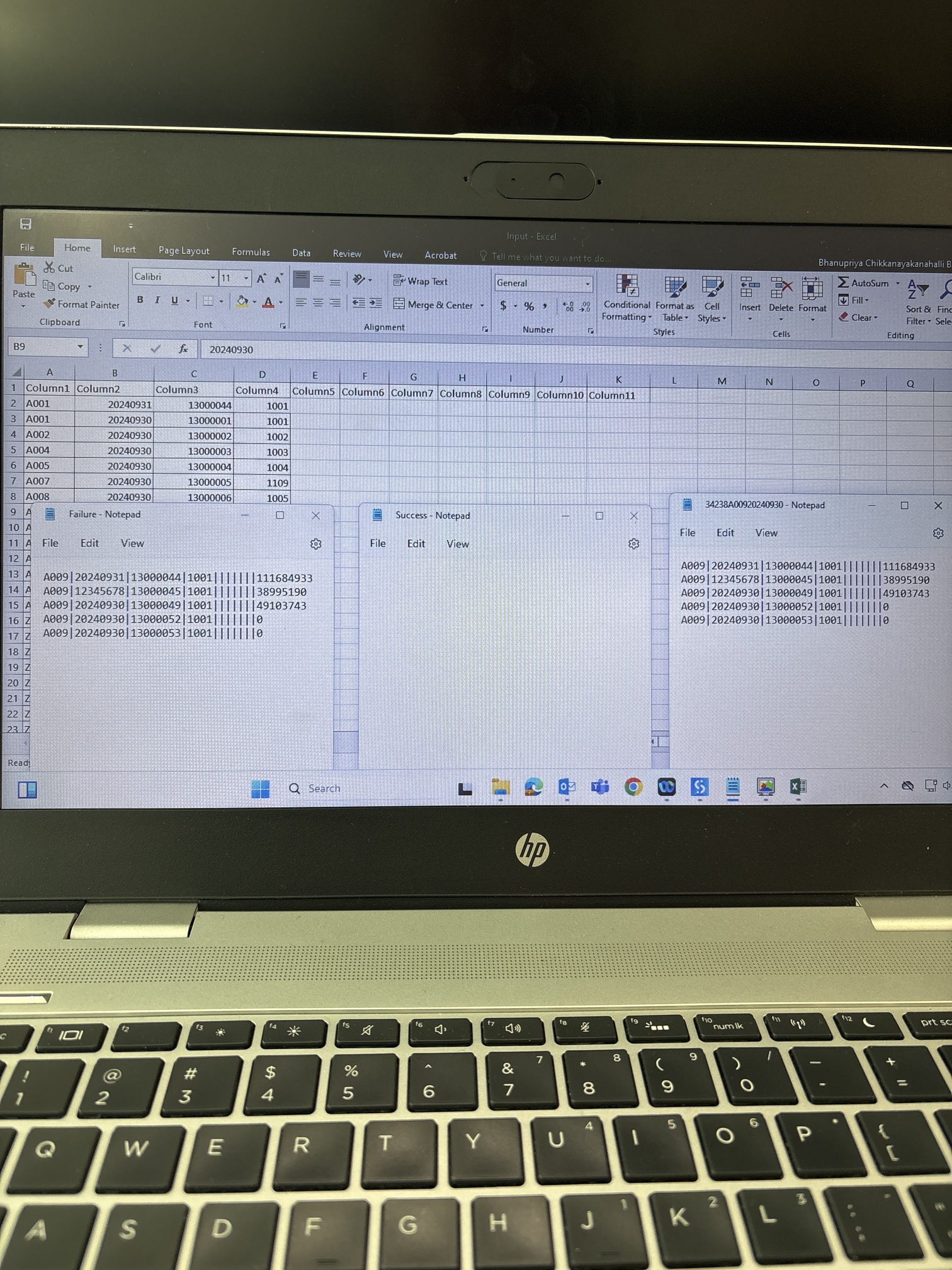
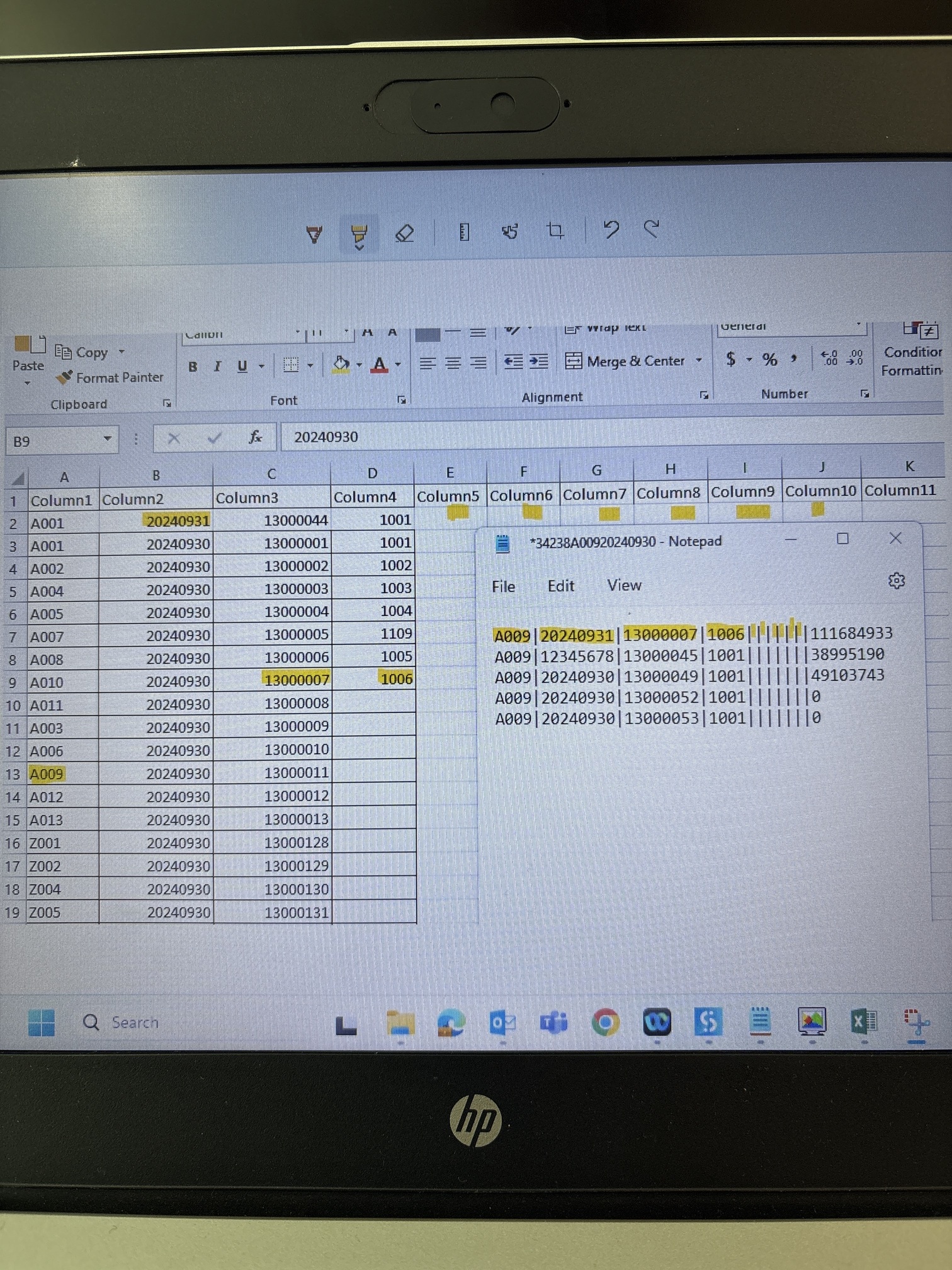
Hi Team, the above is the input files attached.
I want the bot has to read the text file and excel file then the text file has to get compared with excel file, say for example:
A009 should validate the entire Feild ID column in excel, it should match with the any number which is mentioned in the FieldID column if the match is successful then I should add the success data into seperate text file and if it not match then i should add the failed data to seperate text file…like wise it should compare each character from text file from excel file…
Also one point which is confusing me.
When I scroll down in the text file there is also data in between the continuous pipes….so should make sure everything matches with the excel data…how do i achieve this?
use generate datatable then all text file data will be converted to datatable
3.Read your excel data data
now you can use compare two datatables.
5.to compare two datatable whether you can use linq or use loop and for one datatable inside loop you can make condition or filter datatable you can use
But how do I validate? I need check each character from text file should match with the first column each cell….i mean A009 from text file should loop into each cell in the field id column and make sure it is matching with any cell in that column in excel….if there is no match it should store the failure data in seperate text file like wise success data in seperate excel
To solve this, you must include some space between each separator “|”, so that it can be considered as an empty cell. Use an assign statement after reading text file.
inputString = inputString.Replace("|"," |")
Now, use the Generate Data Table from Text Activity, as mentioned earlier in the thread.
Dim resultColumn As New DataColumn("Result", GetType(String))
dt_InputData.Columns.Add(resultColumn)

Dim columnNames As List(Of String) = dt_InputData.Columns.Cast(Of DataColumn)().
    Select(Function(col) col.ColumnName).Where(Function(name) name <> "Result").ToList()

For Each row In dt_InputData.AsEnumerable()
    Dim isMatch As Boolean = dt_ReferenceData.AsEnumerable().
        Any(Function(refRow) columnNames.All(Function(colName) refRow(colName).ToString().Trim() = row(colName).ToString().Trim()))

    If isMatch Then
        row("Result") = "Success"
    Else
        row("Result") = "Failure"
    End If
Next
Thanks for your reply, but how do I ignore the last column from text file? Does the column count should be same as text file? What if i don’t want to compare last column from text file….? Say for example last column won’t be there in excel reference file but it will be there in the text file which is numbers…so i don’t want to compare the last column how do i do that?
The logic used in the below code is, it checks whether the entire row of Input Data matches EXACTLY with any row in Reference (you can exclude any column as mentioned earlier). If it matches exactly, then it is success. else failure.
Dim resultColumn As New DataColumn("Result", GetType(String))
dt_InputData.Columns.Add(resultColumn)

Dim columnNames As List(Of String) = dt_InputData.Columns.Cast(Of DataColumn)().
    Select(Function(col) col.ColumnName).Where(Function(name) name <> "Result").ToList()

For Each row In dt_InputData.AsEnumerable()
    Dim isMatch As Boolean = dt_ReferenceData.AsEnumerable().
        Any(Function(refRow) columnNames.All(Function(colName) refRow(colName).ToString().Trim() = row(colName).ToString().Trim()))

    If isMatch Then
        row("Result") = "Success"
    Else
        row("Result") = "Failure"
    End If
Next
I am confused with screenshots you’ve sent. As far as the 3rd row you mentioned (below) is concerned, Since column2 does not match for that row, it will obviously go to failure sheet.
A009 is there in column 1 in input sheet so it is success
12345678 is not there is column 2 so it is failure
13000049 is there in column 3 so it is success
1001 is there in column 4 so it is success and rest of the column till column 10 is blank so it is sucess
But still this row comes in failure sheet because one cell in the entire row is not matching, please let me know this way…it will help me a lot thanks in advance
See just to make you understand I changed the first cell in the reference excel file which is A009 to A001 I think the logic is checking row to row from text file to excel file….
Since I changed the first cell to A001 now everything is written in failure sheet….actually A009 is there is that first column so it should write everything except second row in the sucess sheet …hope i am not confusing you
The above is sucess sample: this is how the bot has to compare if the value is there is any cell in the particular corresponding column then it is a match , it should write in sucess
These 3 screenshots made perfect sense now. So, you don’t want to compare the entire row as One. Here is the updated solution:
The First Invoke Code:
Dim resultColumn As New DataColumn("Result", GetType(String))
dt_InputData.Columns.Add(resultColumn)

Dim columnNames As List(Of String) = dt_InputData.Columns.Cast(Of DataColumn)().
    Select(Function(col) col.ColumnName).Where(Function(name) name <> "Result").ToList()

Dim refDataDict As New Dictionary(Of String, HashSet(Of String))
For Each colName In columnNames
    Dim uniqueValues As New HashSet(Of String)
    For Each row As DataRow In dt_referenceData.Rows
        uniqueValues.Add(row(colName).ToString().Trim())
    Next
    refDataDict(colName) = uniqueValues
Next

For Each row As DataRow In dt_inputData.Rows
    Dim isMatch As Boolean = columnNames.All(Function(colName) refDataDict(colName).Contains(row(colName).ToString().Trim()))

    If isMatch Then
        row("Result") = "Success"
    Else
        row("Result") = "Failure"
    End If
Next
Perfect Thank you so much….it worked…can you suggest me how do I learn this .net code? I am a beginner …confused from where do I start learning this .net …
Also I am concerned incase if any changes comes how do i manage? Columns though I understood I got to know how to ignore…but as per your understanding any challenges to be considered? I am able to understand the code but still concerned if any error comes it won’t show where exactly what is causing right instead it will just show error in invoke code so I am concerned that’s it…thank you
My text file data is getting copied here after using generate data table activity, now what if I want to write sucess and status here this excel sheet also? As below
You want to Create an excel file from the output text files (success file and failure file)?
in the previous solution, second invoke code (Step 3), where we save the output to separate files, you can remove the logic used to exclude the “Results” column
Dim columnNames As List(Of String) = dt_InputData.Columns.Cast(Of DataColumn)().
    Select(Function(col) col.ColumnName).ToList()
Nono, I want both the text files but I also need an excel file where it writes sucess and failure in the corresponding column ….in the starting we use a generate data table to convert the input text file to datatable right…so I have used write range to copy the data to excel file….in that excel or any excel file where the input text file data is stored I need a status of sucess and failure