If I have a file named “Report.xlsx” and I want to save it into a folder called “MonthlyReports,” and I only have the path to the “MonthlyReports” folder, how can I save the “Report.xlsx” file into that folder?
Hi @Saniya_Mane
Welcome to the community
Try these activity,
If you want to copy file use Copy file activity or use move file activity
Refer the below image,

Regards,
Gowtham K
Hi Saniya_Mane welcome to the community!
You can just concatenate the folder path with the name of the file (your Report) in any place where you need to use.
If you are saving this file from an application where you need to type the path, you can concatenate using a “Type Into” like this:

*in my example the foder MonthlyReports is directly in my C drive but can be anywhere, just concatenate the path folder and file name
If you already have the file in some other folder and want to move it to MonthlyReports folder you can use “Move File” like this:
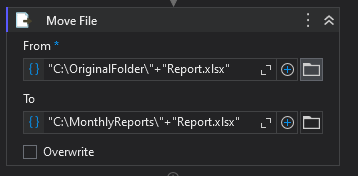
*in my example I’m moving the file from OriginalFolder to MonthlyReports folder (both in my C drive but can be any path, just concatenate like in the example).
**Attached is the UiPath project in case you need to check the example in your UiPath studio.
SaveFile.zip (44.9 KB)
Hello @Saniya_Mane
Where does the file Report.xlsx originate from?
If you have the file open, then you could use a “Keyboard Shortcuts” activity to press F12 to trigger the “Save as” window.
Then simply use a “Write into” activity to type the filepath to MonthlyReports folder (including filename).

Regards
Soren
so you know the file path and file name
assign string
str_filepath = filepath+""+filename.xlsx
use move or copy activity and provide the file path we configured above and in the destination put the
destinationPath+filename.xlsx
if you download it from web or other external app please let us know to change the solution with more activities
Since you have the file “Report.xlsx,” I assume you also know its path. Let’s say the path of “Report.xlsx” is stored in a variable called a, and the path to the “MonthlyReports” folder is stored in a variable called y.
You can use the “Move File” activity to move the file by setting the parameters as follows:
From: a
To: y + “\” + Path.GetFileName(a)
This will move “Report.xlsx” into the “MonthlyReports” folder by combining the folder path with the file name.
There are inbuilt activities within UiPath for achieving this. Copy / Move file will help you to achieve the same. Refer below youtube link for the same
