I am automating an application that contains a PDF with barcodes and their names. I want to get a list of the barcode type names. Instead of using the ‘Get Text’ activity for each barcode types, is there a way to extract all the barcode types in one go?

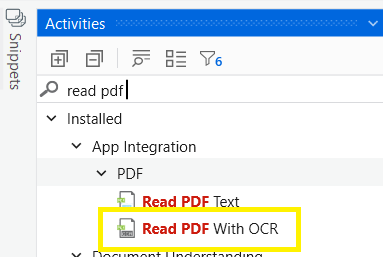
Can you try with Read PDF with ocr activity.
It will extract all the data from PDF from there you can get required data by doing string manipulation.
to get this activity you need to install UiPath.PDF.activities package
Happy Automation!!


@pd2897
If you find the solution Please mark my post as solution to close this topic
Thanks,
Happy Automation
Thank you for the help. In Read PDF with OCR activity, we have to define the path to the PDF. This PDF is opened through the application and cannot be saved, but I can take screenshots of each page. I tried to read values using Tesseract OCR, but I didn’t get the value I wanted.
oo got it..
In this scenario read pdf with OCR wont work, check is there any possibility to download the file. If not you need to work get text activity by enabling full text check if it works,
if not then you need to use CV get text activity.
If possible can you share your application!!
from application if you need to read then better use get text with indicating full page then once you get the text use string manipulation or regex to extract the info you need
cheers
Hello @pd2897 ,
I tried getting text from the image that you provided and i got the output here’s how 

- Firstly you can take screenshot at barcode page.
- Use “load image” activity and pass the file path of the screenshot.
- Use “UiPath Screen OCR” activity to extract all the text from that image.
- Finally use regex or string manipulation to get the required text.
Do let me know if it works,
Cheers!!!