Hi Team,
I Have a data table as follows

How I will get the output like as

Kindly help me out for this solution.
Thanks in Advance
Hi Team,
I Have a data table as follows
How I will get the output like as
Kindly help me out for this solution.
Thanks in Advance
Try this
(From row In dt_Input.AsEnumerable()
                       Let Rowno = dt_Input.Rows.IndexOf(row) + 1
                       Select dt_Input.Clone().Rows.Add(row("Date"),Rowno.ToString)).CopyToDataTable()
Try this way.
Use For Each Row in DataTable activity.Thanks,
Ashok 
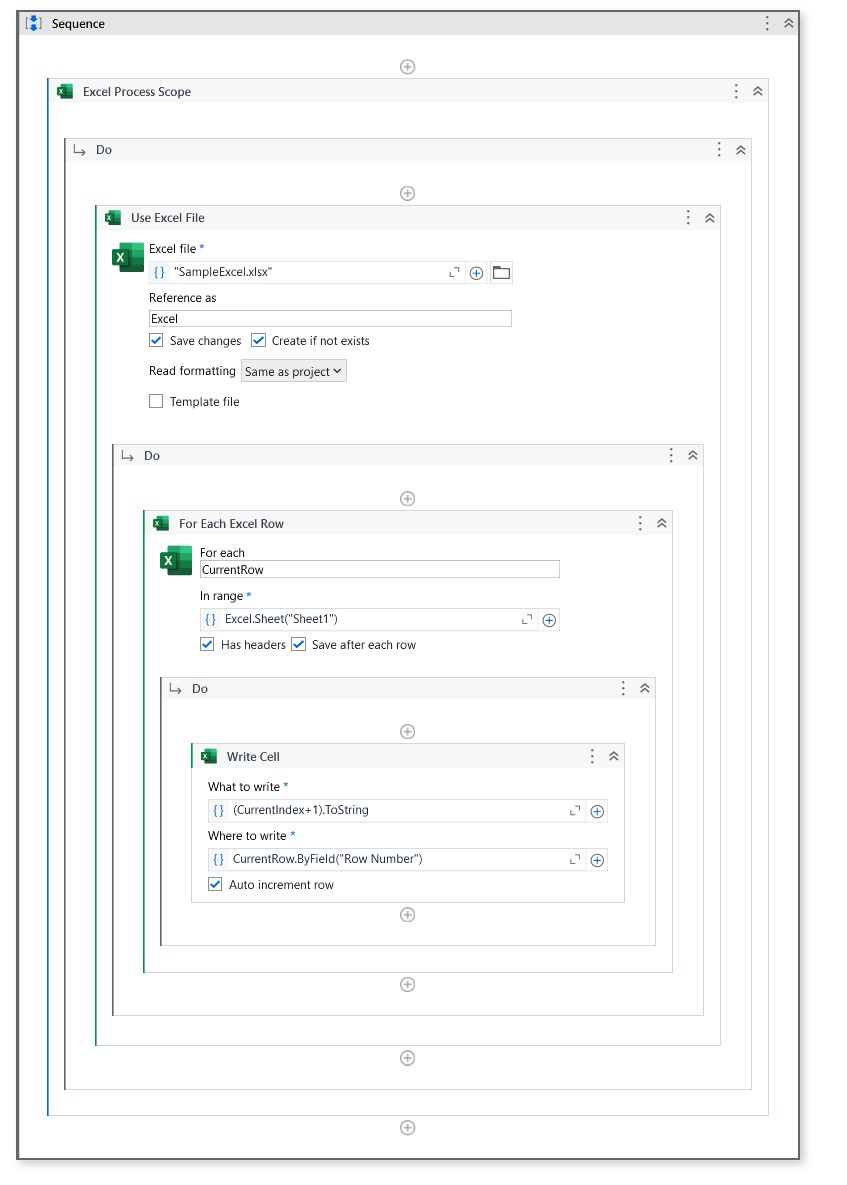
you can try the below workflow by using the excel activities,
→ Use the Excel Process scope activity and insert the Use excel file activity inside of it.
→ Give the path of the excel file in Use excel file activity.
→ Insert the For each excel row activity inside the Use excel file activity.
→ Inside for each insert the write cell activity.
→ Give the CurrentRow.Byfield(“Row Number”) in where to write field and give CurrentIndex+1 in what to write field. Check the Auto increment option for sure.
Check the below workflow for better understanding,
Hope it helps!!
Thanks @ashokkarale @lrtetala @mkankatala
Is there any way to convert a column values (RowNumber) from string to int
Check what’s the datatype of the column RowNumber. If it’s int32 current code should work but if it’s string or object, I would suggest deleting the RowNumber column using Delete Column and add new column with same name but with In32 datatype using Add Data Column
Thanks,
Ashok
No Your Solution is perfect and it’s working,
I merged 2 data tables into a single data table. I used the following
FilterDT.DefaultView.ToTable(True, “Date”,“RowNumber”)
The duplicates are not removed as combination of string value and int. If I change the entire column values as int means I can easily remove the duplicaletes
This topic was automatically closed 3 days after the last reply. New replies are no longer allowed.