Hi All,
In webpage each ID has different page numbers will appear, if i want to download the data from website it has a limit to accept download page number is 25.
Case1: if 24569 ID has 79 pages, I have to enter 25 number first time, 50 second time, 75 third time, 4th time “4” i have to enter the right number to download pages data.
Case2:if 97603 ID has 30 pages, I have to enter 25 number first time, 5 number second time to download the data,
How to right if condition when page number is more than 25, and again how to subtract the number 79-25 and 30-25, when i want to enter the data dynamically in Type into tool.
Please suggest me.
Thanks In Advance,
Niranjan
Hi @Niranjan_k,
There can be different ways to achieve this but is what comes in my mind right now:
- Get the total number of pages in advance of the page navigation- i believe you already have that, if not, there would be something shown on your screen like 1-25 of 79 etc, fetch the total number from there
- to identify what page id you are on, use get attribute property to get the page Id
- check if its 25, then perform logic you want…
Regards
Sonali
@sonaliaggarwal47 Thank you for the details, Here the issue is Page number will change dynamically for any number more than 25 i have to fix the logic to work for any number.
@Darshan_Sable Thank you for the logic if possible can you share me the workflow. Here Page numbers will change dynamically. the logic should work for any page number.
Thank you
Niranjan
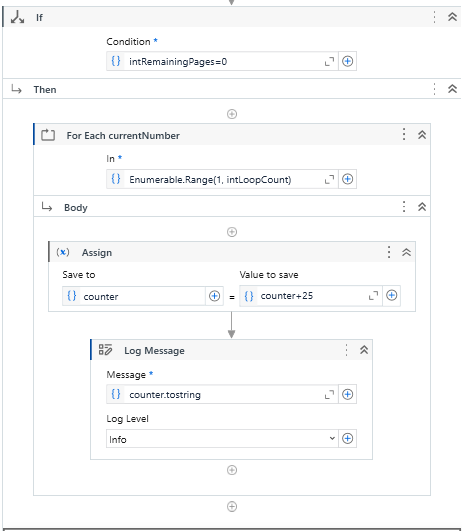
Sure @Niranjan_k , you can use below workflow just replace 79 with your page number variable

Main(Autosaved).xaml (16.1 KB)
@Darshan_Sable Thank you Darshan, I will include and test.
@Niranjan_k please mark it as resolved
@Darshan_Sable Thanks for the file i just tried to open the file
“Could bot be opened: document is invalid”
i got the above error message.
Please help me
@Niranjan_k try right click and open with UiPath studio
@Darshan_Sable No luck i got “document is Invalid message”
@Niranjan_k can you show me the error message and downloaded file as well?
@Darshan_Sable Please find the below image of error message
@Darshan_Sable I tried multiple ways to open the workflow still im getting same error.
Main(Autosaved).xaml (16.1 KB)
Download again and try to open file separately
don’t add the file in your project
@Darshan_Sable i dont know whats happening same error message i got 
@Darshan_Sable im able to open after reinstalling the all the pages. thank you