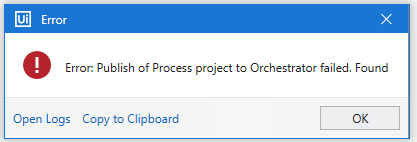
I have a client who is currently migrating from on-prem to Autoamtion Cloud. When I try and publish a new process from studio to the new Orchestrator I’m getting the below error message:
Anyone seen this before, it doesn’t really tell me what the problem is.
There are additional Knowledge Base posts on the same issue but with different error messages. Do let us know if you could also provide us with the Logs in the Error if the suggested posts did not work.
-Make sure you have properly configured the Orchestrator settings in UiPath Studio. Double-check the Orchestrator URL, machine key, and tenant name.
-Ensure that the user account you’re using to publish the process has the necessary permissions in Orchestrator.
-Check if there are any network or firewall issues that might be preventing the communication between UiPath Studio and Orchestrator. Ensure that necessary ports are open and that there are no proxy server issues.
-Verify that the version of UiPath Studio is compatible with the version of Orchestrator you’re using. In some cases, a version mismatch can lead to publishing issues.
-Check the logs in UiPath Studio, Orchestrator, and the Windows Event Viewer for any additional details or error messages.
And there might be the case if you have taken the copy of process which already uploaded into orchestrator, in your Project.Json file need to change the unique ID before upload into orchestrator.