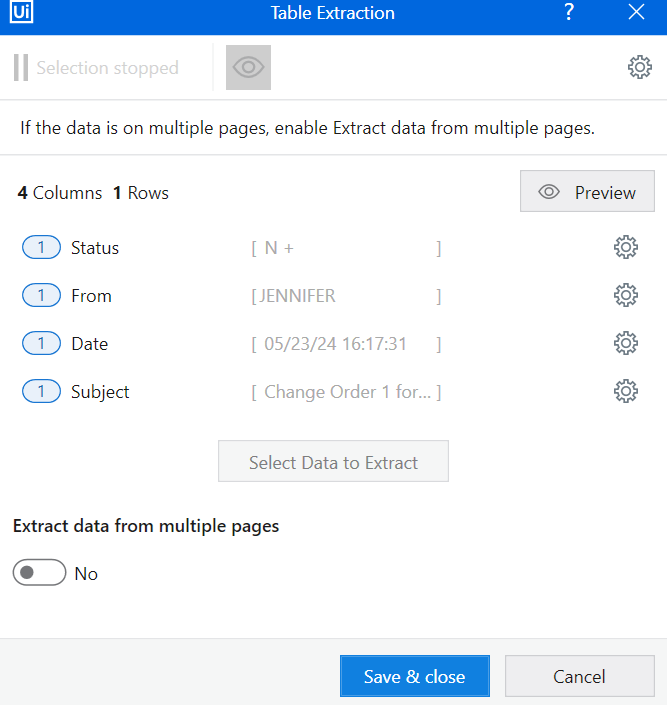
I have the table above. All of the fields populate into the extracted table except for the Status column.
Modern Windows using Studio 2024.2.1
This is using Edge with IE mode. Don’t ask it’s an old system.
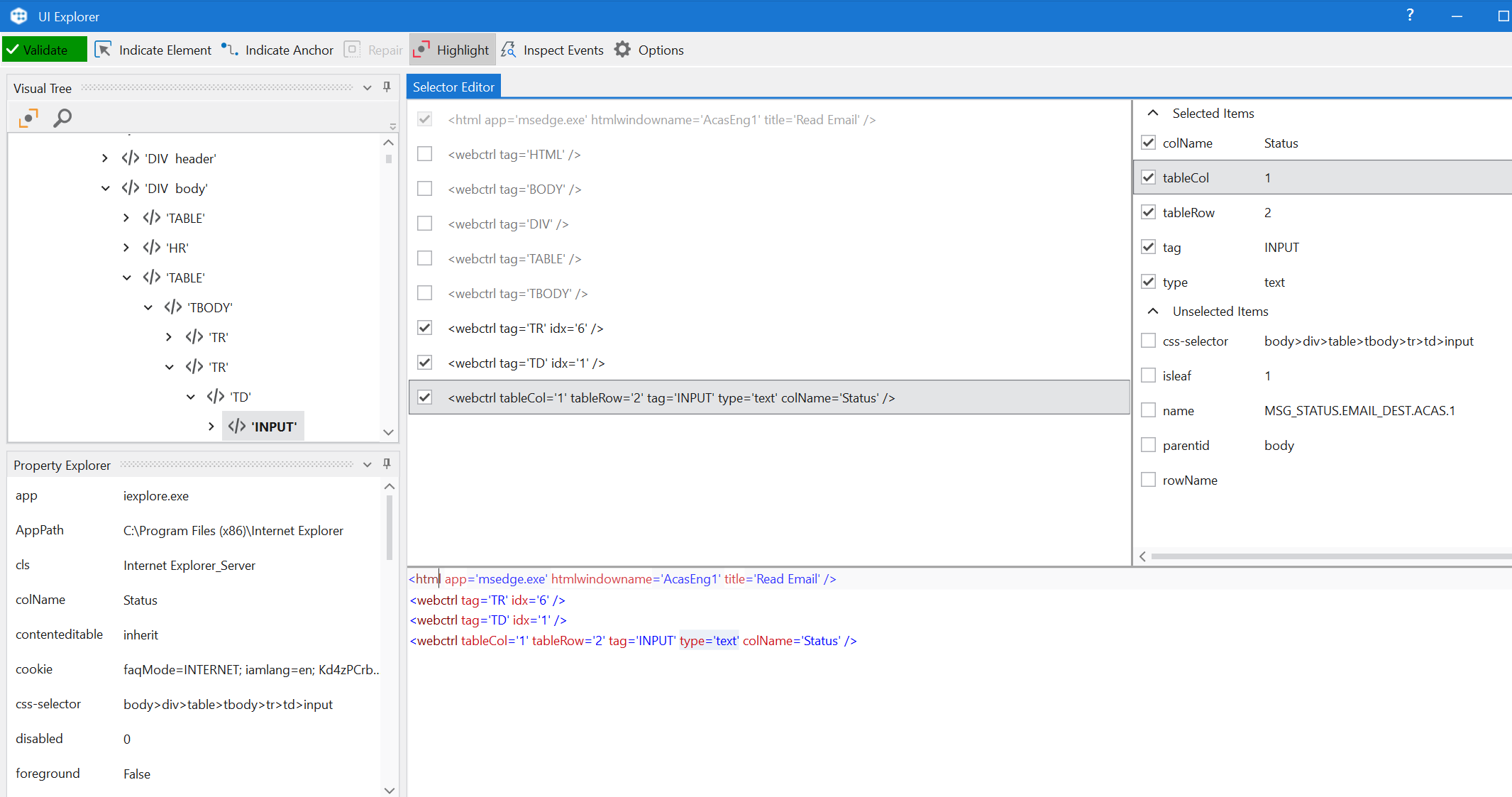
I changed the xml to grab the value of the input like:
SyntaxEditor Code Snippet
<extract-table columns_name_source='Longest' get_empty_columns='1' get_columns_name='1'> <column exact='1' name='Status' attr='value'> <webctrl tag='tr' /> <webctrl tag='td' idx='1' /> <webctrl tag='input' idx='1' /> </column> <column attr='text' name='From' /> <column attr='text' name='Date' /> <column attr='text' name='Subject' /> </extract-table>
But it’s still not working.
Html looks like
<table border="1" width="720" cellpadding="0" cellspacing="0">
<tbody><tr class="myheader">
<th width="80">Status</th>
<th width="130">From</th>
<th width="150">Date</th>
<th width="380">Subject</th>
</tr>
<tr>
<td width="80" align="CENTER" style="font-size: 10pt"><input type="text" name="MSG_STATUS.EMAIL_DEST.ACAS.1" value="N" size="1">
<input type="submit" name="PB_READ.EMAIL_DEST" value="+">
</td>
<td width="130" style="font-size: 10pt"><input type="hidden" name="#.EMAIL_DEST" value="EiJDMjAyNDA1MjMxNjE3MzEwMAgSQ2pqMjM5MggyQzUyMDFzYQ=="><input type="hidden" name="#CRC.EMAIL_DEST" value="00000021">
JENNIFER<input type="hidden" name="NAME.PERSON.ACAS.1" value="JENNIFER " size="18">
<input type="hidden" name="#.PERSON" value="CBJDamoyMzky"><input type="hidden" name="#CRC.PERSON.ACAS.1" value="00000026"></td>
<td width="150" style="font-size: 10pt"> 05/23/24 16:17:31<input type="hidden" name="MSG_TIME_SENT.EMAIL_DEST.ACAS.1" value="05/23/24 16:17:31" size="17"></td>
<td width="380" style="font-size: 10pt"> Change Order 1 for Work Request 01123681<input type="hidden" name="MSG_SUBJECT.EMAIL_DEST" value="Change Order 1 for Work Request" size="27"></td>
</tr>
Any suggestions on how to get the N value in my table? Thanks!
Hi @mike_stahl ,
Thanks for reaching out UiPath Community.
Instead try using get text and then use data manipulation for data you required.
Hope this helps.
Best,
@Vinit_Kawle
Hi I am not sure what you mean. Currently it is pulling nothing. The actual text in the element is a non breaking space. If you mean use the Get Text activity I’m not sure how I extract from a whole table on multiple pages.
Hi
Try this:
ExtractTable.xaml (16.8 KB)
Preview:
Thanks for looking. I’m not seeing anything different other than your extract meta data is different without column names. I’m still getting an empty column and not seeing the N + All I really need is the N but I can figure that part out. I even pasted into my process and made it fit the app scope but still didn’t work. This page is loaded in IE mode of Edge which is probably what is causing the issue. It works fine on Edge alone.
Did you mean use get text to get the path to edit the extract xml?
I’ve tried using that path several ways and it fails.
<extract-table get_columns_name='1' get_empty_columns='1' columns_name_source='Longest'>
<column name='Status' attr='value' exact='1'>
<webctrl tag='TR' />
<webctrl tag='TD' idx='1' />
<webctrl tag='input' />
</column>
<column name='From' attr='fulltext' />
<column name='Date' attr='fulltext' />
<column name='Subject' attr='fulltext' />
</extract-table>
I ended up having to select the columns one by one which gave me a different xml. This is what worked:
<extract>
<row exact='1'>
<webctrl idx='1' tag='tbody' />
<webctrl tag='tr' />
</row>
<column name='Column0' attr='value' exact='1'>
<webctrl idx='1' tag='tbody' />
<webctrl tag='tr' />
<webctrl idx='1' tag='td' />
<webctrl idx='1' tag='input' />
</column>
<column name='Column1' attr='fulltext' exact='1'>
<webctrl idx='1' tag='tbody' />
<webctrl tag='tr' />
<webctrl idx='2' tag='td' />
</column>
<column name='Column2' attr='fulltext' exact='1'>
<webctrl idx='1' tag='tbody' />
<webctrl tag='tr' />
<webctrl idx='3' tag='td' />
</column>
<column name='Column3' attr='fulltext' exact='1'>
<webctrl idx='1' tag='tbody' />
<webctrl tag='tr' />
<webctrl idx='4' tag='td' />
</column>
</extract>
system
(system)
Closed
May 28, 2024, 6:28pm
8
This topic was automatically closed 3 days after the last reply. New replies are no longer allowed.