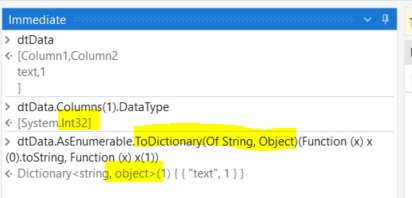
Hi @ppr or @UiPath_Community
The below code is only supporting for Dictionary of string,string datatype variable , how can we make it compatible for Dictionary of string, object
File.ReadAllLines(“\Textfilepath\”).Select(function (x) x.split({“|”},stringsplitoptions.None)).where(Function (x) x.length>1).todictionary(Function (x)x(0).trim, Function (x)x(1).trim)
A sample text file content below:-
Name|Value|
AMAN_GUPTA
January 18, 2024, 7:59am
2
Hi @Sree_Krishnan_vellinezhi ,
please below expression
please also mark correct answer if this helps
AMAN_GUPTA:
File.ReadAllLines(“\Textfilepath\”).Select(function (x) x.split({“|”},stringsplitoptions.None)).where(Function (x) x.length>1).todictionary(Function (x)x(0).trim, Function (x)x(1).trim.cast(Of object))
getting the above error while using it
vrdabberu
January 18, 2024, 8:03am
4
Hi @Sree_Krishnan_vellinezhi
Can you try the below syntax:
dictionaryData= File.ReadAllLines(filePath) _
    .Select(Function(line) line.Split({"|"}, StringSplitOptions.None)) _
    .Where(Function(parts) parts.Length > 1) _
    .ToDictionary(Function(parts) parts(0).Trim(), Function(parts) DirectCast(If(Integer.TryParse(parts(1).Trim(), Nothing), CObj(Integer.Parse(parts(1).Trim())), CObj(parts(1).Trim())), Object), StringComparer.OrdinalIgnoreCase)
dictionaryData is of DataType System.Collections.Generic.Dictionary(System.String,System.Object)
Regards
Can u explain me the last line ?
vrdabberu
January 18, 2024, 8:16am
6
@Sree_Krishnan_vellinezhi
Function(parts) parts(0).Trim()):Function(parts) Function(parts) DirectCast(If(Integer.TryParse(parts(1).Trim(), Nothing), CObj(Integer.Parse(parts(1).Trim())), CObj(parts(1).Trim())), Object):Object. It checks if the value can be parsed as an integer using Integer.TryParse. If it can be parsed, it converts it to an Integer object using Integer.Parse, and if not, it keeps it as a string. The DirectCast is used to explicitly cast the result to Object.StringComparer.OrdinalIgnoreCase:
Hope you understand!!
lrtetala
January 18, 2024, 8:43am
7
Hi @Sree_Krishnan_vellinezhi
How about the following?
File.ReadAllLines("C:\Users\lrtetala\Documents\UiPath\BlankProcess18\New Text.txt").Select(Function(x) x.Split("|"c, StringSplitOptions.None)) _
    .Where(Function(x) x.Length > 1) _
    .ToDictionary(Function(x) x(0).Trim(), Function(x) DirectCast(x(1).Trim(), Object))
Cheers!!
ppr
January 18, 2024, 8:52am
8
@Sree_Krishnan_vellinezhi
touching the value part and converting it into an object (DirectCast, Ctype, but not casting a char()/String into a object)
Defining the dictionary type
pikorpa
January 18, 2024, 9:53am
9
Hey @Sree_Krishnan_vellinezhi File.ReadAllLines("yourFileName").Select(Function(x) x.Split({"|"}, StringSplitOptions.None)).Where(Function(x) x.Length > 1).ToDictionary(Function(x) x(0).Trim, Function(x) DirectCast(x(1).Trim, Object))
worflow: BlankProcess81.zip (2.7 KB)
i have 3 configs and while reading each config to this its getting over written i need it to be appended
This is working but not getting appended while reading 3 configs sequentially … its getting overwritten