Hi ,
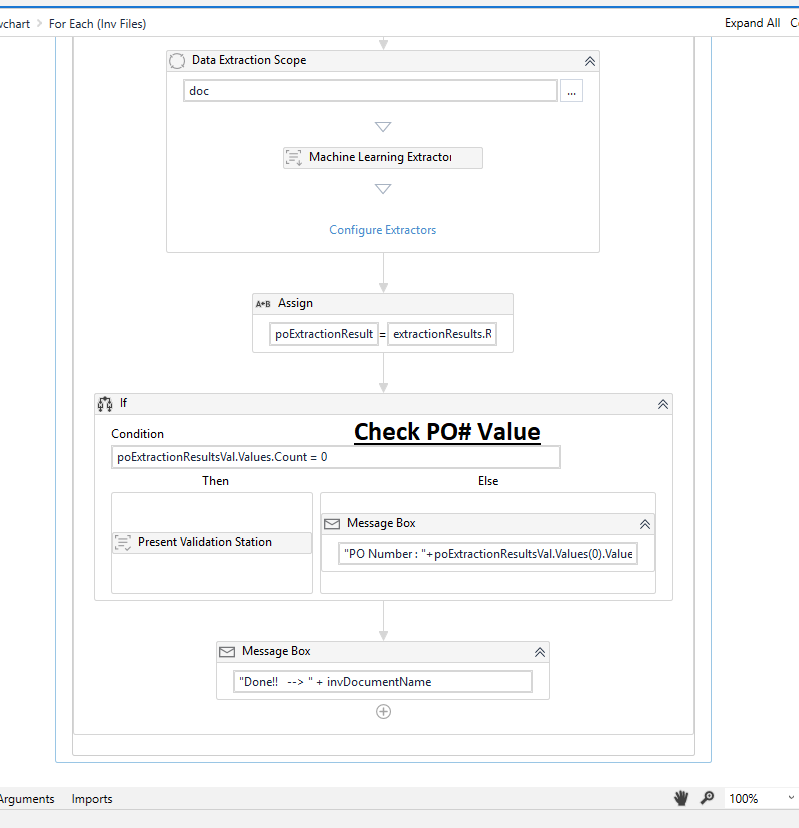
I tried to create “Templateless Invoice Extraction” (sample project attached) but sometime the PO number is not extracted and I have to open “Present Validation Station” to add the correct value.
Please let me know what can I do in order to make the project extract the PO number when the invoice template is the same.
I have also come across this same scenario multiple times through Templateless invoice extraction. What I did is, I used a Regex extractor along with the machine learning extractor to match the regex pattern and capture the fields that machine learning extractor is unable to capture directly. I think this same approach can help get your scenario fixed too…
How can I use Regex extractor in this case, the pattern is shared ,for example PO# is number(digit) and invoice# is number (digit) so how can I write Regex extractor to get PO# only.
With “Configure Extractors” link within the Data Extraction Scope activity - if i try to select and match any label with ML extractor vs taxonomy then it shows API key error. Please let me know what is the problem?