Hi,
I am using Community edition 2025. I am trying to use State Machine.
When I try to open a state, not finding Entry, Exit, Transition. Double click on State or Final State - nothing is happening. Has anything changed?
thank you,
Try upgrading the system package to latest possible version.
If issue persist, share the screenshot.

Hi @ashokkarale
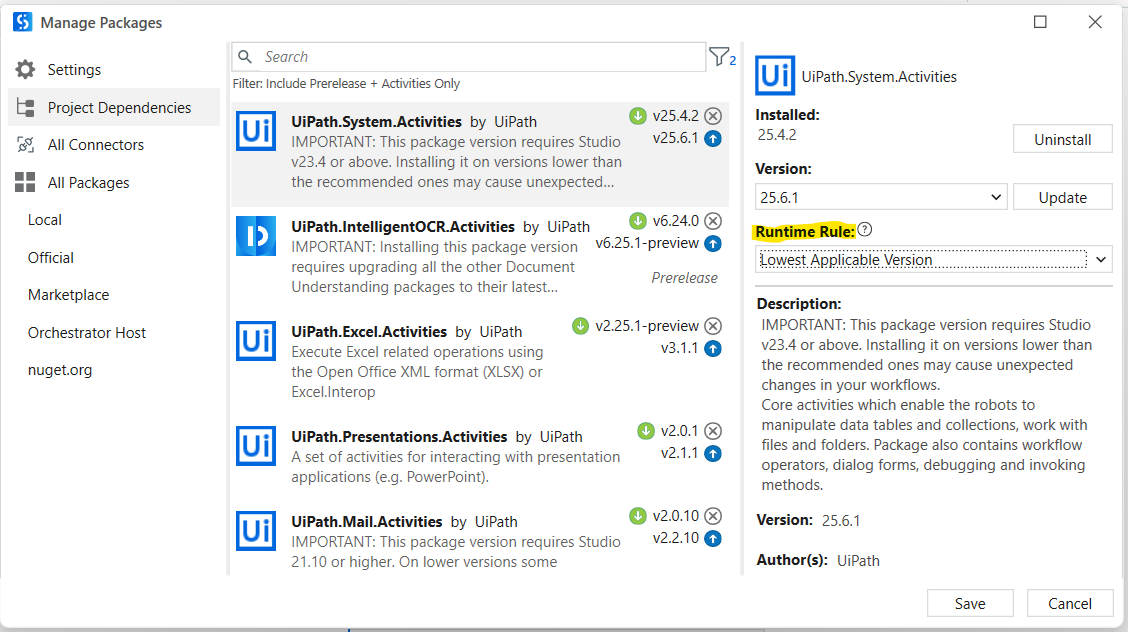
Its looking like dependency problem. So try to reinstall the UiPath.System.Activities package. Select the latest version and in the Runtimerule dropdown select the Lowest as applicable option. Then try drag and drop using state machine activity.
Hope it helps!!
Thank you. Tried this. Did not work.

Thank you. Double click is not giving anything.

Try restarting the machine and creating new project and drag the state machine activities.
If it also didn’t work then try downgrade the version of system activities package from latest to 24.10.7
try all these three steps individually if all didn’t work re install the studio and try.
Give a try.
Happy Automation
I will re-install studio. other options did not work.
Thanks every one!!!
If your problem solved mark the post as solution to close this topic