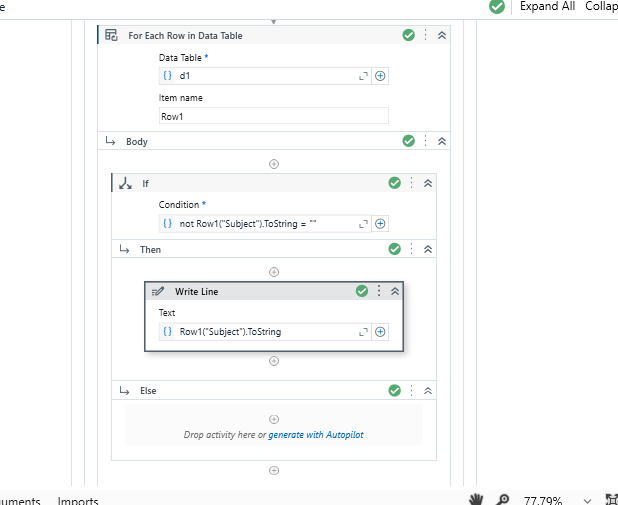
Hi! Tried a few solutions online, but nothing worked so I’m making this post.
I got an Excel file as an input. Using For Each Row only for A1:A6 (has header named “Subjects”) I’m trying to basically only read a max. of 5 book subjects and search each one of them online, then I extract info about them into another Excel. Everything works, but I also want to skip any empty cell on that column if need be. All of this is inside an Excel Process Scope. I tried using an If with String.IsNullOrEmpty(CurrentRow(“Subjects”).ToString) Then the Continue activity, Else does everything I asked for, but the process just stops if it detects an empty cell in the middle of the A1:A6 range. What can I do? Thank you!
I don’t see any Excel Application Scope in my Studio when trying to do this. I’m using an Excel Process Scope in my project and I tried using “Write line”, but I can’t use Row since it says it’s not declared. I used CurrentRow instead and it only reads the values up to the blank cell when it completely stops doing anything. I’d prefer something that works with the Excel Process Scope since I’m not going to redo the whole project just for this to work, there must be a solution for my case as well. Here’s a part of my project (ignore the fact that it’s “Subiecte” and not “Subjects”, that’s how it’s actually meant to be).
@Wolf214356 the issue you get in the read cell and if you want to take the value simply use 1 assign activity of string variable eq- strCellValue = currentrow(“yourcolumn”).tostring
so it will store all the value inside the each cell except the blank one
It works with your code, but not with mine. I’m using For Each Excel Row in my project, not For Each Row in Data Table. Is that the issue, should I change it? Or how to make it work with For Each Excel Row? I’d prefer to keep this activity if possible.
@Wolf214356 jus changed it with fo each row activity as i attached in the code.it will resolve the query. and it not affect at all your code because you have to tackle with the increament row value also like first it will go to row2 ,3,4 so on .thats why i suggest to go with for each row activity
I solved this. Just had to check the Empty Row Behavior to “Skip” in the Properties Pannel of the For Each Excel Row.
It also works with if, but then you have to check “Process” in Empty Row Behavior.