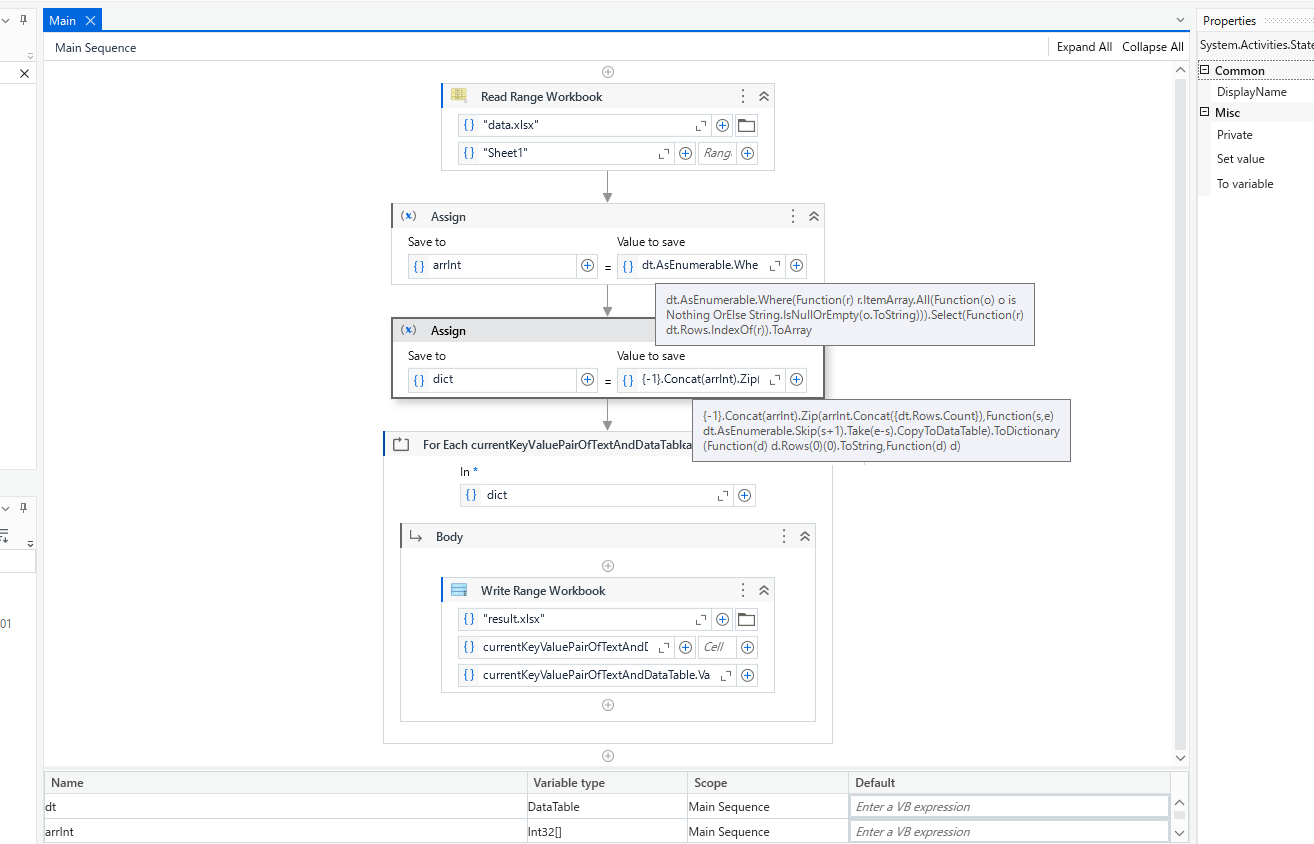
I want to split the datatable. There 3 deposits in the deposit column. I want to split them into individual datatable. For example first deposit and the first 4 rows are one deposit like wise the rest followbthe same. How can i split the datatable.
• Now, dtFiltered contains rows matching the current deposit value. 4. Save or Process Split DataTables • Use Write Range (inside the loop) to store each dtFiltered DataTable into different sheets or files: • For Excel Output: • Sheet Name: currentDeposit
• Write Range: dtFiltered • For Separate Files: • Filename: “Split_” + currentDeposit + “.xlsx”
• Write Range → Save to a different file.
Use For Each Data Row in Datatable activity to iterate through all the rows
Outside for each, declare a variable to store deposit number
Inside for each check if deposit variable is empty or not. If empty, assign current row deposit value. If already have value in deposit variable, check if current row deposit is empty, use Add Data row activity to add this row into a separate datatable.
If the current row deposit have some value and not matching with outer deposit variable, replace deposit variable with current row deposit value and add data row to new datatable
@yochi_ITD i tried yours but however i see the wholedatatable is being copied over. I wan the deposit id which contains 4 rows to be one dt and then follow by the rest.
@singh_sumit it works but it copies only first row for that unique deposit but the rest of rows which is tag to that deposit is not being copied over. Help me with this can?
@mark_rajkumar1 basically this logic will split your data into the deposit basic like first it will take the 1 deposit and write into the excel and when 2 deposit row found it will separate it and write into the next excel.
@singh_sumit yes it works as what u explain. However i want for example the deposit from row 2 should take from 2 to 5 as dt and seperate and likewise for the rest too. How to achieve it?