Hi All,
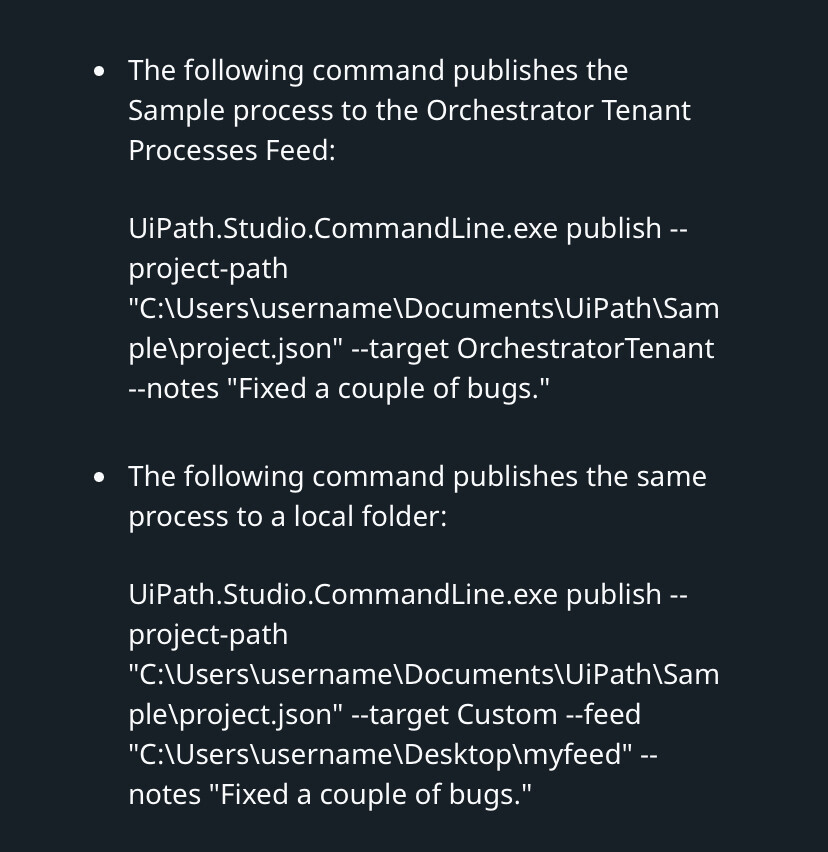
Can anyone please help me with detailed command for publishing UiPath studio process with UiPath CLI and for debugging as well.
@Mir.Jasimuddin - Could you please assist for this.
Regards,
Ankit
Hi All,
Can anyone please help me with detailed command for publishing UiPath studio process with UiPath CLI and for debugging as well.
@Mir.Jasimuddin - Could you please assist for this.
Regards,
Ankit
Hey @Codeverse,
To publish a UiPath process using CLI:
ucli project publish --project-path "C:\YourProjectPath" --output "C:\OutputPath" --version "1.0.0" --api-key "<Your_API_Key>" --url "<Orchestrator_URL>"
To run/debug locally via CLI:
ucli robot run --entry-points Main.xaml --project-path "C:\YourProjectPath"
Make sure you’re authenticated:
ucli auth login --url "<Orchestrator_URL>" --api-key "<Your_API_Key>"
Let me know if you need the commands for CI/CD as well.
Hi @Mir.Jasimuddin.
Just I was giving it try. But can you please let me know about -api-key is it orchestrator api key. If something else how can get this.
Thanks
Hi @Codeverse,
Yes, the --api-key refers to your Orchestrator Personal Access Token (PAT) — not a general API key.
To generate it:
--api-key in CLIExample:
ucli auth login --url "https://cloud.uipath.com/<account>/<tenant>" --api-key "<your_token>"
Let me know if you facing any problems
Hi @Mir.Jasimuddin I got this sorted PAT.
But thinking will this work on Github cli version as I tried this command giving error
Regards,
Ankit
I used the alternate command for packaging and publishing the process.
Here are those commands and my finding
I used the terminal where the process is code there. I hit the command uipath studio package pack . It’s start packaging and build the nuget package with 1.0.0 version
Next I used this command UiPath studio package publish it publish the package as well in orchestrator. But the it’s also creating process in shared folder. I want to create process in other folder how can do that ?
When I tried to run the process with assistant it was giving this error