I have read the Data excel which is containing data of folder names “21.02.2024”
and “22.02.2024” like this below
First it will take 21.02.2024 from data excel and check whether a folder named “21.02.2024”
So here the folder exist so RPA will process the excel inside the folder “21.02.2024”
So after processing it will go to the end process and move the “21.02.2024” to archive folder and give remark like “completed” in Data excel.
So the above process is working fine
So now after end process it is going back to initial state
and it should check for “22.02.2024” folder available or not if available it should process that folder in similar way. instead of that it is picking the same folder “21.02.2024” which is already processed and moved to archive
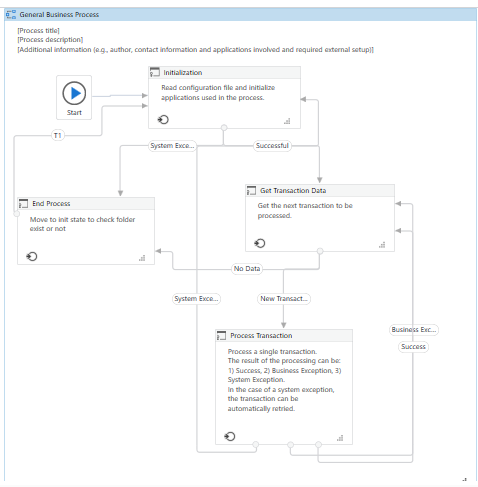
The reframework is made like this
So after folder one processed it is moved to archive and it is going to the initial state but it is not picking the “22.02.2024” folder instead it is picking the same folder which is already processed and moved to archive that is “21.02.2024”.
Consider your data in excel as transactions and pass it through the get transaction state.
In Process state, for each transaction check if the folder exists with the path exists activity.
If the folder exists, loop through the files in the folder.
create a variable of type(System.String) and in the value give as Directory.GetFiles(“FolderPath”)
This will give you the excels in the folder and you can loop through each of them using for each.
In the next transaction, it will pick the next folder again and so on…
I implore you to get away from REFramework for automations like this. It’s unnecessary complexity and overhead. This is a very simple automation to just write from scratch. In fact, I never use REFramework. It’s a mess. Over time we’ve built our own template - based on the UiPath Transactional Process template. You might not even be aware there are tons of other templates besides REFramework.
See this is a sample process to get the solution,
After getting solution i have to shift this Code to other Reframework process which is a massive code already in production.
So if i change the code in production only for this that will consume a huge time for me to change the entire code
so it is passed as a transaction data and checking for folder also and it will processing the first folder,
After first folder is completed it is going again to the initial state but it is not taking the second folder instead it is taking the same folder which is already processed.
I have changed the REframework condition in the end process.
So after completing the first folder it will come to the end process and move the processed folder to archive.
Then again it will go to the init state to check whether there is any folder to process or not if folder exist it will read the excel from that folder in the init state and should proceed.
So transition T1 will pointed to init state so after first folder it will goto the init state again to check folder any other folder exist or not
In T1 transition - If transaction item is nothing it should goto init state and is going to the init state as per the given condition.
But the issue is that when coming to init state after processing the first folder it should take the second folder, instead of that it is taking the first folder again.
To end the process i have given a condition in the end process itself
That is if there is no folder available for process it should terminate
What is the condition you are using in init state to say that it should take second folder now
and if transation item itself is null then what are you using?
why are you trying to complicate it…when you already have the available loop for you
the only thign you need to do is…change transactionitem to string to assign the required path and in init state if first run use directory.GetDirectories("BaseFolder") and save it to a list of string variable
then in get transactiondata use if condition with in_transactionnumber <= listvar.Count then out_transactionitem = listvar(in_transactionnumber-1) on else sisde assign with nothing