Problems with CodedWorkflows

Hi All, have you ever experienced this issue?

1) Arguments of collection types can’t be resolved by Invoke Workflow File activity.

If we have arguments as a collection (array, list, hashset, etc) in our CodedWorkflow, the Invoke Workflow File activity can’t resolve the arguments.

Clicking on Refresh Arguments only resolves non-collection arguments:

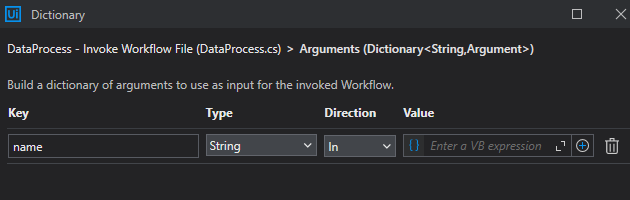
Adding manually the “data” argument of string type also does not work.

It still says “data” argument is missing or misconfigured, the process just don’t compile:

2) Microsoft 365 breaks everything

If the process has a dependency of the UiPath.MicrosoftOffice365.Activities, CodedWorkflows does not compile:

Adding In/Out parameters
  1. To add an argument of type In/Out, define the same argument both before and after the name of the entry point method.
  2. For example, you have a coded automation that takes an initial loan amount (loanAmount) and an interest rate (interestRate) as input and then calculates the updated loan amount after applying the interest rate and returns it. Also, it returns an argument stating the type of financial need that this loan amount would require.

Check out the code snippet below:

public (double loanAmount, string financialNeed) Execute (double interestRate, double loanAmount)

I cannot reproduce the issue, it loaded the arguments for me without issue. Maybe its already been fixed in a later release of Studio, can you share more details of your studio version and dependencies?

Hi @Jon_Smith ,

Yes, you are right.

Studio Version: 2023.10.4
UiPath.System.Activities: 25.4.4

I was able to test in another machine with Studio 2024.10.12 without any issues.

This topic was automatically closed 3 days after the last reply. New replies are no longer allowed.